Hello JB_86_09,
Thank you for posting this case in Microsoft Community!
Based on your description: How to remove automatic sorting folders for Inbox. I would like to cooperate with you working on this case. To clarify this case, are you using Outlook on the web? Where are these folders are labeled: OwaFV15.1AllFocused.... and OwaFV15.1AllOther.. ? If showing under your Inbox or showing above message line as following capture?
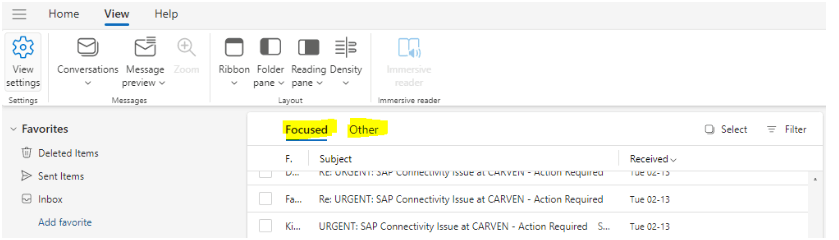
For my suggestion, you may go to View>View Settings and please check if Sort messages into Focused and Otheroptions enabled, you can disable it and select Don‘t sort my messages options enabled.
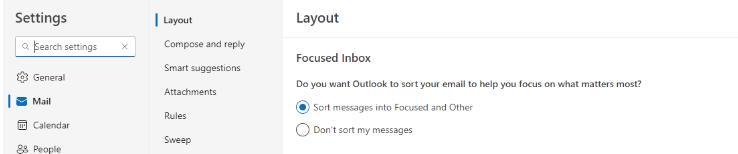
As reference, you may check this Microsoft article which help you to sort folders or messages for Inbox in Outlook on the web.
Focused Inbox for Outlook
Organize your inbox in Outlook on the web
Hope the above workaround would be helpful. Please provide more useful information as well as captures for further assistance and feel free to let me know, I will keep assisting you.
Your understanding and patience will be appreciated.
Thank you!
' cx='32' cy='32' r='32' /%3E%3Ctext x='50%25' y='55%25' dominant-baseline='middle' text-anchor='middle' fill='%23FFF' %3EA%3C/text%3E%3C/svg%3E)
