Developer technologies | Windows Forms
A set of .NET Framework managed libraries for developing graphical user interfaces.
This browser is no longer supported.
Upgrade to Microsoft Edge to take advantage of the latest features, security updates, and technical support.

C# novice here. Creating a little app that will monitor whether there's sufficient space on a backup drive to accommodate scheduled backups. After local drive discovery a window will be shown which lists found drives with associated details per the depicted "mock-up":
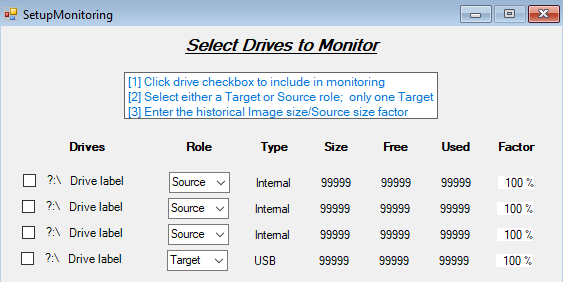
NOTE: mock-up detail controls are Visible = false;.
The objective is to dynamically build the details at run-time based on discovered disks enabling the user to select the drives to monitor, whether the monitored drive is a backup destination or source and enter a n historical backup compression factor. When run I'm only getting the first defined control:
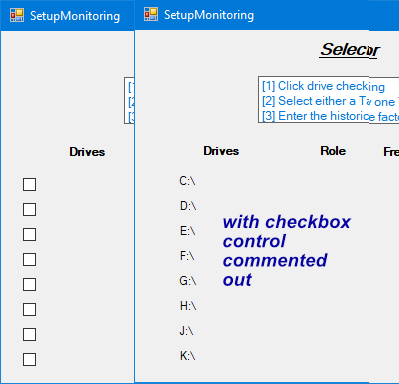
Following is the code:
private readonly static List<Drives4DB> FoundDrives = ConnectionConfig.Connects.GetDrives();

private void SetupMonitoring_Load(Object sender, EventArgs e)
{
 int drvs = FoundDrives.Count;

 CheckBox[] drvChkBx;
 Label[] nameLBL;
 Label[] labelLBL;
 ComboBox[] roleCBX;
 Label[] typeLBL;
 Label[] sizeLBL;
 Label[] freeLBL;
 Label[] usedLBL;
 MaskedTextBox[] factor;

 drvChkBx = new CheckBox[drvs];
 nameLBL = new Label[drvs];
 labelLBL = new Label[drvs];
 // etc.

 int drvChkBxStart_X = 22;
 int drvChkBxStart_Y = 142;
 int nameLBLstart_X = 42;
 int nameLBLstart_Y = 144;
 int labelLBLstart_X = 60;
 int labelLBLstart_Y = 144;
 // etc.

 Console.WriteLine($"\n\n \"{drvs}\" internal drives found\n");

 int vertSpace = 0;

 for (int i = 0; i < drvs; i++)
 {
 foreach (var drv in FoundDrives)
 {
 if (drv.id_DrvBase == i + 1)
 {
 drvChkBx[i] = new CheckBox();
 drvChkBx[i].Name = $"{drvChkBx}{i}";

 nameLBL[i] = new Label();
 nameLBL[i].Name = $"{nameLBL}{i}";
 nameLBL[i].Text = $"{drv.name}";

 // etc.
 }
 }
 }

 for (int i = 0; i < drvs; i++)
 {
 drvChkBx[i].Enabled = true;
 drvChkBx[i].Visible = true;
 drvChkBx[i].Location = new Point(drvChkBxStart_X, drvChkBxStart_Y + vertSpace);

 nameLBL[i].Enabled = true;
 nameLBL[i].Visible = true;
 nameLBL[i].Location = new Point(nameLBLstart_X, nameLBLstart_Y + vertSpace);

 labelLBL[i].Enabled = true;
 labelLBL[i].Visible = true;
 labelLBL[i].Location = new Point(labelLBLstart_X, labelLBLstart_Y + vertSpace);
 // labelLBL[i].Size = new Size(125, 20);

 this.Controls.Add(drvChkBx[i]);
 this.Controls.Add(nameLBL[i]);
 this.Controls.Add(labelLBL[i]);

 vertSpace += 25;
 }

}
NOTE: The example code found breaks the creation of the controls and display definition into two separate "for" loops but I don't understand why. I've tried this both as presented and using a single "for" with the same result.
All expected data is available (output from WriteLine):
"8" internal drives found
C:\ 00 NVMe_fresh_OS
D:\ 02 Data
E:\ 03 Games
F:\ 04 Internal Backups
G:\ 07 Virtual PCs
H:\ 05 NVMe Wrkg Space
J:\ 01 SATA_upgrade_OS
K:\ 06 SATA Wrkg Space
Checking control array content via debug/breakpoint verifies the arrays have the correct elements.
Why is this only picking up/showing the first control of a row?[
Thanx in advance for yur help.
A set of .NET Framework managed libraries for developing graphical user interfaces.
An object-oriented and type-safe programming language that has its roots in the C family of languages and includes support for component-oriented programming.

Does it help if you remove foreach and if?
for (int i = 0; i < drvs; i++)
{
   var drv = FoundDrives[i];

   drvChkBx[i] = new CheckBox();
   drvChkBx[i].Name = $"drvChkBx{i}";

   nameLBL[i] = new Label();
   nameLBL[i].Name = $"nameLBL{i}";
   nameLBL[i].Text = drv.name;

   // etc.
 }
By the way, there are alternatives, such as User Controls and Grids.
@Viorel - thx for the try. Nope, same outcome. The "var drv = FoundDrives[i];" is a lot better than my foreach/if approach, though, so I'm going to use that bit ;-)
And yes, I'm currently exploring the tableLayoutPanel control ..
Answer accepted by question author
Thanks to both folks who provided suggestions that furthered progress .....
The way I got it to work (using a tableLayoutPanel for control placement) was to keep controls instance creation consolidated but give each control its own for loop (in case another novice comes looking):
private void SetupMonitoring_Load(Object sender, EventArgs e)
{
 int drvs = FoundDrives.Count;

 // modify tableLayoutPanel for control placement
 DrivesTable.RowCount = drvs;
 for (int i = 0; i < drvs - 1; i++)
    DrivesTable.RowStyles.Add(new RowStyle(SizeType.Absolute, 25F));
 DrivesTable.Size = new Size(530, drvs * 25);

 CheckBox[] drvChkBx = new CheckBox[drvs];
 Label[] nameLBL = new Label[drvs];
 Label[] labelLBL = new Label[drvs];
 ComboBox[] roleCBX = new ComboBox[drvs];
 Label[] typeLBL = new Label[drvs];
 Label[] sizeLBL = new Label[drvs];
 Label[] freeLBL = new Label[drvs];
 Label[] usedLBL = new Label[drvs];
 MaskedTextBox[] factor = new MaskedTextBox[drvs];
 SuspendLayout();

 int vertSpace = 0;

 for (int i = 0; i < drvs; i++)
 {
 var drv = FoundDrives[i];
 drvChkBx[i] = new CheckBox();
 drvChkBx[i].Name = $"{drvChkBx}{i}";

 nameLBL[i] = new Label();
 nameLBL[i].Name = $"{nameLBL}{i}";
 nameLBL[i].Text = $"{drv.name}";

 // etc.
 }

 for (int i = 0; i < drvs; i++)
 {
 drvChkBx[i].Size = new Size(20, 20);
 DrivesTable.Controls.Add(drvChkBx[i], 0, i);
 }

 for (int i = 0; i < drvs; i++)
 {
 nameLBL[i].Anchor = AnchorStyles.Bottom;
 nameLBL[i].ForeColor = Color.FromArgb(0, 0, 192);
 nameLBL[i].Size = new Size(30, 20);

 DrivesTable.Controls.Add(nameLBL[i], 1, i);
 }
 // etc.
}
' cx='32' cy='32' r='32' /%3E%3Ctext x='50%25' y='55%25' dominant-baseline='middle' text-anchor='middle' fill='%23FFF' %3EDZ%3C/text%3E%3C/svg%3E)
Hi ArtHansen-4605,
First, you can try to change the following code:
drvChkBx[i].Location = new Point(drvChkBxStart_X, drvChkBxStart_Y + vertSpace);
to:
drvChkBx[i].Location = new System.Drawing.Point(drvChkBxStart_X, drvChkBxStart_Y + vertSpace);
drvChkBx[i].Size = new System.Drawing.Size(30, 15);
More details you can refer to MSDN example of how to programmatically add controls to Windows forms at run time.
And I guess it may also be caused by multiple controls overlapping, you can also try to autosize it by setting its AutoSize property to true.
labelLBL[i].AutoSize = true;
Best Regards,
Daniel Zhang
If the response is helpful, please click "Accept Answer" and upvote it.
Note: Please follow the steps in our documentation to enable e-mail notifications if you want to receive the related email notification for this thread.
@Daniel Zhang-MSFT Thx for suggestions. Autosize had no effect & "System.Drawing" is taken care of with a "using" at top (which you can't see here) but forcing a size did get more than "fields" displayed but they were still stacking (z wise) on top of each other ...