' cx='32' cy='32' r='32' /%3E%3Ctext x='50%25' y='55%25' dominant-baseline='middle' text-anchor='middle' fill='%23FFF' %3ES%3C/text%3E%3C/svg%3E)

' cx='32' cy='32' r='32' /%3E%3Ctext x='50%25' y='55%25' dominant-baseline='middle' text-anchor='middle' fill='%23FFF' %3ESX%3C/text%3E%3C/svg%3E)

It depends on what you are interpreting as the meaning of "Discovery"?
The "Discovery" happens behind the scenes and looks for pre-defined patterns in the column names to identify those columns that may need a Sensitivity Label applied. To see what rules it is using and to customise these, you need to export the configuration as follows:
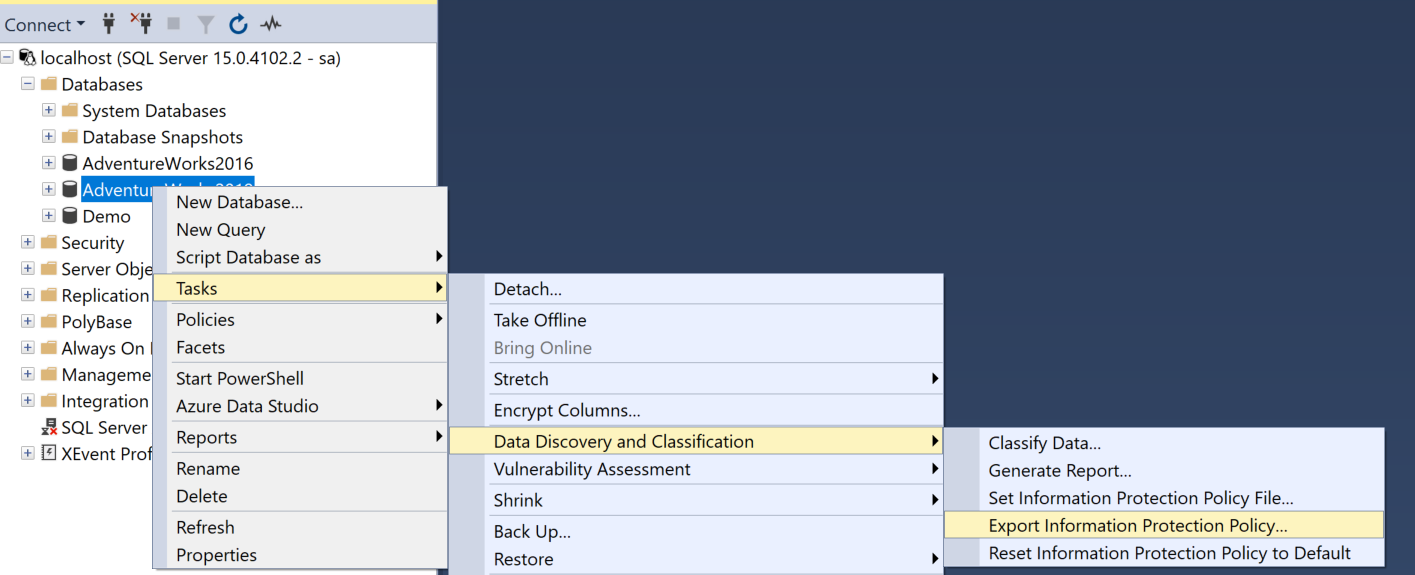
This exports as JSON - you can then edit this and use the same menu to Import the new rules and execute against that.
The "Classification" then groups those into the useful nomenclature (which you CAN customise for your own organisation).
The settings and storage of the data depends upon what version of SQL Server you have as well as the version of SSMS that you use. For SQL Server 2019, the metadata can also be added through TSQL using
ADD SENSITIVITY CLASSIFICATION
command - see here
The benefits of using this arise from some of the aspects you already called out:
AUDITING - you can see who has accessed sensitive data and whether they SHOULD have accessed this data. It can help you tighten up your security or help to identify a Data Breach - obviously a good thing.
METADATA - I have also used the ability to extract columns that are sensitive to produce further TSQL scripts to add either Data Masking or Encryption to all columns that have specific Sensitivity Labels - saves a lot of manual work.
To parse the column you need something like:
WITH AuditWithXML as (
    SELECT event_time, action_id, database_name, statement, CAST(data_sensitivity_information as xml) as d
    FROM sys.fn_get_audit_file ('path_to_your_audit_file',default,default)
)
SELECT event_time, action_id, database_name, statement,
	   h.ep.value('@label','nvarchar(100)') as [Label],
       h.ep.value('@information_type', 'nvarchar(100)') as [InformationType]
FROM AuditWithXML
       OUTER APPLY d.nodes('/sensitivity_attributes/sensitivity_attribute') as h(ep);
GO
