' cx='32' cy='32' r='32' /%3E%3Ctext x='50%25' y='55%25' dominant-baseline='middle' text-anchor='middle' fill='%23FFF' %3EA%3C/text%3E%3C/svg%3E)

Thank you so much for your kindly reply.
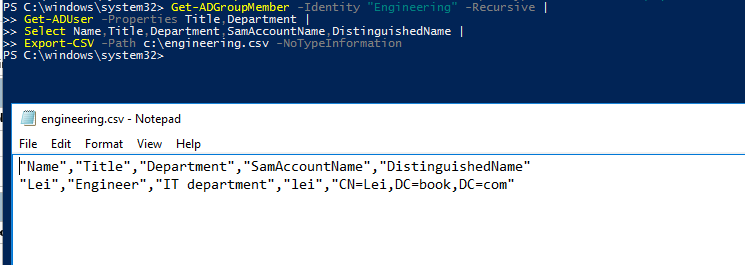
You are welcome. So glad to hear that the link was very helpful to you. To export all required information to CSV file, we could try the below Powershell command.
For example:
Get-ADGroupMember -Identity "Engineering" -Recursive |
Get-ADUser -Properties Title,Department |
Select Name,Title,Department,SamAccountName,DistinguishedName |
Export-CSV -Path c:\engineering.csv -NoTypeInformation
For more information, we could refer to:
https://www.petri.com/powershell-problem-solver-exporting-active-directory-groups-csv
Tip: This answer contains the content of a third-party website. Microsoft makes no representations about the content of these websites. We provide this content only for your convenience.
If we have more question about this powershell command, we could turn to our dedicated PowerShell forum. Below is the forum link: https://social.technet.microsoft.com/Forums/en-US/home?forum=winserverpowershell.
For any question, please feel free to contact us. Thanks again and have a nice day.