Microsoft 365 and Office | SharePoint Server | For business
A family of Microsoft on-premises document management and storage systems.

This browser is no longer supported.
Upgrade to Microsoft Edge to take advantage of the latest features, security updates, and technical support.
' cx='32' cy='32' r='32' /%3E%3Ctext x='50%25' y='55%25' dominant-baseline='middle' text-anchor='middle' fill='%23FFF' %3EJW%3C/text%3E%3C/svg%3E)
Hi,
I am trying to change "from" address in emails that are sending by workflows on our server. But changing it in usual location doesn't make any change. We are using SharePoint 2019 on Premise.
In "Central Administration -> System Settings -> E-Mail and Text Messages(SMS) -> Configure outgoing e-mail settings" in "From address" I have "Sharepoint@<CorpName>.com", but in emails from workflows I have "Sharepoint@(...)corp.local". Where can I change this value if not in listed menu?
A family of Microsoft on-premises document management and storage systems.
Answer accepted by question author

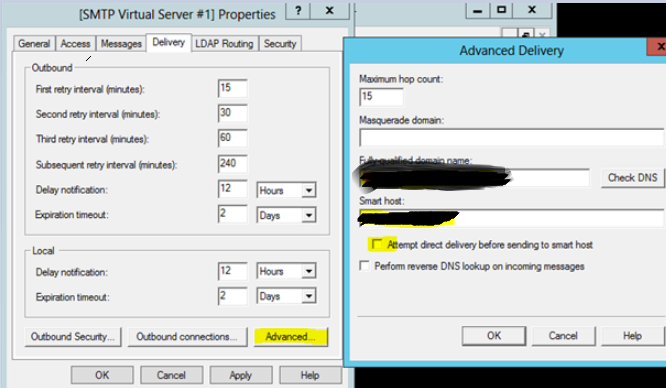
To narrow this issue, I have something to confirm with you. What’s the smart host configured in your SMTP Server? Did you check the Attempt direct delivery box under smart host? The system may attempt to deliver the email directly first before sending to the Smart host.
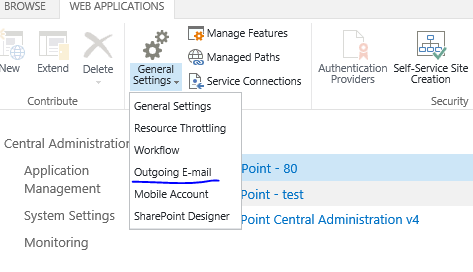
Did you set the “From address” on web application level through: Web Applications Management page, select a web application, and then in the General Settings group on the ribbon, click Outgoing E-mail?
If an Answer is helpful, please click "Accept Answer" and upvote it.
Note: Please follow the steps in our documentation to enable e-mail notifications if you want to receive the related email notification for this thread.
Thanks,
It was the second issue. So web applocation settings override settings in Outgoing e-mail settings. Good to know.
' cx='32' cy='32' r='32' /%3E%3Ctext x='50%25' y='55%25' dominant-baseline='middle' text-anchor='middle' fill='%23FFF' %3ECW%3C/text%3E%3C/svg%3E)
The second issue helped me as well. Thanks Yi Lu.