Microsoft 365 and Office | Excel | For home | Windows
A family of Microsoft spreadsheet software with tools for analyzing, charting, and communicating data.

This browser is no longer supported.
Upgrade to Microsoft Edge to take advantage of the latest features, security updates, and technical support.
' cx='32' cy='32' r='32' /%3E%3Ctext x='50%25' y='55%25' dominant-baseline='middle' text-anchor='middle' fill='%23FFF' %3EA%3C/text%3E%3C/svg%3E)
Hello,
In a workbook I'm trying to calculate the number of days in between a date field and Today's date. The formula that I use is:
=DATEDIF(G2, TODAY(),"d")
However I get incorrect result using this formula.
For example if Today's date is 11/16/2010, and I want to calculate the number of days between 'Order Date' and Today's date. This is the result:
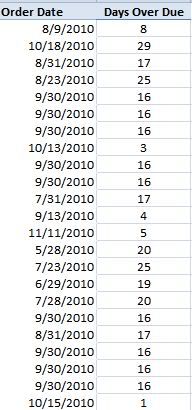
It seems that the workbook ignores that the date is actually on different months.. The calculation is correct if Order Date is also in the month of November...
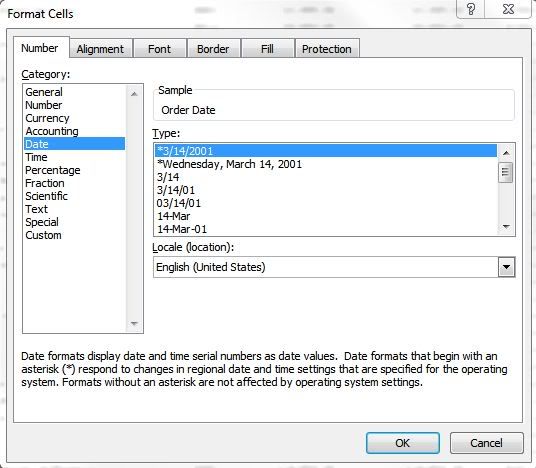
The Order Date column is using the date format as follow:
Could someone please help me with this issue?
Thanks in advanced for your help!
-Elizabeth K.
A family of Microsoft spreadsheet software with tools for analyzing, charting, and communicating data.
Locked Question. This question was migrated from the Microsoft Support Community. You can vote on whether it's helpful, but you can't add comments or replies or follow the question.
Answer accepted by question author
Hi,
Try this
=DATEDIF(G2, TODAY(),"d")
If this post answers your question, please mark it as the Answer.
Mike H
Hi Mike,
I must be going blind !! Your formula looks exactly the same as the one that Elizabeth said she was using. What's the difference?
Pete
If youi're only looking for the difference in days, then you could drop the
=datedif() function and just subtract the two dates.
Make sure that the results are formatted as General (not a date).
kurobenko wrote:
Hello,
In a workbook I'm trying to calculate the number of days in between a date field and Today's date. The formula that I use is:
=DATEDIF(G2, TODAY(),"d")
However I get incorrect result using this formula.
For example if Today's date is 11/16/2010, and I want to calculate the number of days between 'Order Date' and Today's date. This is the result:<http://i170.photobucket.com/albums/u277/kuroneko1313/DateDiff.jpg> <http://s170.photobucket.com/albums/u277/kuroneko1313/?action=view¤t=DateDiff.jpg>
It seems that the workbook ignores that the date is actually on different months.. The calculation is correct if Order Date is also in the month of November...
The Order Date column is using the date format as follow:<http://i170.photobucket.com/albums/u277/kuroneko1313/date.jpg> <http://s170.photobucket.com/albums/u277/kuroneko1313/?action=view¤t=date.jpg>
Could someone please help me with this issue?
Thanks in advanced for your help!
-Elizabeth K.
--
Dave Peterson
That works Mike, thanks alot for your help!
Why don't you just subtract the dates directly?
=TODAY()-G2
and format that cell as Number or General.
Hope this helps.
Pete