Microsoft Security | Intune | Configuration Manager | Deployment
Deploying software and updates using Configuration Manager

This browser is no longer supported.
Upgrade to Microsoft Edge to take advantage of the latest features, security updates, and technical support.
' cx='32' cy='32' r='32' /%3E%3Ctext x='50%25' y='55%25' dominant-baseline='middle' text-anchor='middle' fill='%23FFF' %3EK%3C/text%3E%3C/svg%3E)
hello,
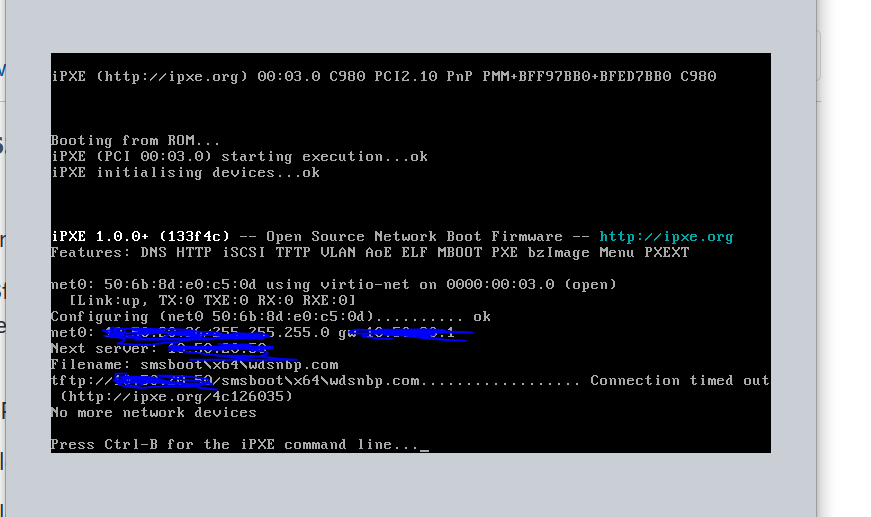
can somene help me with this issue i'am not expert in SCCM , my pxe boot was working since a while and sudenly no more pxe boot
can anybody tel me if they is a fix to this
thank you
sms.log
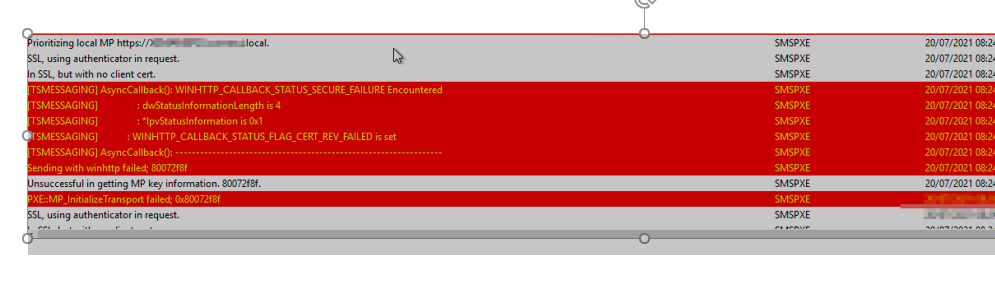
PXE::MP_InitializeTransport failed; 0x80072f8f
PXE::MP_ReportStatus failed; 0x80070490
E Provider failed to process message.
Element not found. (Error: 80070490; Source: Windows)

Hi,
Thanks for posting in Microsoft Q&A forum.
The error 0x80072f8f means "A security error occurred" and the 0x80070490 means "Element not found". Per my experience, this issue may be related to PKI certs or CRL. Please check the followings:
1, Do you add valid PKI certs to the properties of the PXE-enabled DPs?
2, Is the CRL available on an accessible CDP to the MP as well as the PXE-booted systems?
3, Is the CRL available via an HTTP URL from the PXE-booted systems?
Best regards,
Simon
If the response is helpful, please click "Accept Answer" and upvote it.
Note: Please follow the steps in our documentation to enable e-mail notifications if you want to receive the related email notification for this thread.
 Good Morning Simon
First thank you so much for your reply
could be please the certif yes in attachment the screenshot that i took from the seeting of the DP and from smsts.log in facat the whole setup has been done by another persone i just started with sccm in this company
regarding the CRL how can check if it's accessible ?
Hi,
Thanks for your reply.
We could uncheck the the option "Clients check the CRL for site systems" in your site properties to disable client CRL checking to have a try. As shown below:

About CRL checking, please refer to:
CHECKING YOUR CRL FOR REVOKED CERTIFICATES
Basic CRL checking with certutil
Best regards,
Simon
If the response is helpful, please click "Accept Answer" and upvote it.
Note: Please follow the steps in our documentation to enable e-mail notifications if you want to receive the related email notification for this thread.
https://learn.microsoft.com/en-us/answers/articles/67444/email-notifications.html