Azure Files
An Azure service that offers file shares in the cloud.
This browser is no longer supported.
Upgrade to Microsoft Edge to take advantage of the latest features, security updates, and technical support.
' cx='32' cy='32' r='32' /%3E%3Ctext x='50%25' y='55%25' dominant-baseline='middle' text-anchor='middle' fill='%23FFF' %3EJK%3C/text%3E%3C/svg%3E)
I'm currently trying to write a powershell script to delete files older than 14 days from our Azure file shares. The problem I'm running into is, the files don't return a last modified date, except in the actual UI in portal.azure.com. I have created a context using my access keys, but this still doesn't seem to work. Below is the code I'm using (sanitized for privacy) so far.
$StorageAccountKey = "\
An Azure service that offers file shares in the cloud.
' cx='32' cy='32' r='32' /%3E%3Ctext x='50%25' y='55%25' dominant-baseline='middle' text-anchor='middle' fill='%23FFF' %3EA%3C/text%3E%3C/svg%3E)
@John Kuntz
There is a similar question with some CLI sample script here which you might find helpful. I am investigating to see how this might be done with PowerShell and will get back to you.
I'm not seeing anything in properties that would give me the date.
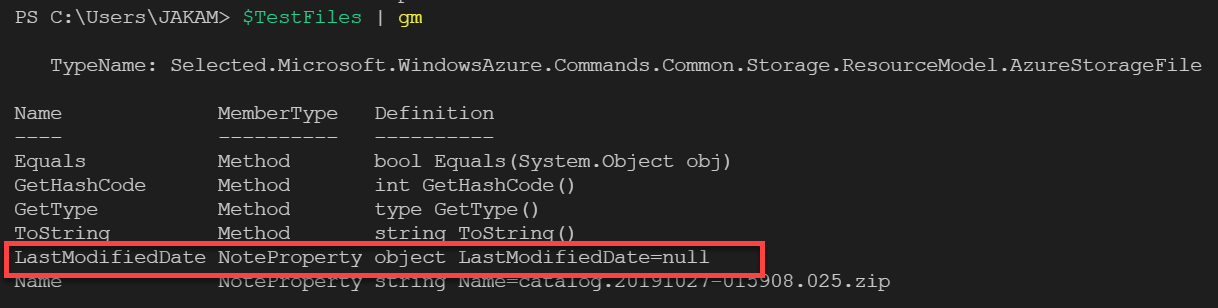
Apologies for the delayed response. For “Get-AzStorageFile”:
• Without “-Path”: It will list file/FileDir which directly in a share/fileDir. To list recursively in a share/FileDir, you need to call it recursively.
• With “-Path”: It will get an instance of a directory or file (with file properties like LMT) in the specified path.
The following script will list files/FileDir recursively in a file share, and delete the files older than 14 days.
$ctx = New-AzStorageContext -StorageAccountName $accountName -StorageAccountKey $key
$shareName = <shareName>

$DirIndex = 0
$dirsToList = New-Object System.Collections.Generic.List[System.Object]

# Get share root Dir
$shareroot = Get-AzStorageFile -ShareName $shareName -Path . -context $ctx
$dirsToList += $shareroot

# List files recursively and remove file older than 14 days
While ($dirsToList.Count -gt $DirIndex)
{
    $dir = $dirsToList[$DirIndex]
    $DirIndex ++
    $fileListItems = $dir | Get-AzStorageFile
    $dirsListOut = $fileListItems | where {$_.GetType().Name -eq "AzureStorageFileDirectory"}
    $dirsToList += $dirsListOut
    $files = $fileListItems | where {$_.GetType().Name -eq "AzureStorageFile"}

    foreach($file in $files)
    {
        # Fetch Attributes of each file and output
        $task = $file.CloudFile.FetchAttributesAsync()
        $task.Wait()

        # remove file if it's older than 14 days.
        if ($file.CloudFile.Properties.LastModified -lt (Get-Date).AddDays(-14))
        {
            ## print the file LMT
            # $file | Select @{ Name = "Uri"; Expression = { $_.CloudFile.SnapshotQualifiedUri} }, @{ Name = "LastModified"; Expression = { $_.CloudFile.Properties.LastModified } }

            # remove file
            $file | Remove-AzStorageFile
        }
    }
    #Debug log
    # Write-Host  $DirIndex $dirsToList.Length  $dir.CloudFileDirectory.SnapshotQualifiedUri.ToString()
}
Hope this helps! Let us know if you run into issues or have further questions.
-------------------------------
Please don’t forget to "Accept the answer" and “up-vote” wherever the information provided helps you, this can be beneficial to other community members.
' cx='32' cy='32' r='32' /%3E%3Ctext x='50%25' y='55%25' dominant-baseline='middle' text-anchor='middle' fill='%23FFF' %3EVR%3C/text%3E%3C/svg%3E)
Hi Deherman, i also have similar requirement what John has. here is my requirement. i am maintaining the single fileshare in storage account. one application(let say A) upload the file to file share in one folder and another application(let say B) will consume the file with in 5 mins( another application has ADF connection). now i have to generate an alert if application B could not consume the file with in 5 mins then send an alert to application A team. for this i have used some of the part of your code written in this portal but it is not throwing any error but went to infinite loop. i am trying this cloud powershell.
i am not sure why it went to infinite loop. could you suggest on this
any one has a powershell script already to satisfy my requirement, please share it. thanks for your help
Thanks,
Vasu
' cx='32' cy='32' r='32' /%3E%3Ctext x='50%25' y='55%25' dominant-baseline='middle' text-anchor='middle' fill='%23FFF' %3EC%3C/text%3E%3C/svg%3E)
We have been tasked with same sort of issue but we are only wanting to delete photos or videos? Is there a way to filter that?
' cx='32' cy='32' r='32' /%3E%3Ctext x='50%25' y='55%25' dominant-baseline='middle' text-anchor='middle' fill='%23FFF' %3ESB%3C/text%3E%3C/svg%3E)
This can be quite easily achieved by mounting the File Shares on a Linux for example Ubuntu through WSL2. However deleting a large amount of directories, that may contain a very large amount of files, is painly slow even if using an 'rsync' trick instead of a regular 'rm' command.
@Anonymous Imho Azure storage account lacks a feature to quick and easy delete content recursively under a folder, and only content which is older than X days.