Developer technologies | XAML
A language based on Extensible Markup Language (XML) that enables developers to specify a hierarchy of objects with a set of properties and logic.
This browser is no longer supported.
Upgrade to Microsoft Edge to take advantage of the latest features, security updates, and technical support.

I had used MediaElement a few years ago to great effect for playing sounds in a desktop app. But when I tried today, I got no sound out of it.
I simply made a New Project, WPF .Net framework project in Visual Studio 2019. I drug a .wav file into the root of the project. In XAML for the MainWindow, I added a Media Element object. In the Properties, under Source, I saw and selected the audio file. Build, Run. No sound.
What's up with that? What else is there?
<MediaElement x:Name="mediaElement" Source="ahhh.wav"/>
also tried: <MediaElement x:Name="mediaElement" LoadedBehavior="Play" Source="ahhh.wav"/>
I looked at the MS Wpf example archive for MediaElementExample looking for clues. I added three events to the MediaElement and set breaks. The event MediaFailed fires. The exception said "Cannot find the file".
Seems simple enough. So Debug shows no "omg! Exception" it just runs. But what does it mean? The file is there. You can see it in the Properties for Media Element. Its in the .sln in the root. Its in the directory. I copied in the .wav from the ms example thinking it might be some sample rate issue. Still wont play.
To make it more like the MS example, I set LoadedBehavior to Manual, UnloadedBehavior to Manual, and had a button fire off the .Play() method. Same...
    <MediaElement x:Name="mediaElement" LoadedBehavior="Manual" UnloadedBehavior="Manual"
                  Source="ringin.wav"
                  MediaOpened="mediaElement_MediaOpened"
                  MediaEnded="mediaElement_MediaEnded"
                  MediaFailed="mediaElement_MediaFailed"/>
<Button Click="Button_Click" />
    private void Button_Click(object sender, RoutedEventArgs e)
    {
        mediaElement.Play();
    }

    private void mediaElement_MediaOpened(object sender, RoutedEventArgs e)
    {

    }

    private void mediaElement_MediaEnded(object sender, RoutedEventArgs e)
    {

    }

    private void mediaElement_MediaFailed(object sender, ExceptionRoutedEventArgs e)
    {

    }
![116278-image.png][2] [2]: /api/attachments/116278-image.png?platform=QnA
' cx='32' cy='32' r='32' /%3E%3Ctext x='50%25' y='55%25' dominant-baseline='middle' text-anchor='middle' fill='%23FFF' %3EHL%3C/text%3E%3C/svg%3E)
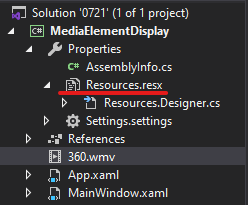
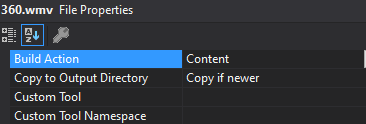
Did you add the .wmv file in the project root directory to Resources.resx? And you could try to set the Build Action and Copy to Output Directory properties of the .wmv file to Content and Copy always/ Copy if newer after adding the .wmv file to Resources.resx. After I add the .wmv file to the project resources and set the properties for the .wmv file, I can successfully play the .wmv file. For more information, you could refer to MediaElement.
Add .wmv files to project resources:

Set properties for the .wmv file:
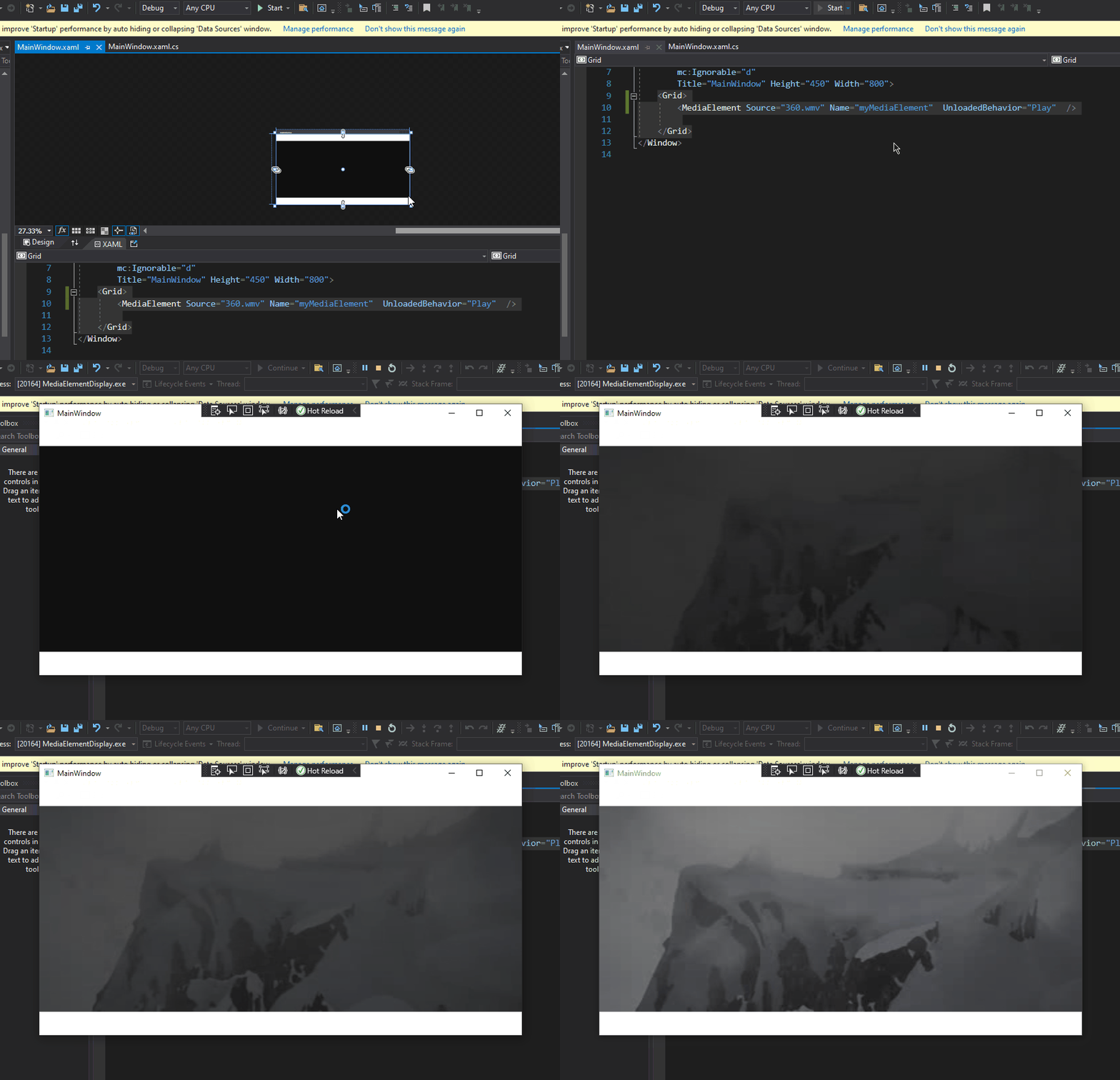
The code of xaml is as follows:
<Grid>
<MediaElement Source="360.wmv" Name="myMediaElement" UnloadedBehavior="Play" />
</Grid>
The result is shown in the figure:
 ]5
]5
Yes, that simple change, Copy To Output was what fixed it.
Shouldn't that be in the documentation about the Media Element someplace? Or if it is, more prominent. I would never have found it otherwise. I hope I remember in 6 months what it was. You should make it the default of adding a sound file to resources or something.
Thanks.