Cannot add system environment variables for my domain via GPO?

Anonymous
2021-07-21T10:36:59.477+00:00

Hello everyone,

I've been having troubles creating a system environment variable for our domain and decided to post a question, maybe someone can shine a light if I'm missing something.

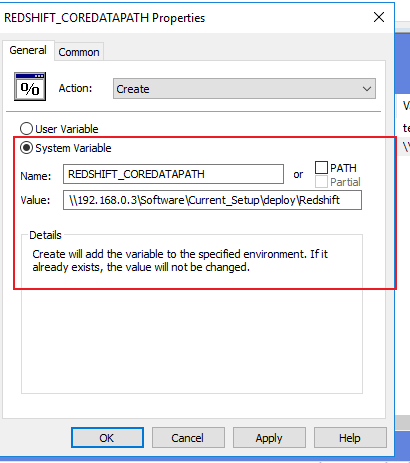
In the policy, Computer Configuration -> Preferences -> Windows Settings I've created an environment:

Name : REDSHIFT_COREDATAPATH

\192.168.0.3\Software\Current_Setup\deploy\Redshift

Action as create.

I've tried different types names but it seems that nothing is being pushed into the computers itself, any clue what could be wrong?

Windows development | Windows API - Win32
Windows for business | Windows Client for IT Pros | User experience | Other
0 comments No comments
{count} votes

Answer accepted by question author
  1. Anonymous
    2021-07-22T01:16:28.04+00:00

    Hi,
    Welcome to ask here!
    I did a test in my lab as following:
    1, Create a GPO named environment variables and link it to the computer OU pc2
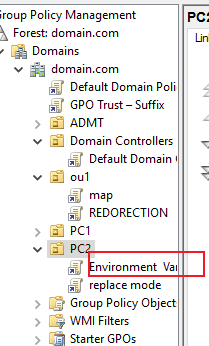
    116828-image.png

    2, Edit the GPO as following:
    116814-image.png

    3, Restart the machine to apply the group policy and the environment variables was created on the machine
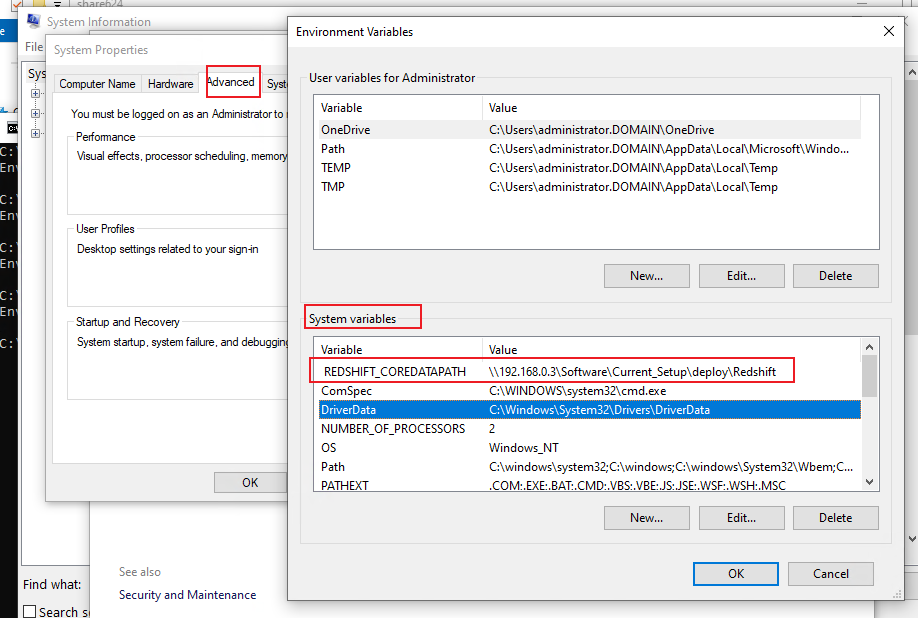
    116894-image.png

    It is suggested to check if the GPO was applied with command (Run CMD as administrator): gpresult /h c:\report.html
    If there are any errors in the report, you may share a screenshot here!
    Best Regards,

    0 comments No comments

1 additional answer

Sort by: Most helpful
  1. Anonymous
    2021-07-22T15:10:39.397+00:00

    Apparently there was an older entry of this stuck in /sysvol/ but wasn't on GPO.. Removed that, works as intended. Thanks for replying to my thread!

    0 comments No comments

Your answer

Answers can be marked as 'Accepted' by the question author and 'Recommended' by moderators, which helps users know the answer solved the author's problem.