Community Center | Not monitored
Tag not monitored by Microsoft.

This browser is no longer supported.
Upgrade to Microsoft Edge to take advantage of the latest features, security updates, and technical support.
' cx='32' cy='32' r='32' /%3E%3Ctext x='50%25' y='55%25' dominant-baseline='middle' text-anchor='middle' fill='%23FFF' %3EMF%3C/text%3E%3C/svg%3E)
Hello,
I insert this if (x==0 )
{
Bracket open, then automatically the close bracket insert.
I don't want it.
Where I can change it?
' cx='32' cy='32' r='32' /%3E%3Ctext x='50%25' y='55%25' dominant-baseline='middle' text-anchor='middle' fill='%23FFF' %3EA%3C/text%3E%3C/svg%3E)
C# is not currently supported here on QnA. They're actively answering questions in dedicated forums here.
https://social.msdn.microsoft.com/Forums/en-US/home?forum=csharpgeneral
--please don't forget to Accept as answer if the reply is helpful--
Regards, Dave Patrick ....
Microsoft Certified Professional
Microsoft MVP [Windows Server] Datacenter Management
Disclaimer: This posting is provided "AS IS" with no warranties or guarantees, and confers no rights.

The questions seems more on Visual studio tool. There is a separate forum where you can post the question as well. Use Report problem button on below page.
https://developercommunity.visualstudio.com/spaces/8/index.html
If the response helped, do "Accept Answer" and upvote it -- Vaibhav
Hello,
The questions seems more on Visual studio tool.
No is Visual Studio 2017, C#
My question is this.
I enter the following.
If (x == 0)
{
The editor automatically closes the closing bracket.
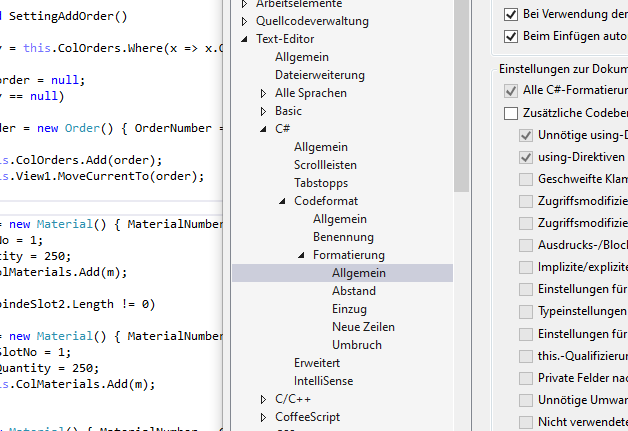
But I do not want that. I can definitely set that somewhere. But where, what the question would be. Thanks for hints.
C# is not currently supported here on QnA.
Is the same Editor, the same VS2017.
I wait one day, maybe somebody knows where.
This forum is not version specific.
https://social.msdn.microsoft.com/Forums/en-US/home?forum=csharpgeneral
--please don't forget to Accept as answer if the reply is helpful--