SQL Server Reporting Services
A SQL Server technology that supports the creation, management, and delivery of both traditional, paper-oriented reports and interactive, web-based reports.
This browser is no longer supported.
Upgrade to Microsoft Edge to take advantage of the latest features, security updates, and technical support.
' cx='32' cy='32' r='32' /%3E%3Ctext x='50%25' y='55%25' dominant-baseline='middle' text-anchor='middle' fill='%23FFF' %3EMG%3C/text%3E%3C/svg%3E)
I am creating a cover page (first page) by having a subreport on the top of the report body. The subreport has a page break after. Visibility of the subreport is set to hide when a page number is not 1. Right after the subreport I have a rectangle (for page header) which RepeatWith is set to an object below the rectangle. In RB everything works fine, but in PDF first page also works fine - no rectangle, but the second page doesn't have it either. Any idea how to solve my problem?
Thanks

Hi @mark goldin ,
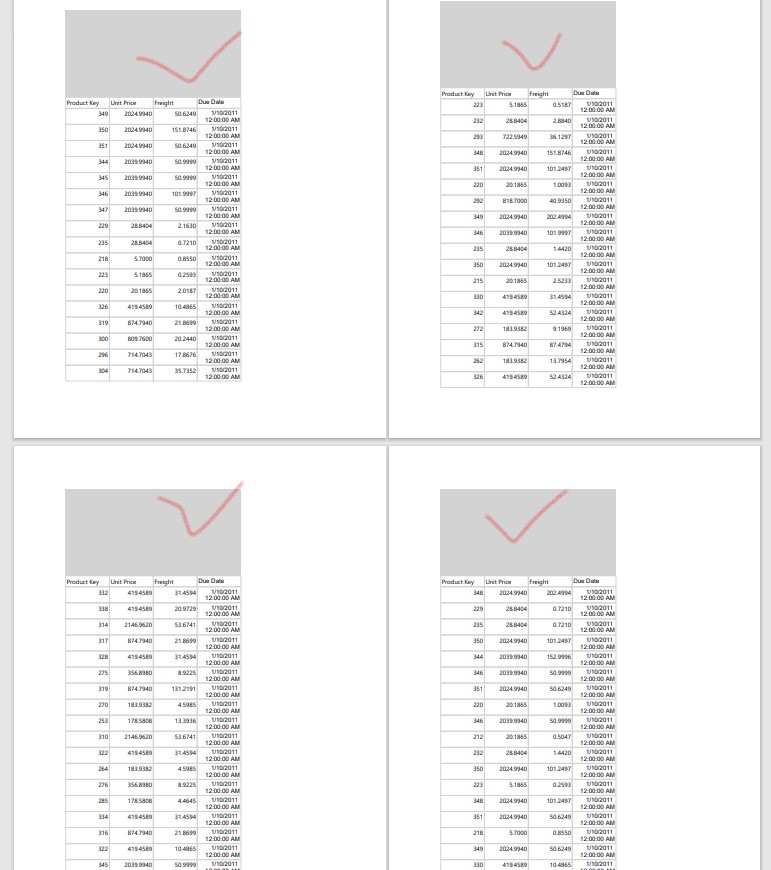
I did some tests on my local server. I set the rectangle to repeat on every page. But when I export the pdf, the rectangle only appears on the first page and seems to ignore the repeatwith setting. When I exported to word format, the same problem occurred. This is a fact that cannot be changed.
However, there is a way to add a custom header. The premise is that you have a Table or Matrix in the report.
For a clearer display, I fill the background color with gray. I made everything works fine by using the above method.
Best Regards,
Joy
If the answer is helpful, please click "Accept Answer" and upvote it.
Note: Please follow the steps in our documentation to enable e-mail notifications if you want to receive the related email notification for this thread.
Hi @mark goldin ,
Do you still have any questions?
If you have any questions, please feel free to let me know.
Best Regards,
Joy
II dont see "title" property in Table.
check this link:
Display Row and Column Headers on Multiple Pages (Report Builder and SSRS).
Please follow the link above to repeat the Table/Matrix header.
Then insert a blank row above this, merge, and this blank area will appear on every page. As shown in my image above.