Azure Logic Apps
An Azure service that automates the access and use of data across clouds without writing code.
This browser is no longer supported.
Upgrade to Microsoft Edge to take advantage of the latest features, security updates, and technical support.
' cx='32' cy='32' r='32' /%3E%3Ctext x='50%25' y='55%25' dominant-baseline='middle' text-anchor='middle' fill='%23FFF' %3EB%3C/text%3E%3C/svg%3E)
I am using SFTP SSH connector to post blob files to the SFTP server.
My workflow is :
list blobs (Azure Blob Storage Action) ->get blob content using path ( Azure Blob Storage Action) ->create File in SFTP using SFTP-SSH connector.
Everything was working with smaller files. When I want to send a file with size > 15 MB, it started failing. The chunking is ON for the action. Now I am seeing any files which is greater than the chunk size is failing and I have the following error.
{
"status": 400,
"message": "No partial file found. Please restart file transfer.\r\nclientRequestId: 9e292563-48f4-4c26-a62b-98d7eca0d5fd",
"error": {
"message": "No partial file found. Please restart file transfer."
},
"source": "edited the server details here"
}

@Balaji As per the error message and client ID that you have shared it looks like the Logic app uploaded the first chunk. From here, connector is unable to find that partial file created by the first request. This signifies that some other service is managing the SFTP server folder and probably deleting the partial files created as part of the chunked transfer mode.
I have tested the same at my end for the SFTP server created using this script (creating SFTP server on azure) and couldn't observe any issue while uploading the file greater than 15 MB (tested with 49 MB file). This looks like the issue at your SFTP server end where the chunk file created are deleted/removed there and the next request gives the 400 error.
I will suggest you to change the "Infer content type" to No and see if it helps you. If not then the suggested to verify whether your SFTP server folder is not locked by other service or retry with a new folder?

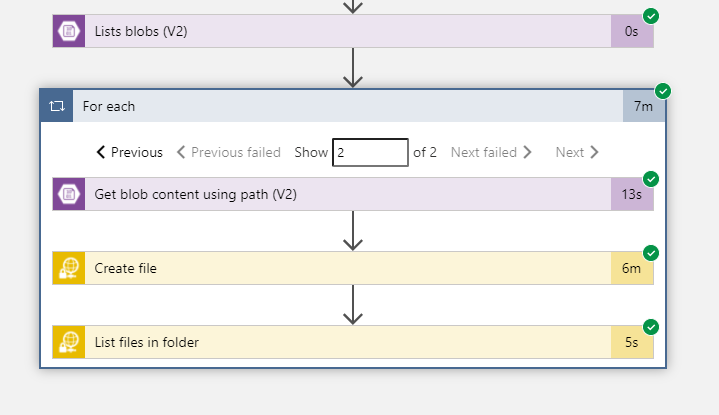
It appears that the partial file seems removed by some processes which I do not have control. But I tried in another SFTP environment, I got requested operation is not supported error. I could see the partial files in this environment.
{
"status": 401,
"message": "Requested operation is not supported.\r\nclientRequestId: f014f938-45cf-41a0-8887-bd3afeb9f2cc",
"error": {
"message": "Requested operation is not supported."
},
"source": "sftpwithssh-eus.azconn-eus.p.azurewebsites.net"
}
I tested using the azure-sftp setup you mentioned above and it works fine till the file size becomes 1GB.
I was wondering why there is a size limit!!
Do you propose any other solution with in azure cloud infra structure to post blobs greater than 1 GB?
@Balaji As per the new error the issue is at SFTP server end where the partial file updation is not supported.
For your other query, this is limitation of the logic app and the connectors that support chunking supports 1GB.
You can explore Azure data factory and that would be possible solution for copying the to the SFTP server.
If you are using logic app, its best to offload that processing to something like Azure Functions which you can call from Logic Apps.
Depending on how long such transfers would take, you will need to choose where to deploy such a function. Refer this table for more information.