Microsoft 365 and Office | Access | For home | Windows
A family of Microsoft relational database management systems designed for ease of use.

This browser is no longer supported.
Upgrade to Microsoft Edge to take advantage of the latest features, security updates, and technical support.
' cx='32' cy='32' r='32' /%3E%3Ctext x='50%25' y='55%25' dominant-baseline='middle' text-anchor='middle' fill='%23FFF' %3EA%3C/text%3E%3C/svg%3E)
Good day! I would just like to ask, is there a way to automatically reroute connectors so that it won't overlap with other connectors nor with other objects (pass around the shape until it does not cross over any element at all)? Thank you.
A family of Microsoft relational database management systems designed for ease of use.
Locked Question. This question was migrated from the Microsoft Support Community. You can vote on whether it's helpful, but you can't add comments or replies or follow the question.
Answer accepted by question author
Connectors have an in built routing algorithm that would not overlap with other connectors i.e. it will show a Omega sign to indicate connector overlapping and will go around other objects, Are you by any chance using the line shape as connector.
Check the snapshot I have below if it clarifies the issue,
Let me know if I am missing something
Hello Mr. AnoopHariyani! Yes, I have read articles on the internet about rerouting, but I cannot get the result that I want...I want to make a diagram with no jumps at all...the connectors must find themselves a way for them not to overlap. Is that possible? Sorry for the late reply
Connectors have an in built routing algorithm that would not overlap with other connectors i.e. it will show a Omega sign to indicate connector overlapping and will go around other objects, Are you by any chance using the line shape as connector.
Check the snapshot I have below if it clarifies the issue,
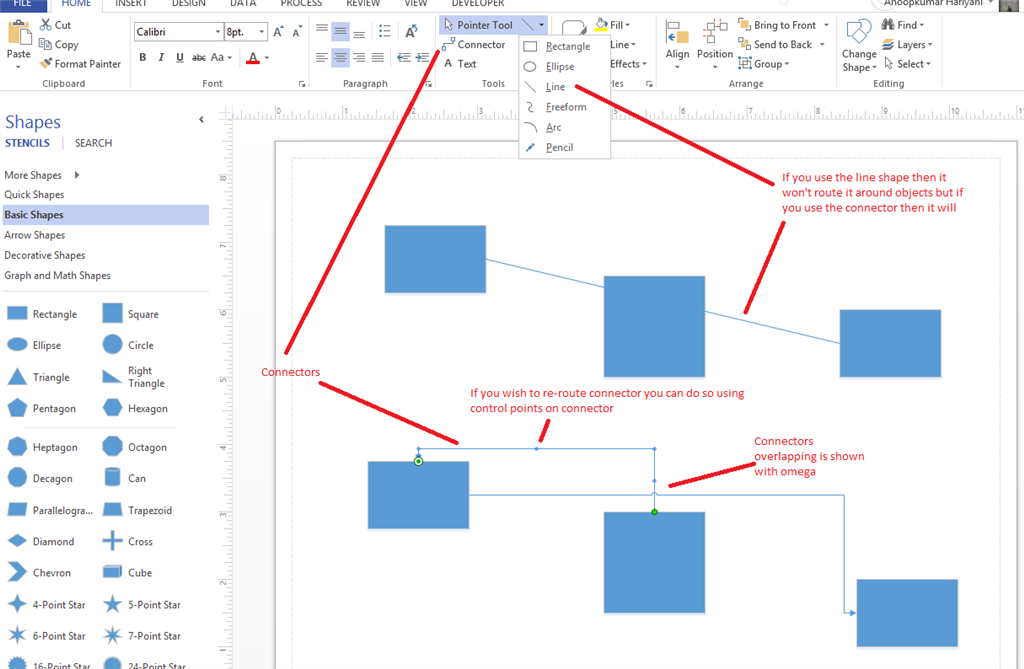
Let me know if I am missing something
Hey, thanks but the option "Connector" is missing from my Word
I Searched in Word Options> Customize Ribbons and All Command Option
There was "Connect"(which does not relate to this topic) but not "Connector".
Can you please help me get rid of this problem.
Thanks! In advance.
Hi,
Did you mean you did not want that the connectors and lines did not cross over any shapes and lines in a drawing?
If it was, there were two workarounds:
Please refer to the links and get more detaled help:
http://office.microsoft.com/en-nz/visio-help/change-how-a-connector-reroutes-itself-HP085052597.aspx
http://packetlife.net/blog/2012/jan/23/visio-connector-tips/
http://visguy.com/vgforum/index.php?topic=1664.0
Please Note: Since the web site is not hosted by Microsoft, the link may change without notice. Microsoft does not guarantee the accuracy of this information.
If I misunderstand something, please let me know.
Regards,
George Zhao