Microsoft 365 and Office | PowerPoint | For home | Windows
A family of Microsoft presentation graphics products that offer tools for creating presentations and adding graphic effects like multimedia objects and special effects with text.

This browser is no longer supported.
Upgrade to Microsoft Edge to take advantage of the latest features, security updates, and technical support.
' cx='32' cy='32' r='32' /%3E%3Ctext x='50%25' y='55%25' dominant-baseline='middle' text-anchor='middle' fill='%23FFF' %3EA%3C/text%3E%3C/svg%3E)
Is there seriously no way of turning off auto-saving on Microsoft Office Mobile? I've looked through all the possible options I can think off but I may not have thought of everything. Thanks Microsoft but I really don't need my 2in1 weak laptop (which I literally only bought to use word and powerpoint presentation) freezing for a couple seconds after I type one or two letters. My experiences with this OS so far have all been incredibly frustratingly terrible.
A family of Microsoft presentation graphics products that offer tools for creating presentations and adding graphic effects like multimedia objects and special effects with text.
Locked Question. This question was migrated from the Microsoft Support Community. You can vote on whether it's helpful, but you can't add comments or replies or follow the question.
Ok so you can't even work on your file if you're not logged in to your Microsoft account. So that's out and the problem of autosaving is still there. Does Microsoft office 365 offer a solution to any of this?
Thanks
There's no autosave function? So how does it save then? Because i'm sure not manually saving it, seeing as there's no manual save option in the first place apart from the 'save a copy of this file' which only needs to be used once to actually get the file on your device in the first place as opposed to having it only on a cloud, after that's done the autosaving will do the rest. This is the default Microsoft office mobile that came pre-installed on my 2in1 device. As you can see from the cropped screenshots I've attached I do have Microsoft office mobile, it is autosaving, it is autosaving after one letter has been typed, there is no manual save option apart from the 'save a copy of this file' but this is made redundant after doing it once due to the autosaving function, and there is no way to turn off auto saving. My problem isn't that there's no manual save option (there is, it's just redundant due to the forced use of autosaving), I could even look past the fact that they force you to use auto-saving, but I would've thought that at the very least if they reaaaaaaally want to force their users to use autosaving for whatever reason, that they should put in an option to change how often it saves so it doesn't save after literally typing one letter and clicking off. What's wrong with a good ol' timer? One which the user could alter to suit their needs? Thanks for the response but judging from my use of the program and my attached screenshots, I really don't see where you got that answer from.
The Microsoft mobile apps in my start menu
I literally only typed the letter f and clicked on the text box, nothing else; yet its still saving.
"All your changes are saved automatically" seems pretty clear 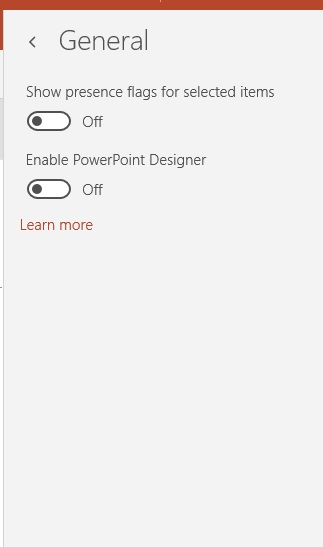
All the options in the 'general' section of settings, where I would've thought to find the option to disable auto-saving (if it existed)
All the options in the settings menu as you can see the only possible options to change anything would be found in 'General' and 'Accounts'. I've also tried logging out of my windows account in the powerpoint app but it sstill continues to autosave, however it may be faster when not logged in as I assume its not uploading to the cloud as well as my computer, regardless even if it is faster (i'll have to use it more to know), it's still autosaving at the same rate at the same times, its so unnecessary.
Thanks
There is no autosave function for mobile store apps on windows 10. You can run the app troubleshooter to fix issues with it. Click on the link http://download.microsoft.com/download/F/2/4/F24D0C03-4181-4E5B-A23B-5C3A6B5974E3/apps.diagcab