Azure SQL Database
An Azure relational database service.
This browser is no longer supported.
Upgrade to Microsoft Edge to take advantage of the latest features, security updates, and technical support.
' cx='32' cy='32' r='32' /%3E%3Ctext x='50%25' y='55%25' dominant-baseline='middle' text-anchor='middle' fill='%23FFF' %3EA%3C/text%3E%3C/svg%3E)
Hi, I was running the command to export database to azure storage using below command, but it throw error when i run it. I checked and all entries looks fine. I am using the same database login and password. I can login using same in azure sql database. Stoage account is also created.
Command: az sql db export --admin-password "xxxxxx" --admin-user "testadmin" --server xxxxxxx.database.windows.net --name "teststorageacc" --resource-group "xxxxxxx" --storage-key "xxxx-------" --storage-key-type StorageAccessKey --storage-uri "xxxxx.blob.core.windows.net/test/testdb"
error: The Resource 'Microsoft.Sql/servers/xxxxx.database.windows.net/databases/teststorageacc' under resource group 'xxxxx' was not found. For more details
I created database again but same error.
An Azure relational database service.
Answer accepted by question author
' cx='32' cy='32' r='32' /%3E%3Ctext x='50%25' y='55%25' dominant-baseline='middle' text-anchor='middle' fill='%23FFF' %3EAS%3C/text%3E%3C/svg%3E)
Hi @Arvind-2274,
Please check below details:
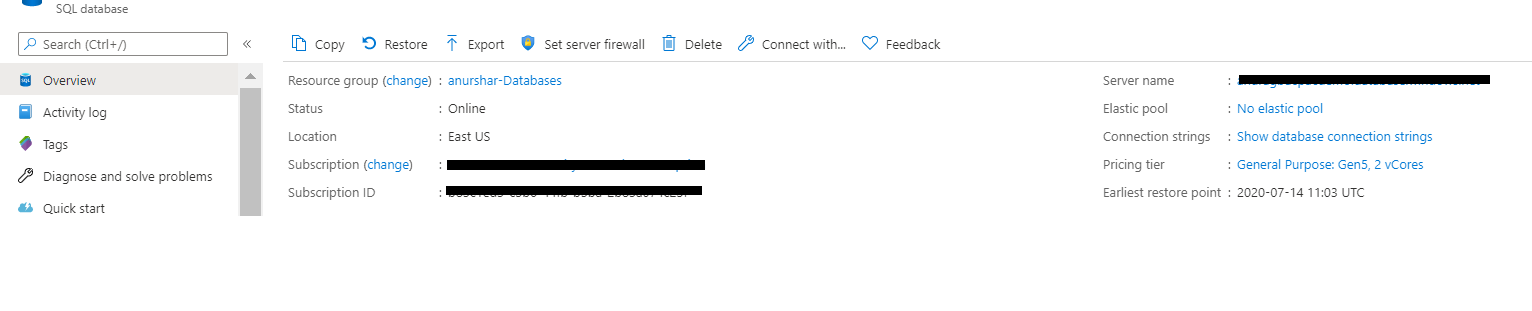
Please refer to similar issues if more details needed:
https://stackoverflow.com/questions/57986477/the-resource-sql-server-under-resource-group-was-not-found
https://learn.microsoft.com/en-us/answers/questions/47129/index.html
If an Answer is helpful, please “Accept Answer” or Up-Vote for the same which might be beneficial to other community members reading this thread.
I used the server name as 'xxxxx' and removed complete address after it and I am able to export. Thank you

Microsoft.Sql/servers/xxxxx.database.windows.net/databases/teststorageacc
Is the DB name given is correct? Is it teststorageacc? Looks like this is the name of storage account.
If the response helped, do "Accept Answer" and upvote it -- Vaibhav
Yes database name is right, I have checked it. Thank you