Microsoft 365 and Office | Access | For home | Windows
A family of Microsoft relational database management systems designed for ease of use.

This browser is no longer supported.
Upgrade to Microsoft Edge to take advantage of the latest features, security updates, and technical support.
' cx='32' cy='32' r='32' /%3E%3Ctext x='50%25' y='55%25' dominant-baseline='middle' text-anchor='middle' fill='%23FFF' %3EA%3C/text%3E%3C/svg%3E)
I have started using MS Projects 2010 and am encountering a problem:
When summarizing groups of tasks the summeries also become part of one another. This is visible in the printscreen that I uploaded, summary 'Prelim' shows 23% completion while the single task that it is made up of 'analyze' is 0% completed, logically the summary 'Prelim' should also show 0% completion.
This shows the summaries are linked but I don't want them to be. 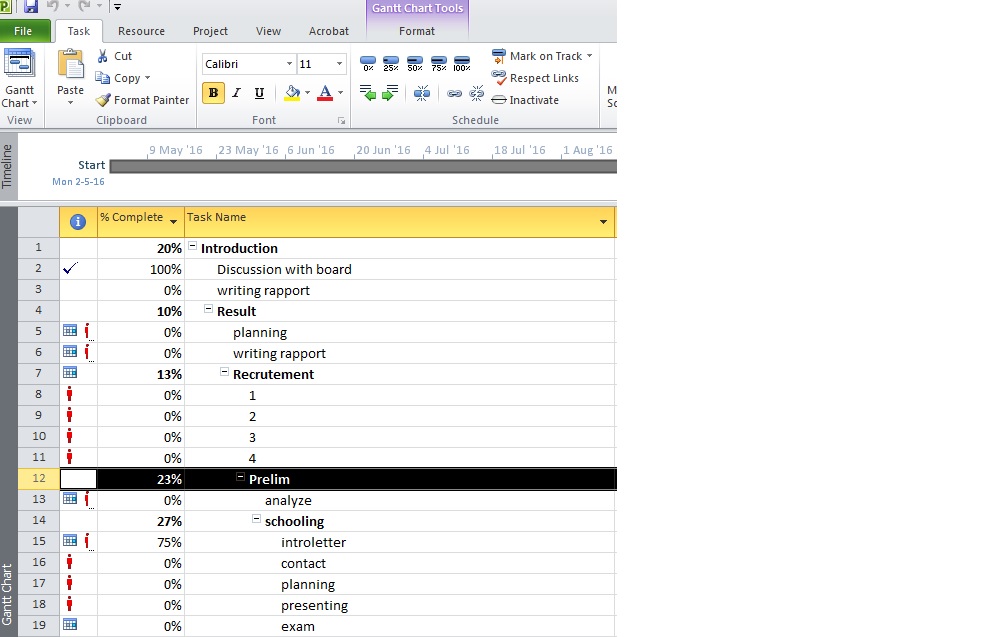
Advice on how to solve this would be greatly appreciated!
Thanks!
A family of Microsoft relational database management systems designed for ease of use.
Locked Question. This question was migrated from the Microsoft Support Community. You can vote on whether it's helpful, but you can't add comments or replies or follow the question.
Answer accepted by question author
Your line 12 is a summary and is supposed to have just one task indented under it, but you have allowed the summary at line 14 and its tasks to be indented one click too far to the right.
Also, line 12 is indented one click too far to the right as well, so that it is at the same level as lines 8 - 11.
Two steps are needed to fix it. Select line 12, click once on the left green arrow. Select line 14, click once on the left green arrow.
Please note that this is in no way any sort of "bug". This is how MSP works and how it has always worked. You just need more practice to get the hang of it. Keep practicing.
Any help?
Answer accepted by question author
' cx='32' cy='32' r='32' /%3E%3Ctext x='50%25' y='55%25' dominant-baseline='middle' text-anchor='middle' fill='%23FFF' %3EJP%3C/text%3E%3C/svg%3E)
corindade jong,
Welcome to the Project forum.
I think it is a simple matter of outdenting your summary lines as appropriate. If you add a series of tasks under an exiting summary line and then create a new summary line of one of those tasks, Project will assume you mean to have that new summary group indented under the original summary.
Hope this helps.
John
Hi John,
I am struggling with the same situation that you have described.
After that i created my 1st summary task, I opened new summary task (tried to open it 2-3 lines under the last sub-task so it would not be linked with the first one..) but it "jumped" up / right under the last sub-task, and liked it.
Now i have 5 summary tasks linked in by top-down order..
How can i separate between them ?
I noticed that if I right the sub-tasks first, and then summary's them together it will not connect to the previews summary task.
Still, I would like to know how to link and unlink between existing summary tasks in case it is possible.
Thanks in advance
Nezar
corinade jong,
You're welcome and thanks for the feedback.
John
Thanks John and Trevor!
Your answers were very helpful and my project planning is turning out exactly the way I wanted!