Microsoft 365 and Office | Subscription, account, billing | For home | Windows
Microsoft 365 features that help users manage their subscriptions, account settings, and billing information.

This browser is no longer supported.
Upgrade to Microsoft Edge to take advantage of the latest features, security updates, and technical support.
' cx='32' cy='32' r='32' /%3E%3Ctext x='50%25' y='55%25' dominant-baseline='middle' text-anchor='middle' fill='%23FFF' %3EA%3C/text%3E%3C/svg%3E)
I'm finding that when you specify a version to download, a v32.cab/v64.cab file is missing. When you perform the installation using the content you just download, the click-to-run client does not use this content but pulls from CDN instead.
VS
why are there missing files when downloading content with a specified version???? It doesn't matter which version you specify, as long as you specify a version, it's missing this one file.
<Configuration>
<Add SourcePath="C:\TEMP\O365 TEST" Version="16.0.6868.2062" OfficeClientEdition="32" Branch="Current" OfficeMgmtCOM="True" >
<Product ID="O365ProPlusRetail">
<Language ID="en-us" />
<ExcludeApp ID="OneDrive" />
<ExcludeApp ID="Groove" />
</Product>
</Add>
</Configuration>
Microsoft 365 features that help users manage their subscriptions, account settings, and billing information.
Locked Question. This question was migrated from the Microsoft Support Community. You can vote on whether it's helpful, but you can't add comments or replies or follow the question.
Hello Eric,
Confirmed that with the new Office Deployment Tool that the said files (**v32.cab/v64.cab)**are missing whether or not a version is specified.
We have an issue here. Without this file the click-to-run client pulls latest content from CDN.... I just tried install 16.0.6868.2062. See screenshot below.
i know of the workaround of copying and renaming "v32_16.0.6868.2060.cab" to v32.cab. Please try the installing this on your end and confirm.
Hi Ramesh,
I tried with version 16.0.7118.5775 and 32-bit installation and I can successfully install using the local resource. Could you confirm if you are using the latest version of Office Deployment Tool? You can check the version by right-clicking on the setup.exe file > Properties > Details.
Thanks,
Eric Yang
Hi Siopow,
I have installed on my end, the outcome is that the v32.cab is created. Here is the screenshot:
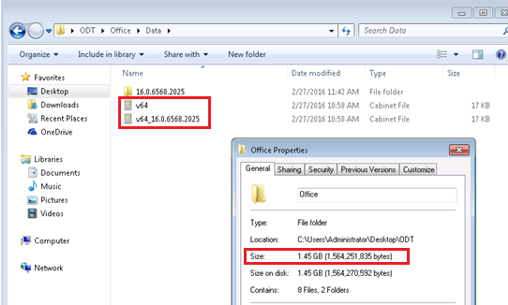
Referring the missing files, please check if the size of the folder is 1.45GB. A related screenshot will be appreciated.
Meanwhile, could you please try installing in another network environment or another computer to see the outcome?
Thanks,
Jason
Hello Jason,
Please confirm what version of the Office Deployment Tool you are using. You also downloaded the 64b it and not the 32bit.
Hi Siopow,
I have installed on my end, the outcome is that the v32.cab is created. Here is the screenshot:
Referring the missing files, please check if the size of the folder is 1.45GB. A related screenshot will be appreciated.
Meanwhile, could you please try installing in another network environment or another computer to see the outcome?
Thanks,
Jason
Hi Siopow,
Could you confirm which version of Office Deployment Tool you used? Based on my test, with the latest version of Office Deployment Tool, a v32.cab/v64.cab will be created with the version number suffixed in the file name, no matter whether I define a version number in the configuration.xml file or not.
Could you download the latest version from the following link and then try again?
https://www.microsoft.com/en-us/download/details.aspx?id=49117
Thanks,
Eric Yang