Developer technologies | C#
An object-oriented and type-safe programming language that has its roots in the C family of languages and includes support for component-oriented programming.
This browser is no longer supported.
Upgrade to Microsoft Edge to take advantage of the latest features, security updates, and technical support.
' cx='32' cy='32' r='32' /%3E%3Ctext x='50%25' y='55%25' dominant-baseline='middle' text-anchor='middle' fill='%23FFF' %3EKS%3C/text%3E%3C/svg%3E)
I want to create dual context menu in c# , And Click the item I want to add Cut, Copy, Paste
  private void listView1_MouseDown(object sender, MouseEventArgs e)
 {
 bool match = false;

if (e.Button == System.Windows.Forms.MouseButtons.Right)
{
    foreach (ListViewItem item in listView1.Items)
    {
        if (item.Bounds.Contains(new Point(e.X, e.Y)))
        {
            MenuItem[] mi = new MenuItem[] { new MenuItem("Hello"), new MenuItem("World"), new MenuItem(item.Name) };
            listView1.ContextMenu = new ContextMenu(mi);
            match = true;
            break;
        }
    }
    if (match)
    {
        listView1.ContextMenu.Show(listView1, new Point(e.X, e.Y));
    }
    else
    {
        //Show listViews context menu
    }

}
}
' cx='32' cy='32' r='32' /%3E%3Ctext x='50%25' y='55%25' dominant-baseline='middle' text-anchor='middle' fill='%23FFF' %3ETY%3C/text%3E%3C/svg%3E)
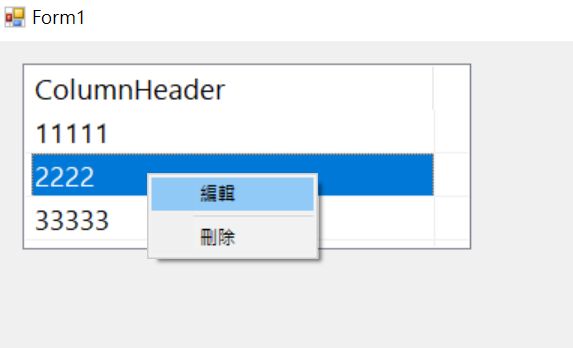
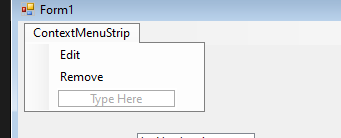
You can first create a contextMenuStrip, add the operations you need, and then use ListView.GetItemAt(Int32, Int32) Method to get the ListViewItem that needs to be operated.
        private ListViewItem listViewItem;
        private void listView1_MouseDown(object sender, MouseEventArgs e)
        {
            if (e.Button == MouseButtons.Right)
            {
                if (listView1.GetItemAt(e.X, e.Y) is ListViewItem)
                {
                    contextMenuStrip1.Show(Cursor.Position);
                    listViewItem = listView1.GetItemAt(e.X, e.Y);
                }
            }
        }
        private void removeToolStripMenuItem_Click(object sender, EventArgs e)
        {
            listView1.Items.Remove(listViewItem);
        }
If the response is helpful, please click "Accept Answer" and upvote it.
Note: Please follow the steps in our documentation to enable e-mail notifications if you want to receive the related email notification for this thread.
Thanku so much very well