Microsoft 365 and Office | Excel | For home | Windows
A family of Microsoft spreadsheet software with tools for analyzing, charting, and communicating data.

This browser is no longer supported.
Upgrade to Microsoft Edge to take advantage of the latest features, security updates, and technical support.
' cx='32' cy='32' r='32' /%3E%3Ctext x='50%25' y='55%25' dominant-baseline='middle' text-anchor='middle' fill='%23FFF' %3EA%3C/text%3E%3C/svg%3E)
Hello,
I am fairly new to Excel, I know how to enter a few formulas, but not a whole lot.
I would like to count numbers in cells (B10:CJ34) by color. I need to count all the red, purple and green colored font separately.
I know I am supposed to enter a code of some sort, but I have no idea what I am looking at once I get to inset module after pressing Alt + F11.
Any guidance is much appreciated.
Thank you.
***Post moved by the moderator to the appropriate forum category.***
Locked Question. This question was migrated from the Microsoft Support Community. You can vote on whether it's helpful, but you can't add comments or replies or follow the question.

Alt and F11 to open the VBA editor
Select menu item Insert -> Module
Copy the code below and paste into the VBA editor.
Then you can insert the following formula in a cell on the worksheet
=CountColors(B10:C34,B10)
where B10:C34 is the range in which you want to count the colors and B10 is a cell containing a color to be counted.
You can repeat the formula as above for the other colors but change B10 to another cell containing a different color.
Added later with Edit: Note that it does not count colors that are part of Conditional Format. If you want to do that then please get back to me.
Copy all of the code below and paste into the VBA editor. For interest it is called a UDF (User Defined Function)
Function CountColors(rngToSearch, rngToMatch) As Long
Dim rngCel As Range
Dim lngCount As Long
For Each rngCel In rngToSearch
If rngCel.Interior.Color = rngToMatch.Interior.Color Then
CountColors = CountColors + 1
End If
Next rngCel
End Function
I have re-read the question and I see that it is Font colors that you want to count. The code I provided counts interior (background) colors. My apologies for that.
Here is a new reply that counts Font Colors
Alt and F11 to open the VBA editor
Select menu item Insert -> Module
Copy the code below and paste into the VBA editor.
Then you can insert the following formula in a cell on the worksheet
=CountFontColors(B10:C34,B10)
where B10:C34 is the range in which you want to count the colors and B10 is a cell containing a font color to be counted.
You can repeat the formula as above for the other colors but change B10 to another cell containing a different font color.
Note that it does not count font colors that are part of Conditional Format. If you want to do that then please get back to me.
Copy all of the code below and paste into the VBA editor. For interest it is called a UDF (User Defined Function)
Function CountFontColors(rngToSearch, rngToMatch) As Long
Dim rngCel As Range
For Each rngCel In rngToSearch
If rngCel.Font.Color = rngToMatch.Font.Color Then
CountFontColors = CountFontColors + 1
End If
Next rngCel
End Function
Hi,
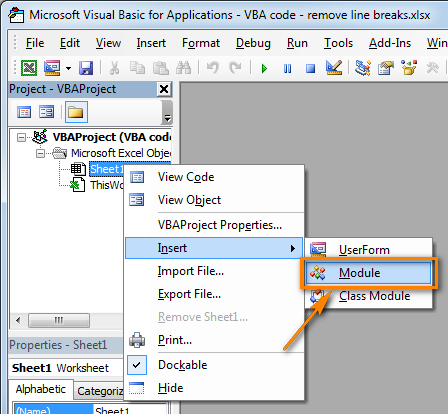
Now enter the following code:
Function GetCellColor(xlRange As Range)
Dim indRow, indColumn As Long
Dim arResults()
Application.Volatile
If xlRange Is Nothing Then
Set xlRange = Application.ThisCell
End If
If xlRange.Count > 1 Then
ReDim arResults(1 To xlRange.Rows.Count, 1 To xlRange.Columns.Count)
For indRow = 1 To xlRange.Rows.Count
For indColumn = 1 To xlRange.Columns.Count
arResults(indRow, indColumn) = xlRange(indRow, indColumn).Interior.Color
Next
Next
GetCellColor = arResults
Else
GetCellColor = xlRange.Interior.Color
End If
End Function
Function GetCellFontColor(xlRange As Range)
Dim indRow, indColumn As Long
Dim arResults()
Application.Volatile
If xlRange Is Nothing Then
Set xlRange = Application.ThisCell
End If
If xlRange.Count > 1 Then
ReDim arResults(1 To xlRange.Rows.Count, 1 To xlRange.Columns.Count)
For indRow = 1 To xlRange.Rows.Count
For indColumn = 1 To xlRange.Columns.Count
arResults(indRow, indColumn) = xlRange(indRow, indColumn).Font.Color
Next
Next
GetCellFontColor = arResults
Else
GetCellFontColor = xlRange.Font.Color
End If
End Function
Function CountCellsByColor(rData As Range, cellRefColor As Range) As Long
Dim indRefColor As Long
Dim cellCurrent As Range
Dim cntRes As Long
Application.Volatile
cntRes = 0
indRefColor = cellRefColor.Cells(1, 1).Interior.Color
For Each cellCurrent In rData
If indRefColor = cellCurrent.Interior.Color Then
cntRes = cntRes + 1
End If
Next cellCurrent
CountCellsByColor = cntRes
End Function
Function SumCellsByColor(rData As Range, cellRefColor As Range)
Dim indRefColor As Long
Dim cellCurrent As Range
Dim sumRes
Application.Volatile
sumRes = 0
indRefColor = cellRefColor.Cells(1, 1).Interior.Color
For Each cellCurrent In rData
If indRefColor = cellCurrent.Interior.Color Then
sumRes = WorksheetFunction.Sum(cellCurrent, sumRes)
End If
Next cellCurrent
SumCellsByColor = sumRes
End Function
Function CountCellsByFontColor(rData As Range, cellRefColor As Range) As Long
Dim indRefColor As Long
Dim cellCurrent As Range
Dim cntRes As Long
Application.Volatile
cntRes = 0
indRefColor = cellRefColor.Cells(1, 1).Font.Color
For Each cellCurrent In rData
If indRefColor = cellCurrent.Font.Color Then
cntRes = cntRes + 1
End If
Next cellCurrent
CountCellsByFontColor = cntRes
End Function
Function SumCellsByFontColor(rData As Range, cellRefColor As Range)
Dim indRefColor As Long
Dim cellCurrent As Range
Dim sumRes
Application.Volatile
sumRes = 0
indRefColor = cellRefColor.Cells(1, 1).Font.Color
For Each cellCurrent In rData
If indRefColor = cellCurrent.Font.Color Then
sumRes = WorksheetFunction.Sum(cellCurrent, sumRes)
End If
Next cellCurrent
SumCellsByFontColor = sumRes
End Function
Save the file in xlsm format.