Developer technologies | ASP.NET | ASP.NET Core
A set of technologies in the .NET Framework for building web applications and XML web services.
This browser is no longer supported.
Upgrade to Microsoft Edge to take advantage of the latest features, security updates, and technical support.
' cx='32' cy='32' r='32' /%3E%3Ctext x='50%25' y='55%25' dominant-baseline='middle' text-anchor='middle' fill='%23FFF' %3EBS%3C/text%3E%3C/svg%3E)
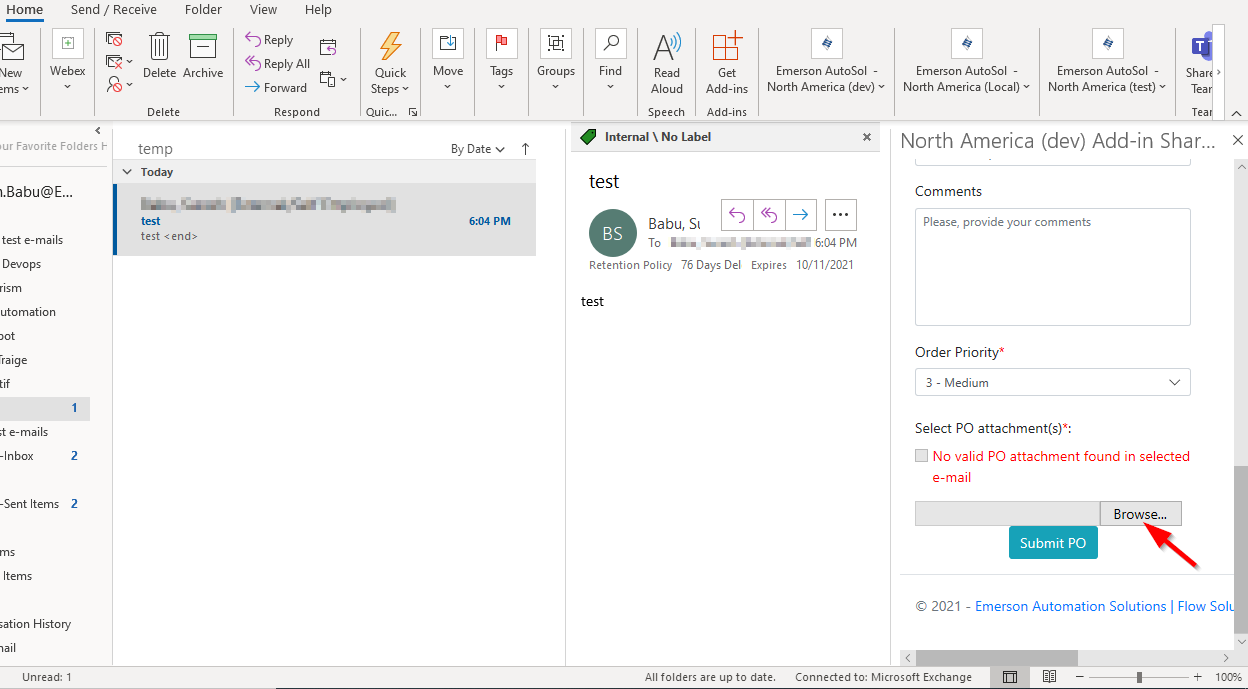
We have an outlook web add-in task pane page written as razor page in asp .net core 3.1, where in there's a file browser control as below:
<input type="file" />
clicking browse does not open any dialog from outlook desktop client nor from web client OWA.
however browse file dialog opens fine in IE 11 or MS edge directly.
we are in OS Windows 1909 version and Microsoft 365 Apps for enterprise version 2102 Build 13801.20294 click to Run.
please advise how to make the browse dialog to appear so that user can select a file.

' cx='32' cy='32' r='32' /%3E%3Ctext x='50%25' y='55%25' dominant-baseline='middle' text-anchor='middle' fill='%23FFF' %3ECM%3C/text%3E%3C/svg%3E)
Hi @Babu, Suresh [External/Self Employed] ,
Welcome to our forum!
Looks like your issue might be more related to add-in development and asp .net. Please kindly understand that the Outlook tag here we mainly focus on general issues about Outlook desktop client and know little about add-in development and asp .net. In order to better solve your problem, we will remove "office-outlook-itpro" tag and add "dotnet-aspnet-core-razor" tag.
Thanks for your understanding and hope your question will be resolved soon!