Microsoft 365 and Office | Excel | For home | Windows
A family of Microsoft spreadsheet software with tools for analyzing, charting, and communicating data.

This browser is no longer supported.
Upgrade to Microsoft Edge to take advantage of the latest features, security updates, and technical support.
' cx='32' cy='32' r='32' /%3E%3Ctext x='50%25' y='55%25' dominant-baseline='middle' text-anchor='middle' fill='%23FFF' %3EA%3C/text%3E%3C/svg%3E)
I have a problem with Excel's "Text to Columns" . This happens when use the "Text to Columns" button and macro(see below).
Last column does not separate and A value in the second column moves to the top. I don't know why.
Please, someone, kindly explain it.
Thank you.
Last columns does not change. A value in the second column moves to top.
Here is the test macro.
Columns("S:S").Select
Selection.TextToColumns Destination:=Range("S1"), DataType:=xlDelimited, _
TextQualifier:=xlDoubleQuote, ConsecutiveDelimiter:=False, Tab:=False, _
Semicolon:=False, Comma:=False, Space:=False, Other:=True, OtherChar _
:="[", FieldInfo:=Array(1, 1), TrailingMinusNumbers:=True
Locked Question. This question was migrated from the Microsoft Support Community. You can vote on whether it's helpful, but you can't add comments or replies or follow the question.
Hi インストーラー,
I have a problem with Excel's "Text to Columns" . This happens when use the "Text to Columns" button and macro(see below).
Last column does not separate and A value in the second column moves to the top. I don't know why.
Please, someone, kindly explain it.
Thank you.
Last columns does not change. A value in the second column moves to top.
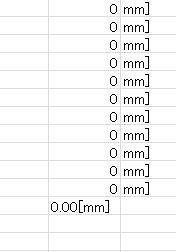
Here is the test macro.
Columns("S:S").Select
Selection.TextToColumns Destination:=Range("S1"), DataType:=xlDelimited, _
TextQualifier:=xlDoubleQuote, ConsecutiveDelimiter:=False, Tab:=False, _
Semicolon:=False, Comma:=False, Space:=False, Other:=True, OtherChar _
:="[", FieldInfo:=Array(1, 1), TrailingMinusNumbers:=True
Your code works for me. Perhaps your problem arises if you try to perform the Text to Columns operation manually. In this case, I could reproduce your experience by selecting the data in cells S2:S12 and specifying S1 as the destination cell. In this way you create a one row offset to the data and, as you have observed, the last data cell, S12, will not be overwitten. This problem may be avoided either by including the S1 cell in your manual selection or by specifying S2 as the destination cell, Your code implicitly adopts the first solution by selecting the entire column.
===
Regards,
Norman
Hi インストーラー,
Just to add, by default, the Text to Columns tool uses the initial data selection as the first output column and, therefore, the original data is overwritten. If an alternative destination is stipulated, the original data is left intact and all of the split data is copied to the the new range defined by the destination cell. In this way both the original data and the split data will be available on the worksheet. Your scenario represents the special case where the stipulated destination partially overlaps the existing data. In this instance the new data will be available together with that part of the original data which is not overwritten. More explicitly, you are not observing a failure of the Text to Columns tool to convert the last data cell but rather the impossibility of overwriting this cell with the offset destination selected.
===
Regards,
Norman
To summarize: Your purpose will be probably best fulfilled by following macro that
Sub Test()
Columns("S:S").TextToColumns Destination:=Columns("S:S"), DataType:=xlDelimited, _
TextQualifier:=xlDoubleQuote, ConsecutiveDelimiter:=False, Tab:=False, _
Semicolon:=False, Comma:=False, Space:=False, Other:=True, OtherChar _
:="[", FieldInfo:=Array(1, 1), TrailingMinusNumbers:=True
Columns("T:T").Replace What:="]", Replacement:="", LookAt:=xlPart, _
SearchOrder:=xlByRows, MatchCase:=False, SearchFormat:=False, _
ReplaceFormat:=False
End Sub
Regards
PB