Microsoft 365 and Office | Excel | For home | Windows
A family of Microsoft spreadsheet software with tools for analyzing, charting, and communicating data.

This browser is no longer supported.
Upgrade to Microsoft Edge to take advantage of the latest features, security updates, and technical support.
' cx='32' cy='32' r='32' /%3E%3Ctext x='50%25' y='55%25' dominant-baseline='middle' text-anchor='middle' fill='%23FFF' %3EA%3C/text%3E%3C/svg%3E)
When printing EXEL 2016 spreadsheets, the cell borders and shading do not print. I am using WIN 10 and an HP Office JET 8710 printer.
A family of Microsoft spreadsheet software with tools for analyzing, charting, and communicating data.
Locked Question. This question was migrated from the Microsoft Support Community. You can vote on whether it's helpful, but you can't add comments or replies or follow the question.
Answer accepted by question author
Hi David,
If print options are set to Black and white or Draft quality — either on purpose, or because the workbook contains large or complex worksheets and charts that caused draft mode to be turned on automatically — cell shading cannot print in color.
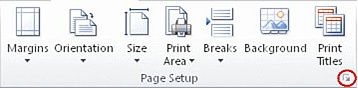
Note: If you do not see colors in the worksheet, it may be that you are working in high contrast mode. If you do not see colors when you preview before you print, it may be that you do not have a color printer selected.
Keep us updated if anything comes up so we can further assist you.