Microsoft 365 and Office | SharePoint | For business | Windows
A group of Microsoft Products and technologies used for sharing and managing content, knowledge, and applications.

This browser is no longer supported.
Upgrade to Microsoft Edge to take advantage of the latest features, security updates, and technical support.
' cx='32' cy='32' r='32' /%3E%3Ctext x='50%25' y='55%25' dominant-baseline='middle' text-anchor='middle' fill='%23FFF' %3EA%3C/text%3E%3C/svg%3E)
I have a SharePoint Online library that contains Word and Excel master files that I want to allow users to open and fill out and save as a local copy. The users have read access to the library and I have enabled the library to "Open in client application" but when the user clicks on the document, it opens in either Word Online or Excel Online and does not give them the ability to save a local copy. There are hundreds of documents in this library, so do not want to set it up using document templates or content types. All of the users have full desktop versions of Word and Excel so that is what I would like the documents to open with. Help please and thank-you.
A group of Microsoft Products and technologies used for sharing and managing content, knowledge, and applications.
Locked Question. This question was migrated from the Microsoft Support Community. You can vote on whether it's helpful, but you can't add comments or replies or follow the question.
Answer accepted by question author
Hi Scott,
We have received the requested information via the PM. The behavior you reported is not what we commonly encounter. We have engaged the relevant team to continue to assist you with this. You will be contacted via email for further troubleshooting. We will share the solution to the community once you confirm that this is resolved. Community members will benefit from your sharing.
Thanks,
Jim
William,
I am not getting any options when I click on "More" and also right clicking on the Word or Excel document in classic experience only displays the IE settings and not the SharePoint options as you can see from the last screenshot in my previous reply. This is where the issue is as I cannot find a way for the users to download a copy of the file from the library while still restricting them to read-only on the library.
I understand the Syncing option, but do not want to do this as there would be many documents that they do not use or care about. The view of the library creates a simplified page that allows them to easily find what they are looking for and ideally they would just click on the document and be able to edit and print a local copy and not be able to modify any of the master forms that are in that library.
Thanks,
Scott
Hi Scott,
Thanks taking time for this clarification.
Regarding directly “Edit Properties”, you can also do that in the information panel in new experience. Besides, right click on the Word/Excel documents should be work in classic experience.
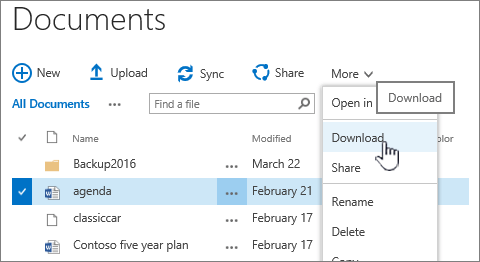
In your scenario with add-on applied to this library(classic experience), please using Open with Explorer in IE browser, see Open with Explorer and Explorer view for more information.
Meanwhile, if this is a frequent scenario in your company, I would suggest you let your users consider syncing document library with computer to work with documents. Syncing creates a local folder on your desktop machine where you can open and edit files easily. When you save a documents, it's automatically uploaded to the SharePoint or OneDrive for Business. For more info, see Sync SharePoint files with the new OneDrive sync client.
Regards,
William
William,
I am running in Classic Experience as I am using an add-on called “O365 Ultimate Forms” from InfoWise Solutions as it gives us some additional form control, business logic and workflows for the application that we are using the site for. Changing to “New Experience” takes away some of the features that the users need such as ability to click directly on the “Edit Properties” icon and to see “Review Progress” bar and expand and collapse the associated tasks with the item (as seen in the screenshot below)
As you can see from this screenshot (end user view), we are only displaying the “Name (linked to document)” field and want the user (who has read-only access) to click on the document, have it open in either Word or Excel and be able to print or update the document and “Save As” to a new file location (either file share or different SharePoint site or library).
The “More” option does not show anything and displaying the ribbon has “Download a Copy” greyed
out
If I switch it to “New Experience” then it opens in Word or Excel desktop rather than the Online
versions, but as I mentioned this is not what is required as it would mess up the end user experience.
This is one library, Forms, of several in this site (SOP – standard operating procedures, Policies, Forms,
Quality Manual) and the other libraries are working as intended.
If I am in “Classic Experience” and right mouse click on the document name, this is what I get
Thanks,
Scott
Hi SG_306,
Based on your description, I understand there are many documents in the library and you want to users are able to click on the documents to open them in Office desktop.
If yes, please click gear in this library and select **Library settings > Advanced settings,**and then scroll down to the page to choose New experience in the List experience section to check the outcome.
If this doesn't help, please try it in private browser and check it again and share the following information with us if this issue persists.
Regards,
William