Microsoft 365 and Office | Access | For home | Windows
A family of Microsoft relational database management systems designed for ease of use.

This browser is no longer supported.
Upgrade to Microsoft Edge to take advantage of the latest features, security updates, and technical support.
' cx='32' cy='32' r='32' /%3E%3Ctext x='50%25' y='55%25' dominant-baseline='middle' text-anchor='middle' fill='%23FFF' %3EA%3C/text%3E%3C/svg%3E)
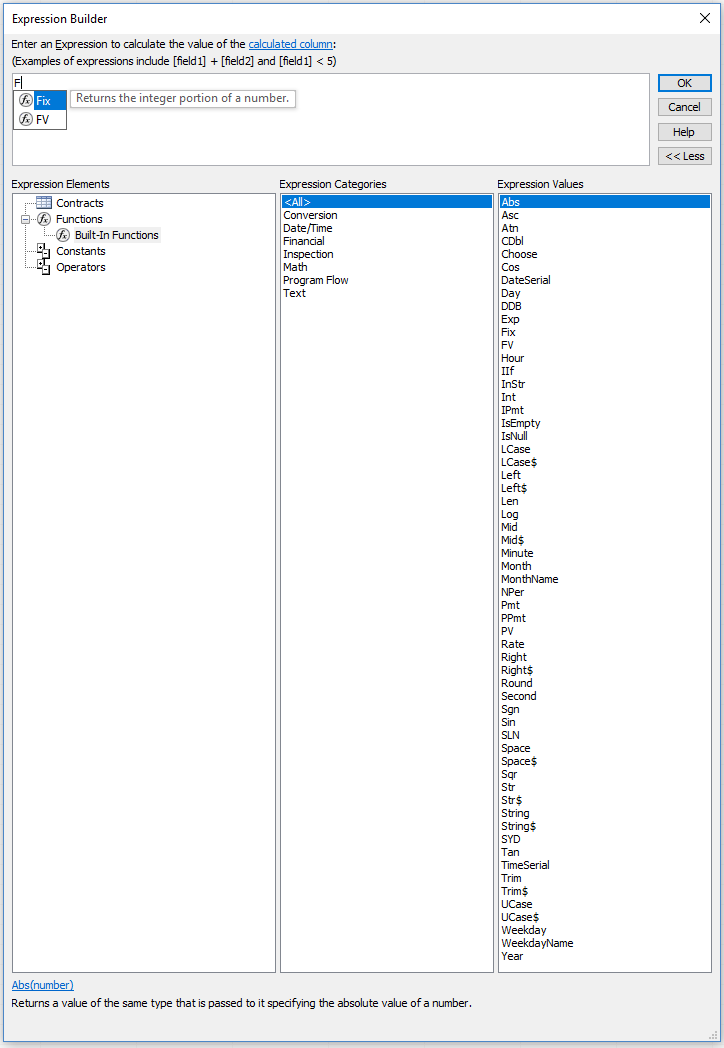
Hi, newbie Access user here. I'm trying to use the Expression Builder, and I see many tutorials referencing built-in functions that don't exist in my installation. The only possible solutions I've seen are to reinstall Office, and to check VBA references for any "missing" entries. I haven't reinstalled Office yet but I don't use it much so it's a fairly fresh install anyway, and I've checked my VBA references for any missing entries without luck. Can anyone give me some suggestions (if not, I will first try reinstalling)?
These are my VBA enabled references:
Visual Basic for Applications
Microsoft Access 16.0 Object Library
OLE Automation
Microsoft Office 16.0 Access database engine Object
Here are my available expressions (yes, this is *all* that I have)
https://i.gyazo.com/5fa0d0fc5ce9515680e0901bdbababaa.png
Compared to the official list, I'm missing several:
Thanks!
A family of Microsoft relational database management systems designed for ease of use.
Locked Question. This question was migrated from the Microsoft Support Community. You can vote on whether it's helpful, but you can't add comments or replies or follow the question.
Answer accepted by question author
"Calculated Fields" in Tables are not (by any means!) the only calculations you can do in Access; they were introduced just a couple of versions ago to accommodate Sharepoint, which has now pretty much been abandoned. I would not recommend using them unless you have a very specific need to do so.
Instead, base Queries on your tables, and use expressions in those Tables.Queries.
That said, the Format() function can be useful, but maybe less than you think; it converts a Number or Date value to a Text string. If you just want to format a value for display, base a Form or Report on your table (or more likely on a selective Query of your table), and set the Format property of a textbox on that object.
Edited 9:51pm 2/3 to correct Tables to Queries
This answer has been deleted due to a violation of our Code of Conduct. The answer was manually reported or identified through automated detection before action was taken. Please refer to our Code of Conduct for more information.
Comments have been turned off. Learn more