Microsoft 365 and Office | Install, redeem, activate | For home | Other
Processes in Microsoft 365 for setting up Office apps, redeeming product keys, and activating licenses.

This browser is no longer supported.
Upgrade to Microsoft Edge to take advantage of the latest features, security updates, and technical support.
' cx='32' cy='32' r='32' /%3E%3Ctext x='50%25' y='55%25' dominant-baseline='middle' text-anchor='middle' fill='%23FFF' %3EA%3C/text%3E%3C/svg%3E)
When I use Insert Hyperlinkit freezes and then excel and word stop working and restart.
Using:
Office 365 - Version 1704 - Build 8067.2102
Windows 10 Home version 1703 OS Build 15063.296
Lenovo Flex 2-15 Laptop (Lenovo) 80FK(WB14889489)
How do I fix this?
Processes in Microsoft 365 for setting up Office apps, redeeming product keys, and activating licenses.
Locked Question. This question was migrated from the Microsoft Support Community. You can vote on whether it's helpful, but you can't add comments or replies or follow the question.
If anyone is still experiencing this issue, or somebody stumbles upon this thread, somebody in another thread figured out the problem for a lot of us. Check out this thread (page 4, from Zardoc) for more details.
TL;DR - delete the "God Mode" folder in your "My Documents" folder.
FYI, this issue is directly related to Creators Update (1703); a number of us are seeing is on both Office 2016 as well as O365. Here are two other threads about the issue:
I am also having this issue.
I am running
Microsoft Home and Business 2016 version 1703 (Build 7967.2161 Click-to-Run)
Windows 10 Pro version 1703 (OS Build 15063.296)
Running on an Intel i5-6600.
When I try to insert a hyperlink, the window pops up and as soon as I click on a folder, it crashes (stops responding) and either restarts or exits. This worked just fine before I let the last windows update install. I have already did the quick repair and online repair to no avail. This problem happens on any excel spreadsheet that i try it on. It also crashes in safe mode when trying to insert hyperlinks.
Please Help.
Hi,
Regarding your concern, there are several factors why it freezes whenever you insert a hyperlink. Usually some are caused by plug-ins installed in your Office programs. For us to have this corrected, kindly follow the steps below:
Method 1 - Repair Office application:
 (lower-left corner), and select
Programs and Features on the pop-up menu.
(lower-left corner), and select
Programs and Features on the pop-up menu.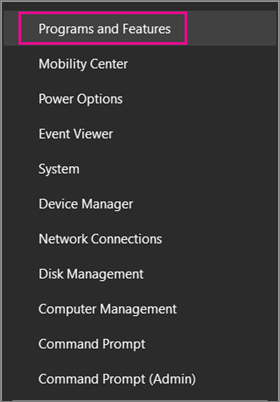 2. Right-click the Microsoft Office product you want to repair, and select Change***.******Note:***If you have a suite such as Office 365 Home or Office Home and Student 2013 or 2016, search for the suite name, even if it's just a particular application you want to repair such as Word or Excel. If you have a standalone application such as Word or Excel, search for the application name.
3. From the "How would you like to repair your Office Programs" screen, select Online Repair to make sure everything gets fixed, and then select Repair. The Quick Repair option is also available, which runs faster but only detects and then replaces corrupted files.
2. Right-click the Microsoft Office product you want to repair, and select Change***.******Note:***If you have a suite such as Office 365 Home or Office Home and Student 2013 or 2016, search for the suite name, even if it's just a particular application you want to repair such as Word or Excel. If you have a standalone application such as Word or Excel, search for the application name.
3. From the "How would you like to repair your Office Programs" screen, select Online Repair to make sure everything gets fixed, and then select Repair. The Quick Repair option is also available, which runs faster but only detects and then replaces corrupted files.
Note:****If your copy of Office is MSI-based, selectRepair* and then click Continue. If you need help figuring out if your Office is Click-to-Run or MSI-based, see below.* 4. Follow the instructions on the screen to complete.
Method 2 - Open Office app in safe mode:
Note: To stop Office Safe Mode, exit and restart your Office application. It will start in normal mode unless there's a problem opening the application.
Keep us updated if anything comes up so we can further assist you.
Thanks for that post NTP66. The links directed me to check on my updates and come to find out, Cumulative update kb4016871 apparently fixes the issue. Mine is adding hyperlinks with no issue now.