Azure Data Factory
An Azure service for ingesting, preparing, and transforming data at scale.
This browser is no longer supported.
Upgrade to Microsoft Edge to take advantage of the latest features, security updates, and technical support.
' cx='32' cy='32' r='32' /%3E%3Ctext x='50%25' y='55%25' dominant-baseline='middle' text-anchor='middle' fill='%23FFF' %3EAA%3C/text%3E%3C/svg%3E)
Data flow in azure data factory not getting saved. It disappears everytime I save it and close it and then open it again. I have GIT enabled.

Hi @Anonymous ,
Following up to check is below provided answer helps you? If yes, Please Accept Answer. Accepting answer helps community too. Please let us know if any further queries. Thank you.
Hi @Anonymous ,
Just checking is below provided answer helps you? If yes, Please Accept Answer. Accepting answer helps community too. Please let us know if any further queries. Thank you.
' cx='32' cy='32' r='32' /%3E%3Ctext x='50%25' y='55%25' dominant-baseline='middle' text-anchor='middle' fill='%23FFF' %3ERA%3C/text%3E%3C/svg%3E)
You have to make sure you click the "Commit" (single tab commit, so have to do for all tabs) or "Commit All" button
Hi @Anonymous ,
Welcome to Microsoft Q&A Platform. Thank you for posting your query here.
You need click on "Save" button inside your Dataflow tab to save your data flow changes OR click on "Save All" button to save all unsaved changes. Please check below screenshot for same.
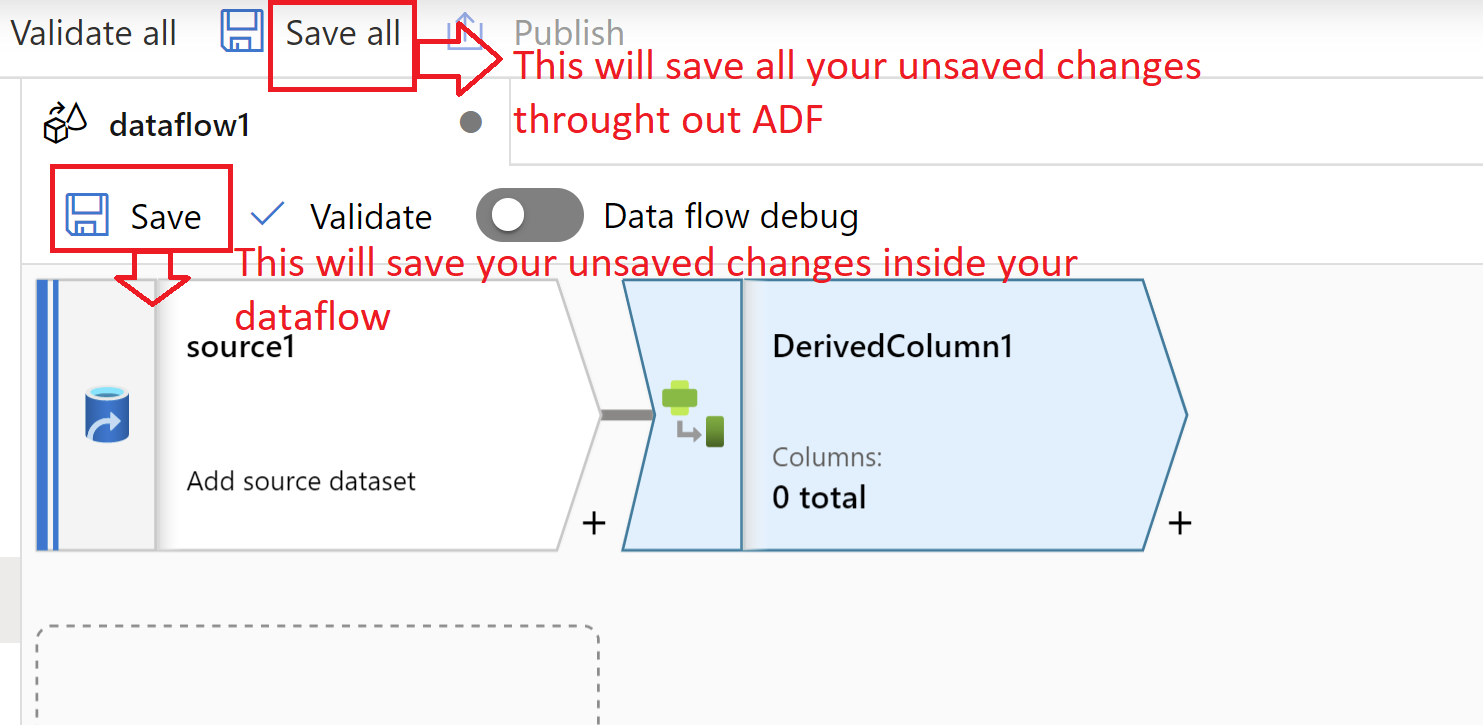
Hope this will help. Please let us know if any further queries.
-----------------------
accept an answer if correct. Original posters help the community find answers faster by identifying the correct answer. Here is how.