Developer technologies | .NET | Xamarin
A Microsoft framework for building cross-platform mobile apps using .NET and C# with native performance and user interfaces.
This browser is no longer supported.
Upgrade to Microsoft Edge to take advantage of the latest features, security updates, and technical support.
' cx='32' cy='32' r='32' /%3E%3Ctext x='50%25' y='55%25' dominant-baseline='middle' text-anchor='middle' fill='%23FFF' %3EEG%3C/text%3E%3C/svg%3E)
Hello
I am using firebase, to make a note-taking app.
I am using this documentation
https://firebase.google.com/docs/reference/rest/auth
and this is my auth
  using (HttpClient client = new HttpClient()) {
                var bodyJson = JsonConvert.SerializeObject(new {
                    email = user.Email,
                    password = user.Password,
                    returnSecureToken = true });

                var data = new StringContent(bodyJson, Encoding.UTF8, "application/json");

                var response = await client.PostAsync
                    ($"https://identitytoolkit.googleapis.com/v1/accounts:signUp?key={FirebaseKey}", data);
                if (response.IsSuccessStatusCode) {
                    string resutJson = await response.Content.ReadAsStringAsync();
                    var res = JsonConvert.DeserializeObject<AuthResult>(resutJson);
                    App.UserId = res.localId;
                    Console.WriteLine($"**************************Register : {res.email} with token {res.localId}");

                    return true;

                } else {
                    string errorJson = await response.Content.ReadAsStringAsync();
                    var res = JsonConvert.DeserializeObject<AuthError>(errorJson);
                    DispayError(res);

                    return false;
                }
            }
        }
        public static async Task<bool> LoginUser(User user) {

            using (HttpClient client = new HttpClient()) {
                var bodyJson = JsonConvert.SerializeObject(new {
                    email = user.Email,
                    password = user.Password,
                    returnSecureToken = true
                });

                var data = new StringContent(bodyJson, Encoding.UTF8, "application/json");

                var response = await client.PostAsync
                    ($"https://identitytoolkit.googleapis.com/v1/accounts:signInWithPassword?key={FirebaseKey}", data);
                if (response.IsSuccessStatusCode) {
                    string resutJson = await response.Content.ReadAsStringAsync();
                    var res = JsonConvert.DeserializeObject<AuthResult>(resutJson);
                    App.UserId = res.localId;
                    Console.WriteLine($"**************************Login : {res.email} with token {res.localId}");
                    return true;

                } else {
                    string errorJson = await response.Content.ReadAsStringAsync();
                    var res = JsonConvert.DeserializeObject<AuthError>(errorJson);
                    DispayError(res);

                    return false;
                }
            }
        }

        private static void DispayError(AuthError res) {
            Application.Current.MainPage.DisplayAlert("Error", res.error.message, "OK");
        }
When the user logs in, I grabbed the user UID of firebase, and get the notebooks, and the notes within that notebook
The brig problem is that for some reason, my notebook variable gets emptied
  private async void GetNotebooksAsync() {
            var notebooks = await Database.ReadAsync<Notebook>();
            if (notebooks != null) {
                notebooks = notebooks.Where(book => book.Id == App.UserId).ToList();
                NotebooksCollection.Clear();
                foreach (var item in notebooks)
                {
                    NotebooksCollection.Add(item);
                }

            }
        }
The strange part is that I am filtering by the UserId of the notebook, and as you can see
the user ******@a.com with the id of 8zOEcqbNxxxxxxxx4qVRSpWEv2 has one notebook
So I do not understand by the filter do not work
here is my project if you want to test it
https://github.com/eduardoagr/safe.Xamarin/tree/main/Safe
Furthermore, you can log in with ******@a.com/ // this user has one notebook assigned to it
user ******@b.com does not have a notebook
And if I do
   var notebooks = await Database.ReadAsync<Notebook>();
        if (notebooks != null) {
            notebooks.Where(book => book.Id == App.UserId).ToList();
            NotebooksCollection.Clear();
            foreach (var item in notebooks)
            {
                NotebooksCollection.Add(item);
            }
if I do that I can see the same notebook in user ******@a.com and ******@b.com
' cx='32' cy='32' r='32' /%3E%3Ctext x='50%25' y='55%25' dominant-baseline='middle' text-anchor='middle' fill='%23FFF' %3EA%3C/text%3E%3C/svg%3E)
Hello,
Welcome to our Microsoft Q&A platform!
Firstly, I add the breakpoint in the ReadAsync method of Database.cs, I find it always return null, So I change the code like following code snap. then I can get the correct result with ******@a.com account
   public static async Task<List<T>> ReadAsync<T>() where T : HasId {

               using (HttpClient client = new HttpClient ()) {
                   var res = await client.GetAsync($"{FirebadeDb}{typeof(T).Name.ToLower()}.json");
                   List<T> objts = new List<T>();
                   var JsonRes = await res.Content.ReadAsStringAsync();
                   if (res.IsSuccessStatusCode) {
                       var valuePairs = JsonConvert.DeserializeObject<Dictionary<string, T>>(JsonRes);
                       if (valuePairs != null) {

                           foreach (var item in valuePairs) {

                               item.Value.Id = item.Key;
                               objts.Add(item.Value);
                           }

                       }
                       return objts;

                   } else {
                       return null;
                   }

                   //return null;
               }
           }
Then, I find you compare book => book.Id == App.UserId in the GetNotebooksAsync method, it is different id. so you always get the null result. so I compare with book => book.UserId == App.UserId like following code snap.
   private async void GetNotebooksAsync() {
               var notebooks = await Database.ReadAsync<Notebook>();
               if (notebooks != null) {
                   //notebooks = notebooks.Where(book => book.Id == App.UserId).ToList();
                   notebooks = notebooks.Where(book => book.UserId == App.UserId).ToList();
                   NotebooksCollection.Clear();
                   foreach (var item in notebooks)
                   {
                       NotebooksCollection.Add(item);
                   }

               }
           }
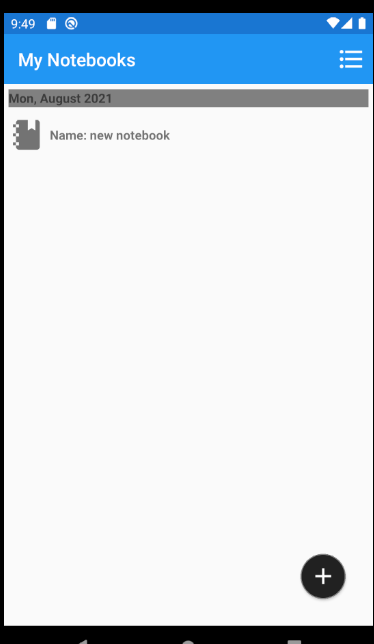
Then I can get the correct result.
Best Regards,
Leon Lu
If the response is helpful, please click "Accept Answer" and upvote it.
Note: Please follow the steps in our documentation to enable e-mail notifications if you want to receive the related email notification for this thread.
Since you always help me, do you have any future request?
Thanks, could you try to add view notebook content function?
Yes it work perfectly,
Thank you so much
What I am trying to do is to increase the performance during navigation, if you navigate to the Editor Page, by selecting a note, it takes quite some time to transition.
So I do not know if is the Messaging Center fault, or if I have to use an interface, or probably add a loading pop-up.
I am planning to add Azure speech recognition and OCR, what do you think, and sort by year.
what other features would you like to see?