Share via

Graphs in PDF display issues

Anonymous
2018-09-03T15:45:49+00:00

Hi, hoping someone can help. 

Whenever I export a presentation with a graph to a PDF, the font renders like the below. Yet looks perfect in PowerPoint. I have tried different fonts and different sizes and I get the same issue. Does anyone have any idea why this might be, or where I am going wrong? 

Thanks in advance! 

Microsoft 365 and Office | PowerPoint | For business | MacOS

Locked Question. This question was migrated from the Microsoft Support Community. You can vote on whether it's helpful, but you can't add comments or replies or follow the question.

0 comments No comments

Answer accepted by question author

Anonymous
2018-09-04T18:59:02+00:00

Hi Ben:

The example text came through rather low contrast so it was hard to tell. I see it now that you described the problem.

On the Windows side there is Font spacing.  Set it to Expanded and then play with the number of points you expand. 
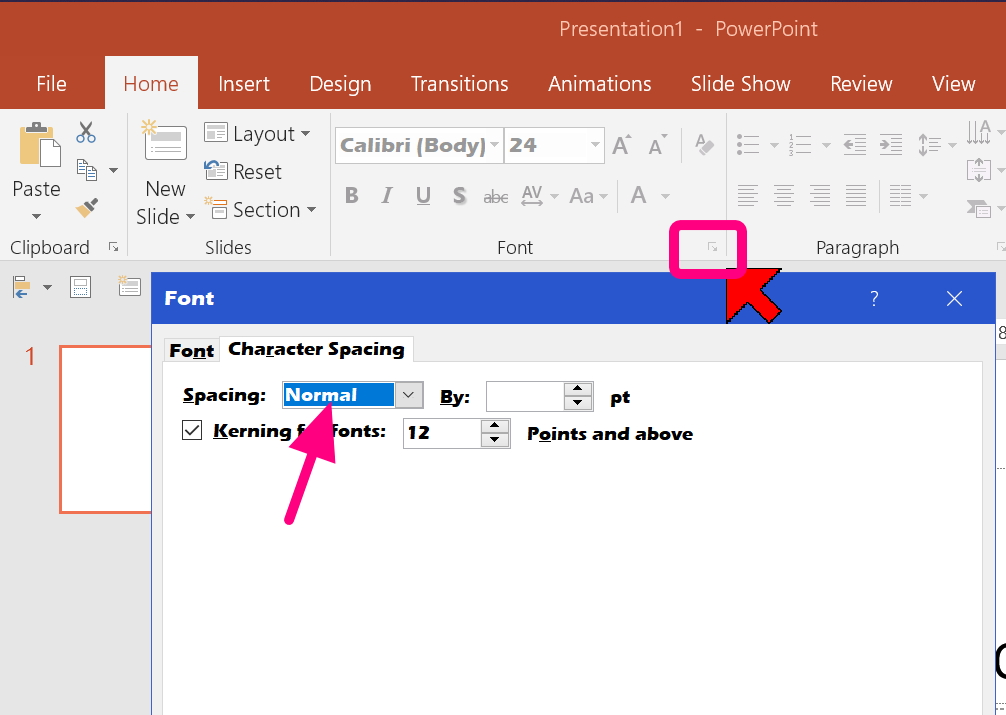
Have you tried looking at the problem files on other systems Mac and Windows?

If the problem persists on multiple systems you should report it to MS using the Feedback process:

**********************

Send Feedback to MS Developers:

“Official” MS does not pay much attention to this forum. However, you now can send your complaints and feature requests directly to MS developers and managers using the “Feedback” process described in this link:

https://answers.microsoft.com/en-us/windows/forum/windows_10-windows_install/send-feedback-to-ms-developers/506e7654-8ced-405b-911e-c58d8f253069

Please post a share link to your feedback, back here, so other people who find your question will be able to vote for it and add their comments to it.

If you could upload a simple example file, remove sensitive data.  Paste a screen cap of how the charts appear on your system so we can compare how they are formatted on our systems.

Upload Example - Trouble Shooting - Share OneDrive File

https://answers.microsoft.com/en-us/windows/forum/windows_other-winapps/trouble-shooting-share-onedrive-file/a231a097-bcbf-4e34-ad6c-a33118baf471?tm=1523189328156

Trouble shooting problems in files can be like a visit to the dentist, a long, slow painful process of us trying to “extract” the clues needed to recognize the problem in a back and forth flow of questions and answers so that we can come up with a / “the” solution.

Often it is faster and easier for everyone if we have a “sample file” to look at, and “play with”:

.  *  Make a copy of the file

.  *   Remove any sensitive corporate or personal data from the file. 

.  *  Delete most of the unneeded content before and after the problem (to make the file smaller).

.  *  Add highlights or other indicators to make it easier for us to clearly identify the problem

.  *  add descriptive text about the problem.

.     *  What you are seeing (the problem)

.     *  what you expected to see (desired result)

.     *  document the steps you used to create the problem (so we can try to recreate it on our machine)

.  *  save the sample file

.  *  upload it to OneDrive: https://support.office.com/en-us/article/Upload-photos-and-files-to-OneDrive-b00ad3fe-6643-4b16-9212-de00ef02b586

.  *  Get a Share link to the file: https://support.office.com/en-us/article/share-onedrive-files-and-folders-9fcc2f7d-de0c-4cec-93b0-a82024800c07

.  *  Paste the link in a reply to the question in the forum

Was this answer helpful?

1 person found this answer helpful.
0 comments No comments

5 additional answers

Sort by: Most helpful
  1. Anonymous
    2018-09-04T14:14:06+00:00

    Hi Rohn

    The issue is with the font spacing. You'll see the characters overlap and are not evenly spaced as they should be, despite looking accurate in PowerPoint. 

    I have tried using various fonts, similar and dissimilar, the issue persists. 

    As for the export, I have tried both methods you mention several times and the issue is there both ways. 

    Thanks, 

    Ben

    Was this answer helpful?

    0 comments No comments
  2. Anonymous
    2018-09-04T14:11:43+00:00

    Hi Qing

    Thanks for the response. I have tried to export the PDF several times, using different fonts, different font sizes and the same issue persists I'm afraid. 

    In answer to your questions:

    • I am running version 16.14.1
    • The issue occurs on all graphs.
    • I have tried exporting via "Print - Save to PDF" and via "Export"

    Thanks,

    Ben

    Was this answer helpful?

    0 comments No comments
  3. Anonymous
    2018-09-03T20:32:25+00:00

    Exactly what is the problem?

    What is wrong with the font?

    Have you tried using a different similar font?

    Exactly how are you doing this "export".  On the PC side we have 2 options: SAVE AS PDF and Print to PDF.  The the 'other one' to see if it works better.

    Was this answer helpful?

    0 comments No comments
  4. Anonymous
    2018-09-03T20:11:18+00:00

    Hi Ben,

    We could totally understand your frustration about encountering the situation and we are willing to help you try figuring it out.

    Based on my test, I didn’t meet the issue on our side.

    I suggest you create a new file to print as PDF to check the result.

    If the issue still exists, could you please provide the following information?

    1. The Office version. (Click PowerPoint>select About PowerPoint)
    2. Check if the issue occurs on other graphs.
    3. The detailed steps about how to export the file.

    Regards,

    Qing

    Was this answer helpful?

    0 comments No comments