Microsoft 365 and Office | Excel | For home | Windows
A family of Microsoft spreadsheet software with tools for analyzing, charting, and communicating data.

This browser is no longer supported.
Upgrade to Microsoft Edge to take advantage of the latest features, security updates, and technical support.
' cx='32' cy='32' r='32' /%3E%3Ctext x='50%25' y='55%25' dominant-baseline='middle' text-anchor='middle' fill='%23FFF' %3EA%3C/text%3E%3C/svg%3E)
Hi All,
How do I create an average the weekly basis (column C) within the pivot table so that it automatically refreshes when I add new data.
I have a pivot table
| Name | Week1 | Week2 | Week3 (and so on)... | Average |
|---|---|---|---|---|
| bob | 8.2 | 23.74 | ||
| joe | 16.61 | 23.23 | 7.98 |
GOAL for Column E within the pivot.
| Name | Week1 | Week2 | Week3 (and so on)... | Average |
|---|---|---|---|---|
| bob | 8.2 | 23.74 | 15.97 | |
| joe | 16.61 | 23.23 | 7.98 | 15.94 |
This will be a daily report so following week the pivot will include "Week4" therefore I would like it to refresh the avg on a weekly basis.
A family of Microsoft spreadsheet software with tools for analyzing, charting, and communicating data.
Locked Question. This question was migrated from the Microsoft Support Community. You can vote on whether it's helpful, but you can't add comments or replies or follow the question.
Answer accepted by question author
Answer accepted by question author
' cx='32' cy='32' r='32' /%3E%3Ctext x='50%25' y='55%25' dominant-baseline='middle' text-anchor='middle' fill='%23FFF' %3ET5%3C/text%3E%3C/svg%3E)
Dear Tokyo,
I understand on how to do it but my excel isn't calculating avg. It's giving me the average for all and not just in the grand total section. (the data i provided was already pivoted).
I would like to avg each name across each the weeks. (green)
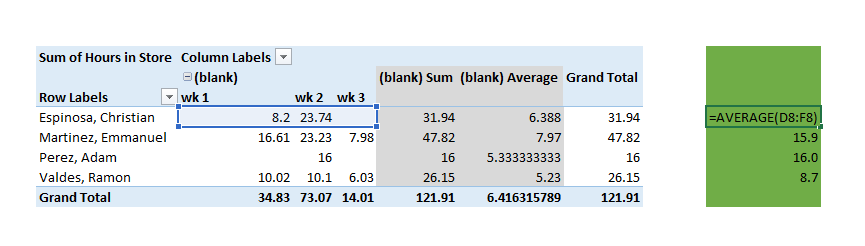
You need to take the following actions:-
SCREEN SHOT 4 - this is your starting point
PIVOTTABLETOOLS
PivotTable Fields
Get to:-
SCREEN SHOT 5
- then in the far lower right-hand corner click on (in the VALUES section):-
Sum of Numb . . .
- then click on:-
Value Field Settings . . .
Change the Value Field Settings to what you see in:-
SCREEN SHOT 6
Your Pivot Table should now appear as per:-
SCREEN SHOT 7
Screen Shot 7 agrees with your screen shot / numbers.
Just change the label called:-
Grand Total
- by clicking on that label and changing it to read:-
Average
Save the file at this point if you want.
That’s it!
Answer accepted by question author
Hi All,
How do I create an average the weekly basis (column C) within the pivot table so that it automatically refreshes when I add new data.
I have a pivot table
Name Week1 Week2 Week3 (and so on)... Average bob 8.2 23.74 joe 16.61 23.23 7.98 GOAL for Column E within the pivot.
Name Week1 Week2 Week3 (and so on)... Average bob 8.2 23.74 15.97 joe 16.61 23.23 7.98 15.94 This will be a daily report so following week the pivot will include "Week4" therefore I would like it to refresh the avg on a weekly basis.
1.
Set your data up like screen shot 1.
Create a table for this data.
If you don’t know how to do this see here:-
Create and format tables in EXCEL 2016
2.
See the Pivot Table in screen shot 2.
3.
See Pivot Table setting in screen shot 3.
4.
Note that the underlying data’s set up as follows:-
- the Name field is General
- the Week Number field is Text
- the Number field is Number (Decimal places: 2)
5.
In the Pivot Table if you want to change the far right hand column from:-
Grand Total
- to:-
Average
- just type in:-
Average
- to overwrite:-
Grand Total
- and save the file.
Thanks for your reply.
I have followed your steps but i'm not getting the end results of step#5
Below is my result when I avg. it
What am I missing? Much is appreciated.
Right Click any Value Cell with in Pivot Table and Click "Summarize Values By" then select Average.
Hope it helps.
