Power Point Notes Prints Blank Page

Anonymous
2019-05-08T12:29:06+00:00

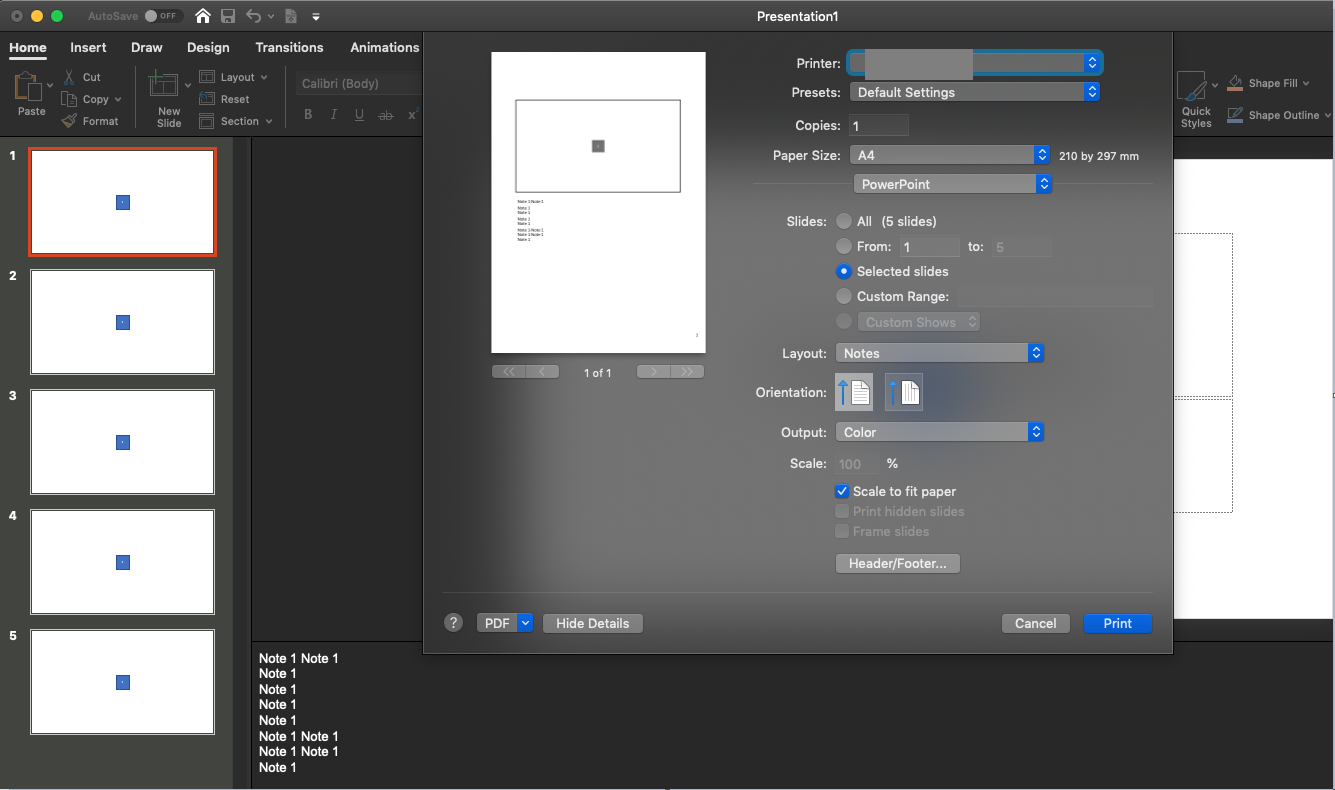
I'm having an issue with a power point slide deck. The deck contains 28 slides of which some contain notes. When I try to print the notes, the preview panel only shows a single blank page (instead of the usual notes pages). Printing then obviously results in the same. I've tried various things to fix, but to no avail. 

I'm attaching a screenshot of how this looks like. I've also redacted all the private information, though. I hope it's still visible what's the problem here for everyone. 

Help would be very much appreciated. 

Side notes: I'm on MacOs and all software is up to date. Power Point is version 16.24

Microsoft 365 and Office | PowerPoint | For home | Windows

Locked Question. This question was migrated from the Microsoft Support Community. You can vote on whether it's helpful, but you can't add comments or replies or follow the question.

0 comments No comments
{count} votes

8 answers

Sort by: Most helpful
  1. Anonymous
    2019-05-08T15:07:46+00:00

    Hi stf1,

    Thanks for your query in this community.

    I have performed the test on my side with MacOS Mojave 10.14.4 & PowerPoint 16.24 190414. Unfortunately, I could not reproduce this issue on my side. Please check my image below:
     

    I noticed that in your screenshot, you have 28 slides in this presentation, and you selected print All slides, but the under the preview panel, it's still 1 of 1.  In this kind of scenario, to help us narrow down the issue, please check my following suggestions:

    1.Click on the Print, will the Notes be exported to PDF  without issue?

    2.In the print Layout, could you switch to the other options, and will the preview appear?

    3.Create a new presentation, and check if the preview panel is still blank out.

    Regards,

    Alex Chen

    0 comments No comments
  2. John Korchok 224.3K Reputation points Volunteer Moderator
    2019-05-08T15:14:39+00:00

    On-screen, do the Notes Master (View>Notes Master) and Notes Pages for each slide (View>Notes Page) look normal? Do they display the notes?

    1 person found this answer helpful.
    0 comments No comments
  3. Anonymous
    2019-05-08T15:20:37+00:00

    Hi Alex,

    Thanks for the quick response. 

    This issue only happens on this very same slide deck. All other decks are fine and notes print as expected. 

    With regard to your notes: 

    1. The print and export to PDF results in the same empty page visible in the preview. 
    2. Other options work fine (I tested Handouts, Outline, and Slides)
    3. New presentations don't have this issue.
    1 person found this answer helpful.
    0 comments No comments
  4. Anonymous
    2019-05-08T15:22:16+00:00

    Hi John,

    Yes, both work and look normal. The notes are displayed the way you'd expect it.

    0 comments No comments
  5. Anonymous
    2019-05-09T15:28:10+00:00

    Hi stf1,

    Thanks for your updates.

    Per your description, issue is only occurring on this deck. Then could you send us a sample copy of that slide show? We will check if we could reproduce this issue on our side.

    Share OneDrive files and folders

    If your file contains any private information, you could send it to us via Private Message. In this way, your file won't be open to the public in this community.

    Regards,

    Alex Chen

    0 comments No comments
