How do I access the parameters in a C++ Event handler?

Dave Clark 1 Reputation point
2021-08-04T15:22:58.043+00:00

When I create an event in a C++ program, for example a radio button click event, the compiler generates an event handler like this:

private: System::Void EnableX_Click(System::Object^ sender, System::EventArgs^ e) {

     // I added this code to change the checked state of the button "Enable_1"   
if (this->Enable_1->Checked) this->Enable_1->Checked = false; else this->Enable_1->Checked = true;  

}

I have twenty buttons in my app, all doing pretty much the same thing. However, I would like to have one handler that handles all the buttons, using the button caption to identify which button is clicked.
I note that "sender" has the caption "01" in its parameters if I put a breakpoint on this line and inspect "sender". It appears under CreateParams
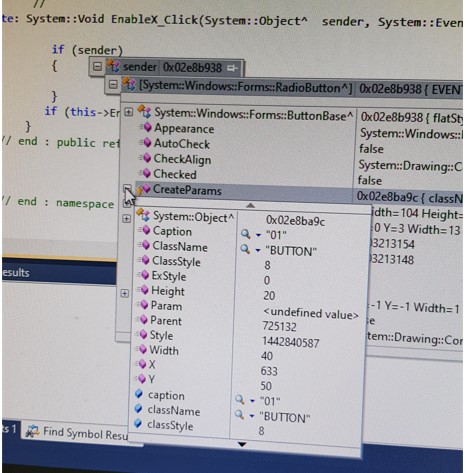
120503-sender-properties.jpg

How do I access these parameters of "sender" in my code?

Developer technologies | C++
A high-level, general-purpose programming language, created as an extension of the C programming language, that has object-oriented, generic, and functional features in addition to facilities for low-level memory manipulation.
0 comments No comments
{count} votes

2 answers

Sort by: Most helpful
  1. Castorix31 91,511 Reputation points
    2021-08-04T15:50:18.263+00:00

    The caption is the Text.
    So you can do for example, for a RadioButton :

    System::String^ sText = ((System::Windows::Forms::RadioButton^)sender)->Text;
    
    0 comments No comments

  2. Viorel 125.8K Reputation points
    2021-08-04T18:44:35.573+00:00

    To identify individual controls, you can also write something like this:

    if( sender == radioButton1 )
    {
       . . .
    }
    

    where radioButton1 is the name of control that was entered to (Name) field in Properties window. It is the variable that is associated with control.

    It is also possible to determine the type of current control.

    It depends on your needs.

    0 comments No comments

Your answer

Answers can be marked as 'Accepted' by the question author and 'Recommended' by moderators, which helps users know the answer solved the author's problem.

