Azure Blob Storage
An Azure service that stores unstructured data in the cloud as blobs.
This browser is no longer supported.
Upgrade to Microsoft Edge to take advantage of the latest features, security updates, and technical support.
' cx='32' cy='32' r='32' /%3E%3Ctext x='50%25' y='55%25' dominant-baseline='middle' text-anchor='middle' fill='%23FFF' %3EDN%3C/text%3E%3C/svg%3E)
Hi Guys,
We have Files on-premise which will be moved to cloud ADSL2; we are using azure data factory to load all the files from source to sink; But we were wondering whether we have any options in ADF, which automatically makes all the files loaded in an folder to cool tier by default?
Else we need to create an Data Management life cycle management rule to make the folder files as cool? As i see there is no option like auto in alerts, we need to mention 0 days for last modified or accessed.
Do we have any easy options, else we need to write powershell to do that for us after each ADF load to sink?
Regards,
Navin
An Azure service that stores unstructured data in the cloud as blobs.
An Azure service for ingesting, preparing, and transforming data at scale.
' cx='32' cy='32' r='32' /%3E%3Ctext x='50%25' y='55%25' dominant-baseline='middle' text-anchor='middle' fill='%23FFF' %3EMM%3C/text%3E%3C/svg%3E)
@Anonymous did my suggestion help? If is solved your issue, please mark as accepted answer. Otherwise let me know how I may better assist.
Hello @Anonymous and welcome back to Microsoft Q&A.
I haven't seen any options in Data Factory for specifying the storage tier during copy. I suspect it defaults to whatever the account storage tier is set to. I never looked closely at this before, so it is worth a test to see whether changing the inferred property affects blobs written by ADF. Actually, there is an easier way. I'll open up storage explorer and inspect the metadata of a few blobs....
.... Yes, looking at existing outputs, it says "Access tier: Hot (inferred)" . So changing the default should affect this.
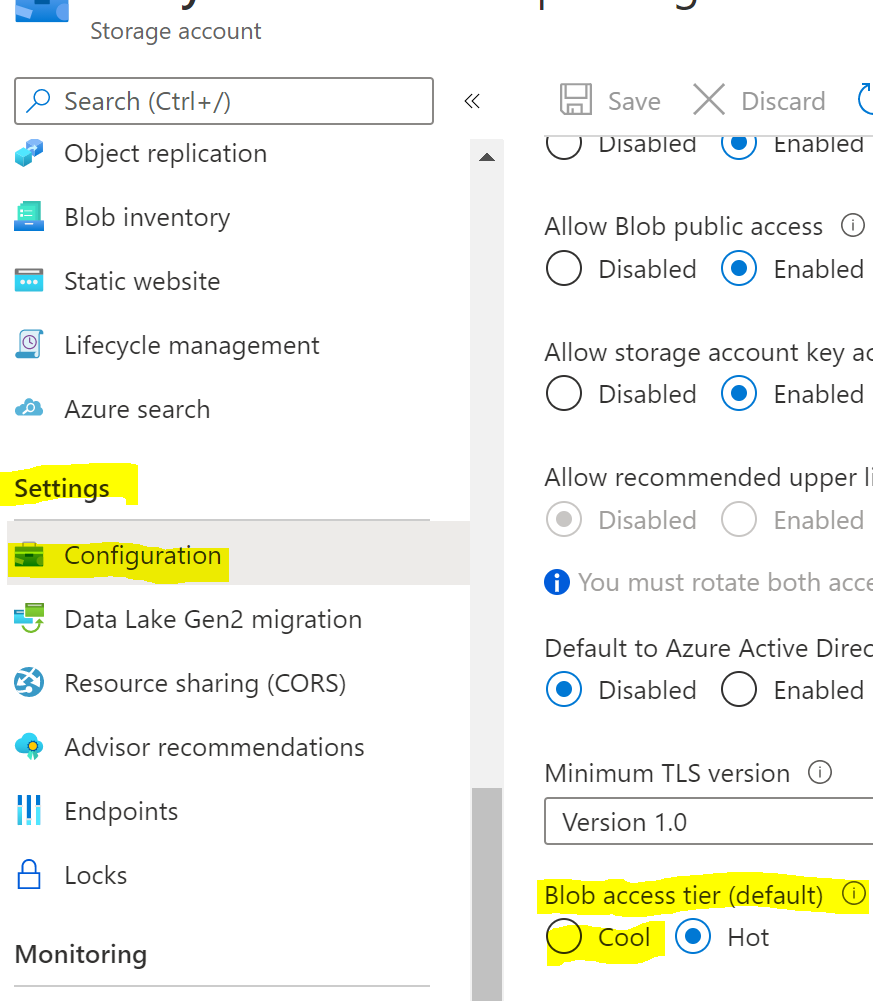
So while making this change should make all files loaded cool by default, it would not be limited to ADF. Other applications writing without specifying which tier, would also default to cool. This may be something you desire, or maybe not.
Nope, What are looking for is, each file not the entire storage account, we know we can do complete storage to Cool Tier, but we want for each file that upload to specific folder within Storage account.
You mean, you have like this @Navinder Kaur ?
MyContainer
MyContainer/ColdFolder
MyContainer/ColdFolder/ColdFile
MyContainer/HotFolder
MyContainer/HotFolder/HotFile
I'll let the product group know about your desire for hot/cold tier to be an option in copy activity.
I think for now you will have to make a lifecycle rule, and add filter to only apply to the ColdFolder.
Something like
{
	"enabled": true,
	"name": "MakeCool",
	"type": "Lifecycle",
	"definition": {
		"actions": {
			"baseBlob": {
				"tierToCool": {
					"daysAfterModificationGreaterThan": 1
				}
			}
		},
		"filters": {
			"prefixMatch": [
				"MyContainer/ColdFolder"
			]
		}
	}
}
' cx='32' cy='32' r='32' /%3E%3Ctext x='50%25' y='55%25' dominant-baseline='middle' text-anchor='middle' fill='%23FFF' %3EH%3C/text%3E%3C/svg%3E)
Hello @Navinder Kaur ,
We haven’t heard from you on the last response and was just checking back to see if you have a resolution yet .In case if you have any resolution please do share that same with the community as it can be helpful to others . Otherwise, will respond back with the more details and we will try to help .
Thanks
Himanshu