Developer technologies | .NET | Xamarin
A Microsoft framework for building cross-platform mobile apps using .NET and C# with native performance and user interfaces.
This browser is no longer supported.
Upgrade to Microsoft Edge to take advantage of the latest features, security updates, and technical support.
' cx='32' cy='32' r='32' /%3E%3Ctext x='50%25' y='55%25' dominant-baseline='middle' text-anchor='middle' fill='%23FFF' %3EAG%3C/text%3E%3C/svg%3E)
I have a multilanguage application (English, french, dutch) that works with the default system language.
How can i change the language of the application after selecting the language from a Combobox?
' cx='32' cy='32' r='32' /%3E%3Ctext x='50%25' y='55%25' dominant-baseline='middle' text-anchor='middle' fill='%23FFF' %3EKW%3C/text%3E%3C/svg%3E)
Hi AnasGuibene,
Welcome to our Microsoft Q&A platform!
To achieve multilanguage in Xamarin.Forms, you can use Xamarin Community Toolkit TranslateExtension.
Here are the steps you can refer to.
First, create the resource file for each language and add "Name-Value" pair to it.
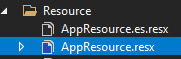
AppResource.es.resx

AppResource.es.resx
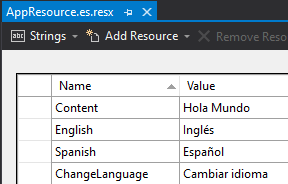
Second, modify the App.xaml.cs as follows.
public App()
{
    InitializeComponent();

    LocalizationResourceManager.Current.PropertyChanged += Current_PropertyChanged;
    LocalizationResourceManager.Current.Init(AppResource.ResourceManager);

    MainPage = new MainPage();
}

private void Current_PropertyChanged(object sender, System.ComponentModel.PropertyChangedEventArgs e)
{
    AppResource.Culture = LocalizationResourceManager.Current.CurrentCulture;
}
And here is the view "MainPage.xaml"
<ContentPage.BindingContext>
    <local:MainPageViewModel/>
</ContentPage.BindingContext>

<StackLayout>
    <Label Text="{xct:Translate Content}"/>
    <Button Text="{xct:Translate ChangeLanguage}" Command="{Binding ChangeLanguageCommand}" />
</StackLayout>
Last, create the viewmodel for MainPage.
class MainPageViewModel
{
    public class LanguagePair
    {
        public Func<string> name;
        public string value;
    }

    public MainPageViewModel()
    {
        CurrentLanguage = new LocalizedString(() => GetCurrentLanguageName());

        ChangeLanguageCommand = new AsyncCommand(ChangeLanguage);
        languageMapping = new List<LanguagePair>();
        languageMapping.Add(new LanguagePair { name = () => AppResource.English, value = "en" });
        languageMapping.Add(new LanguagePair { name = () => AppResource.Spanish, value = "es" });
    }

    List<LanguagePair> languageMapping { get; }
    public LocalizedString CurrentLanguage { get; }
    public ICommand ChangeLanguageCommand { get; }
    private string GetCurrentLanguageName()
    {
        string name = languageMapping.SingleOrDefault(m => m.value == LocalizationResourceManager.Current.CurrentCulture.TwoLetterISOLanguageName).name.ToString();

        return name != null ? name : LocalizationResourceManager.Current.CurrentCulture.DisplayName;
    }

    async Task ChangeLanguage()
    {
        string selectedName = await Application.Current.MainPage.DisplayActionSheet(
            AppResource.ChangeLanguage,
            null, null,
            languageMapping.Select(m => m.name()).ToArray());
        if (selectedName == null)
        {
            return;
        }

        string selectedValue = languageMapping.Single(m => m.name() == selectedName).value;
        LocalizationResourceManager.Current.CurrentCulture = selectedValue == null ? CultureInfo.CurrentCulture : new CultureInfo(selectedValue);
    }
}
Regards,
Kyle
If the response is helpful, please click "Accept Answer" and upvote it.
Note: Please follow the steps in our documentation to enable e-mail notifications if you want to receive the related email notification for this thread.
' cx='32' cy='32' r='32' /%3E%3Ctext x='50%25' y='55%25' dominant-baseline='middle' text-anchor='middle' fill='%23FFF' %3EA%3C/text%3E%3C/svg%3E)
@Anas Guibene May I know if you have got any chance to check Kyle's answer? I am glad to help if you have any other questions.

I think you can take a look to this video: watch