Exchange Online
A cloud-based service included in Microsoft 365, delivering scalable messaging and collaboration features with simplified management and automatic updates.
This browser is no longer supported.
Upgrade to Microsoft Edge to take advantage of the latest features, security updates, and technical support.
' cx='32' cy='32' r='32' /%3E%3Ctext x='50%25' y='55%25' dominant-baseline='middle' text-anchor='middle' fill='%23FFF' %3ER%3C/text%3E%3C/svg%3E)
Good afternoon all,
A small group of people are having an issue with documents being opened as read-only (after checking out) or unable to edit due to {insert user name here} having it opened/checked out.
We are using a Sharepoint 2007 website to check in and out documents and Excel documents seem to be the ones giving us the issues.
The users having the issue are all using the new Office 365 Excel, Word, etc suite and we open the documents we check out with the Excel program - not online.
All permission are set correctly, this issue only started to happen about two months ago.
Upload Center 2013 shows no pending uploads and we have tired clearing the upload center cache - but no luck.
An example:
Mia Gray needs to update her daily productivity on the portal.
Mia logs into the work computer using her account (graym) which is on the work domain.
She goes to www.ExampleWebsite.com/Manager on Internet Explorer and checks out her productivity.xlsx
A window pops up that prompts - Would you like to open as Read-Only or Check out and Edit. She selects check out-edit.
Excel launches and loads document.
Once the document loads, she finds out that on top there is a yellow strip that says 'read-only - to edit you'll need to check out.'
When clicking to edit, there is an error message stating that 'File is already checked out to user 'graym',' and that the document will remain as read only or she can save a local copy.
graym is Mia's log in, which she is currently logged in as. She has used Internet Explorer, Chrome, and Microsoft Edge and all are having the same issue.
The only workaround we are able to do is to download a copy, delete the original excel doc off the portal, rename file to something like productivity_2021.xlsx, and reupload. Then user 'graym' is able to check out, edit, then check back in. However, this only a temporary fix as the next day (or moments later) the document needs to be reuploaded with a different file name.
What can be causing this issue?


Hi @RichieeTorres , welcome to Q&A forum!
Are you using SharePoint 2007 or SharePoint Online? You could try to check in the file first and then edit the file to see if the issue persists.
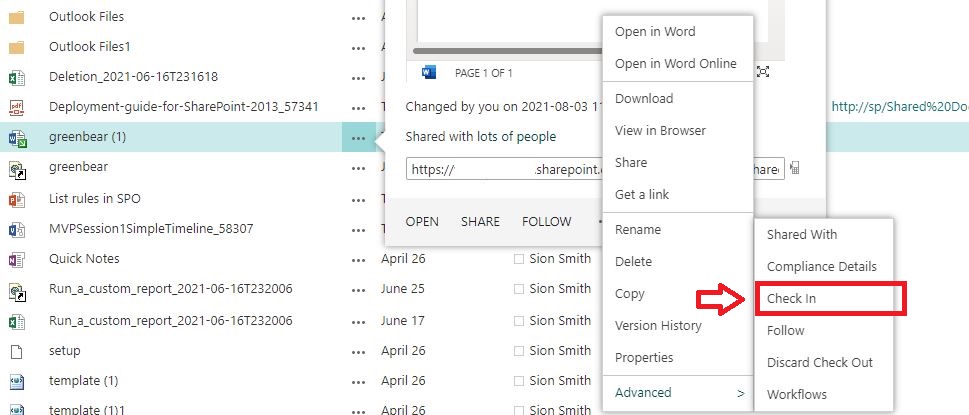
Reference:
Check out or check in files in a document library
If the answer is helpful, please click "Accept Answer" and upvote it.
Note: Please follow the steps in our documentation to enable e-mail notifications if you want to receive the related email notification for this thread.
Good morning,
Thank you for your speedy reply!
We are using Sharepoint 2007. The interesting thing is that out of the 1000 associate we have, only about 7 are having this issue - Read-only. When attempting to enable editing, a message would pop up indicating that the file is locked for editing with their log-in name.
Once we edit the file name and re-upload the document, it'll work for a day and then will go back to read-only with the same error message as above. One associate had the fix work for about 30 minutes before the file was checked back out it would say read-only.
Could this be an incompatibility with Office 365/Office 2016 and Sharepoint 2007? All permissions are the same, this issue only started happening about 3-4 months back.
Thank you!
Hi @RichieeTorres ,
Thanks for your reply. In fact, Microsoft has stopped supporting SharePoint 2007, so we cannot provide test data for this version of the environment. However according to my understanding, the previous version of SharePoint is indeed relatively unstable. I would suggest you consider upgrading SharePoint to the current mainstream supported versions: SP2019 and SPO.
Thanks,
Elsie Lu