Azure Functions
An Azure service that provides an event-driven serverless compute platform.
This browser is no longer supported.
Upgrade to Microsoft Edge to take advantage of the latest features, security updates, and technical support.
' cx='32' cy='32' r='32' /%3E%3Ctext x='50%25' y='55%25' dominant-baseline='middle' text-anchor='middle' fill='%23FFF' %3EA%3C/text%3E%3C/svg%3E)
When adding a queueTrigger in my project i get this error
The 'AutoAssign' function is in error: Microsoft.Azure.WebJobs.Host: Error indexing method 'AutoAssign'. Microsoft.Azure.WebJobs.Extensions.Storage: Storage account connection string 'AzureStorageAccount' does not exist. Make sure that it is a defined App Setting.
This is my queue code
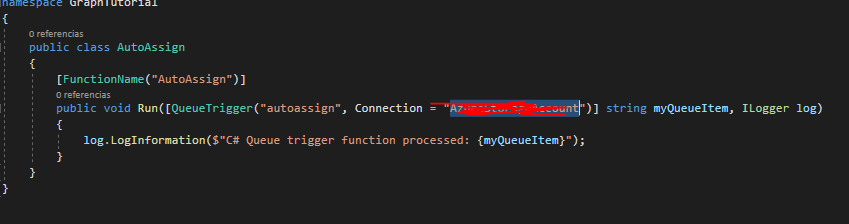
That just happens when i execute my project in Visual Studio, not even when i'm calling the queue, and this just happens when i add a queue not even a httpTrigger or timerTrigger

@API As per the error message you have define the Connection="AzureStorageAccount" for QueueTrigger. Please make sure that you have define AzureStorageAccount as the key and value as storage account connection string in your local.settings.json if you are testing in local environment. If you have deployed in azure function app then it should be in application setting configuration.
The 'AutoAssign' function is in error: Microsoft.Azure.WebJobs.Host: Error indexing method 'AutoAssign'. Microsoft.Azure.WebJobs.Extensions.Storage: Storage account connection string 'AzureStorageAccount' does not exist. Make sure that it is a defined App Setting.