Hi Matthew,
Thanks for posting the question on our forum.
Based on your description, I want to confirm if you refer to the following steps to embed the file:
- Open PowerPoint file.
- Click Insert.
- Select Object>click Create from file.
- Navigate to the Excel file.
If so, there is not option inserting Objects.
Given the situation, we suggest you vote for your requirement to
UserVoice, which will help better our products and services.
About the issue when insert it on PowerPoint client, I want to confirm how did you navigate to the SharePoint file, did you use the same steps as below:
- After selecting Create from file.
- Click Browser.
- Click Quick access.
- Type the site link as below:
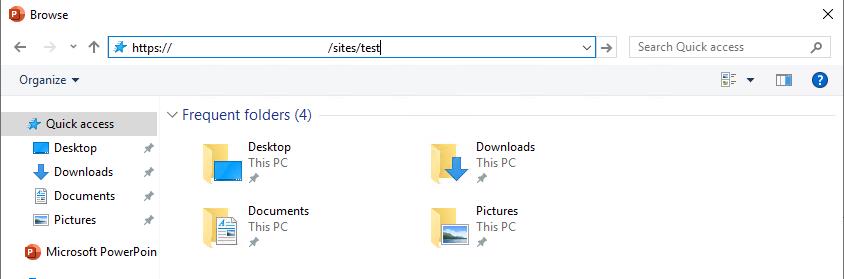
Note: please type the site link not library link:
https://***.sharepoint.com/sites/sitename
If this is not your situation, could you please provide the following information for further analysis?
- The screenshot of error message.
- The detailed steps about how to embed the Excel file.
- The version of Office. (Click File>select Account)
Regards,
Qing
' cx='32' cy='32' r='32' /%3E%3Ctext x='50%25' y='55%25' dominant-baseline='middle' text-anchor='middle' fill='%23FFF' %3EA%3C/text%3E%3C/svg%3E)
