Azure Logic Apps
An Azure service that automates the access and use of data across clouds without writing code.
This browser is no longer supported.
Upgrade to Microsoft Edge to take advantage of the latest features, security updates, and technical support.
' cx='32' cy='32' r='32' /%3E%3Ctext x='50%25' y='55%25' dominant-baseline='middle' text-anchor='middle' fill='%23FFF' %3EMH%3C/text%3E%3C/svg%3E)
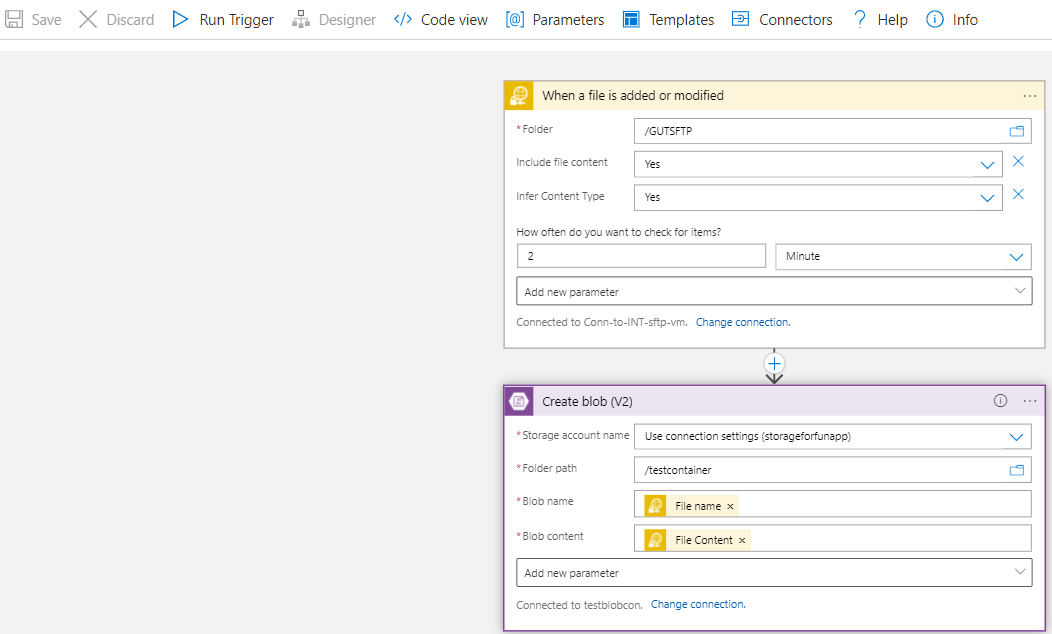
I have an Azure Logic App which supposed to trigger when a new file is added or modified in an SFTP server folder(/GUTSFTP).
When that happens the file (new file added) should be copied to Azure Blob Storage.
This is not working (new file added is not being copied to the Blob storage), when I check back, it is showing the trigger (that should recognize the addition of new file) is being skipped and no other details provided.
Can you kindly suggest the probable reason of the trigger being skipped and how to resolve further or any workaround for this issue.!

@Madala, Hanumantharao The trigger are skipped if the condition specified in the trigger are not met or there are no item changes based on your triggered action. Sometime there might be edge cases where the item might be trigger on the next run. I have tested your workflow at my end and couldn't observe any issue.
If you have confirmed that the condition are met (the file is added/modified on the same folder which you have configured in logic app) and if it didn't trigger on the next run then I will suggest you to verify whether you have set the concurrency Control (under the setting of your trigger) as this could be the other reason for the behavior.