How to create header files for later usage?

JohnCTX 636 Reputation points
2021-08-06T02:49:13.003+00:00

I want to create header files, but I do not know where to begin.

Which reserved keywords start and end within a header file?

Its purpose is to write my own specialized file permissions, even though, I do not need to use the DWORD Windows registry keyword.

Developer technologies | C++
A high-level, general-purpose programming language, created as an extension of the C programming language, that has object-oriented, generic, and functional features in addition to facilities for low-level memory manipulation.
0 comments No comments
{count} votes

2 answers

Sort by: Most helpful
  1. Castorix31 91,416 Reputation points
    2021-08-06T05:47:16.207+00:00
    0 comments No comments

  2. Jeanine Zhang-MSFT 11,356 Reputation points Microsoft External Staff
    2021-08-06T05:53:59.947+00:00

    Hi,

    I want to create header files, but I do not know where to begin.

    You could start from an empty project, and then add a .h file (right click the project -> add -> New Item).
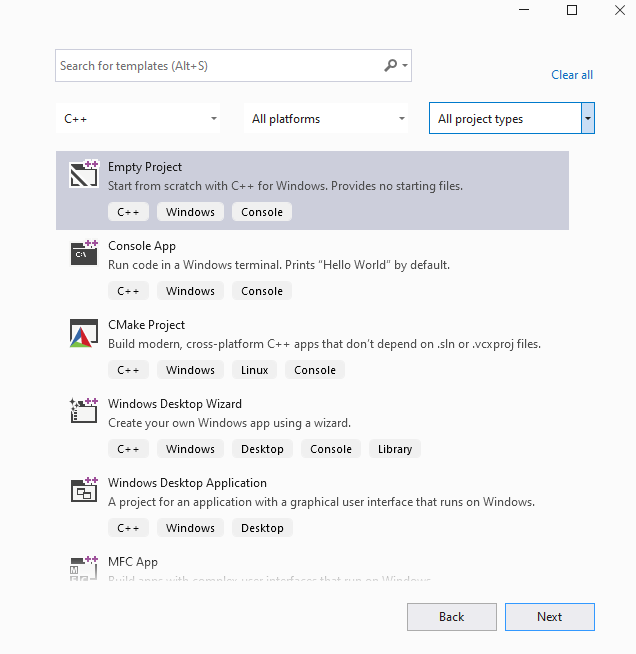
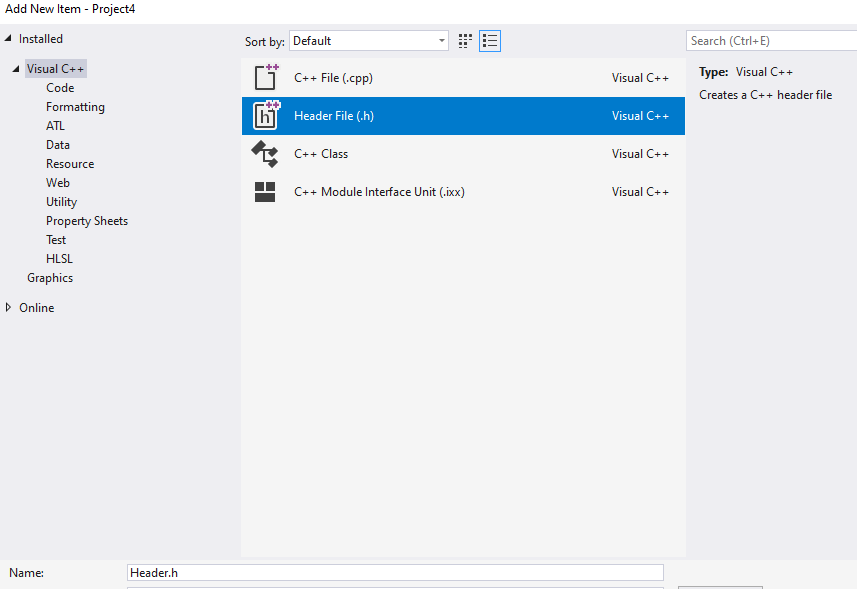
    121028-image.png

    121076-image.png

    Which reserved keywords start and end within a header file?

    Typically, header files have an include guard or a #pragma once directive to ensure that they are not inserted multiple times into a single .cpp file.

    #ifndef YOUR_NAME_INCLUDE  
    #define YOUR_NAME_INCLUDE  
      
    /* Your function statement here */  
    #endif  
    

    For more details about header files, I suggest you could refer to the Doc: https://learn.microsoft.com/en-us/cpp/cpp/header-files-cpp?view=msvc-160

    Best Regards,

    Jeanine


    If the response is helpful, please click "Accept Answer" and upvote it.

    Note: Please follow the steps in our documentation to enable e-mail notifications if you want to receive the related email notification for this thread.


Your answer

Answers can be marked as 'Accepted' by the question author and 'Recommended' by moderators, which helps users know the answer solved the author's problem.