PowerPoint Table Column Height or Width in Hundredths

Anonymous
2020-01-06T17:18:03+00:00

I know that one can select a table cell or column and use the 'distribute' menu option to adjust the height and width, but this only does it in tenths of an inch increments when using the arrows. I do not want to type in values but rather use the up/down arrows to size in hundredths of an inch. And not 1,9, 2.0, 2.1, and so on. Would like a possible macro or config setting if available to control the increments to 1.90, 1.91, 1.92, ...
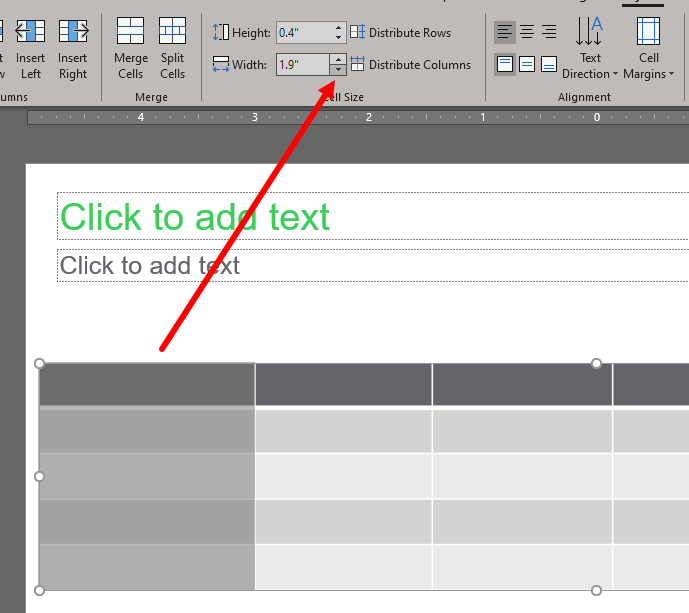
Any help would be appreciated if this is doable. Thank you in advance.

Microsoft 365 and Office | PowerPoint | For home | Windows

Locked Question. This question was migrated from the Microsoft Support Community. You can vote on whether it's helpful, but you can't add comments or replies or follow the question.

0 comments No comments
{count} votes
Answer accepted by question author
  1. Anonymous
    2020-01-06T17:32:06+00:00

    I don't think there a way to make the spin arrows work in 100th but you can type in values to 1/100 inch

    0 comments No comments

2 additional answers

Sort by: Most helpful
  1. Anonymous
    2020-01-06T20:20:51+00:00

    I don't think there a way to make the spin arrows work in 100th but you can type in values to 1/100 inch

    That I know all about. Remember that I posted: "I do not want to type in values but rather use the up/down arrows...". Thought maybe there was a way to set a config file setting, registry entry or even a macro. I know there are a lot of Office experts out there who know how to hack their way around Office functions. ;-)

    0 comments No comments
  2. Anonymous
    2020-01-06T20:31:55+00:00

    There's no way to hack into the msft spinners. It would be possible to create your own spinners but a fair bit if work. Is it worth it?

    0 comments No comments