Microsoft 365 and Office | Excel | For home | Windows
A family of Microsoft spreadsheet software with tools for analyzing, charting, and communicating data.

This browser is no longer supported.
Upgrade to Microsoft Edge to take advantage of the latest features, security updates, and technical support.
' cx='32' cy='32' r='32' /%3E%3Ctext x='50%25' y='55%25' dominant-baseline='middle' text-anchor='middle' fill='%23FFF' %3EA%3C/text%3E%3C/svg%3E)
I am on a mac and recently I can't open any excel files at all. I get a window asking me to find the file and "grant access". Once that is done I get an alert… "Excel cannot open the filebecause the file format or file extension is not valid. Verify that the file has not been corrupted and that the file extension matches the format of the file". My OSX software is up to date along with the Excel software. Ran disk repair and there were no problems. This only started 4 days ago.
Tired reinstalling Excel but that didn't help at all, the problem was still happening.
Any help would be appreciated. Thanks.
Locked Question. This question was migrated from the Microsoft Support Community. You can vote on whether it's helpful, but you can't add comments or replies or follow the question.
I tried each method and only had luck with one of them actually allowing me to open my Excel and Word documents… see below.
• Method 1: Disabling fonts from 3rd party font management apps - I use Suitcase Fusion and disabling this app still would not allow me to open with Excel or Word documents
• Method 2: Booting from recovery partition to reset folder permissions - completed this step and I still could not get Excel or Word documents to open
• Method 3: Avoiding Apple's sandbox requirements - this actually worked.
In previous Mac Office versions (older than Office 2016), users were able to save files in any location and use any font without warnings and permission requests. But this is no longer possible because of the new sandbox requirements. People that use VBA with Excel are severely affected since they are constantly prompted for permissions when running their scripts.
However, Mac has some locations that you can use to avoid those access prompts. These locations allow VBA enthusiasts to run their scripts freely without additional user interaction. Fortunately, we can also use these locations to bypass the grant access error. The trick is, this location is not easily available, so we’ll have to go through additional steps to make it more accessible.
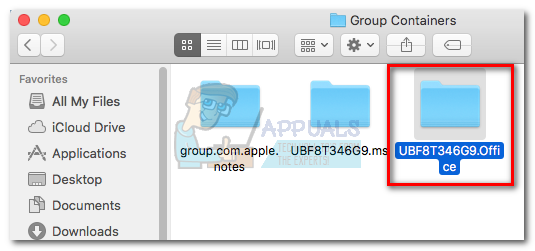
One example of a safe location that avoids Office permission prompts is : /Users / *YourUsername* / Library / Group Containers /UBF8T346G9.Office
You can use this folder to share data between Office programs or with a third party application since it has both read and write access. Here’s a quick guide on using this location to bypass the Grant Access error:
Note: This guide is only confirmed to work with Excel files, but should theoretically work with other files types from the Office 2016 suite.
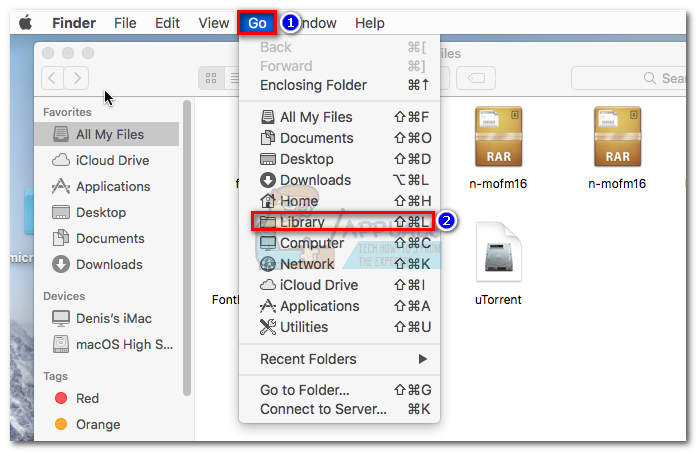 2. Navigate to Group Containers and then double-click on the UBF8T346G9.Office folder.
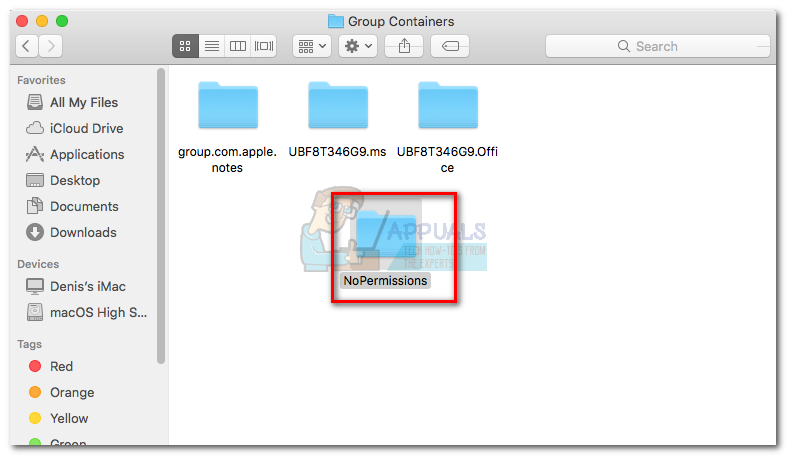
 3. Create a new folder inside the UBF8T346G9.Office folder and name it however you want.
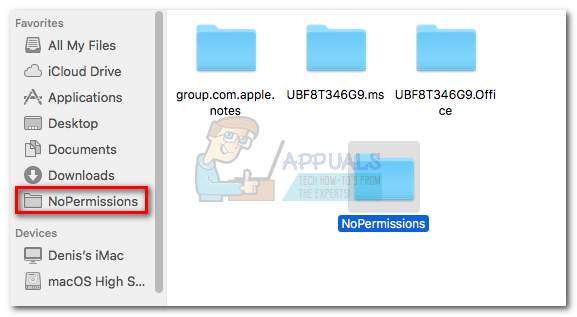
 4. Next, move all the Office related files that are refusing to open in this secure folder. They should all open without issues.
Note: For easy access, you can select the folder and press Command
• Method 4: Pulling Microsoft from the resource folder (Temporary) - completed this step and I still could not get Excel or Word documents to open
• Method 5: Clearing the Mac OS Font Caches via Terminal - completed this step and I still could not get Excel or Word documents to open

By any chance do you use 3rd party font management software?
Grant permission
How to fix permissions errors
https://appuals.com/office-2016-grant-access-error-on-macos/
Hi JeffAlbaugh1,
Did you try the suggestion provided by MVP Jim Gordon? Please update us when you have time.
Regards,
Neha
Please follow the instructions in this article and reply about whether it helps.
Excel prompts you to grantto files and then hangs or shows a warning that it cannot open the .xlsx file because the format or extension is not valid.