Developer technologies | .NET | Xamarin
A Microsoft framework for building cross-platform mobile apps using .NET and C# with native performance and user interfaces.
This browser is no longer supported.
Upgrade to Microsoft Edge to take advantage of the latest features, security updates, and technical support.
' cx='32' cy='32' r='32' /%3E%3Ctext x='50%25' y='55%25' dominant-baseline='middle' text-anchor='middle' fill='%23FFF' %3ET%3C/text%3E%3C/svg%3E)
ListView Grouping Binding Issue
I am having trouble getting the Label inside my ListView Grouping to bind to the collections' items. The basic idea of the app is to organize a user-created grocery list by grouping similar items together. Both the "list of lists" and the individual lists are populating properly. The GroupDisplay is binding correctly, and the app creates the correct number of blank Labels. Can someone tell me what I'm doing wrong? I'm still having a bit of trouble with databinding and MVVM in general, and I've been stuck on this for an embarrassing amount of time. Below is some relevant sample code; let me know if you would like to see more.
Model:
public class Groceries : ObservableCollection<string>
        {
            public string Category { get; set; }

            public static List<Groceries> GroupedList { get; set; } = new List<Groceries>();
            public static Groceries Fruits { get; set; } = new Groceries("Fruit");
            public static Groceries Vegetables { get; set; } = new Groceries("Vegetables");

            public Groceries(string s)
            {
                Category = s;
            }
        }
ViewModel:
class OrganizedViewModel
    {
        public ObservableCollection<Groceries> OGroupedList { get; set; }
        public string Category { get; set; }

    public OrganizedViewModel()
        {
            OGroupedList = new ObservableCollection<Groceries>();
            foreach (Groceries value in Groceries.GroupedList)
            {
                OGroupedList.Add(value);
            }
        }
    }
View:
<ListView ItemsSource="{Binding OGroupedList}"
                  GroupDisplayBinding="{Binding Category}"
                  IsGroupingEnabled="true">
            <ListView.ItemTemplate>
                <DataTemplate>
                    <ViewCell>
                        <Label Text="{Binding .}"
                               VerticalOptions="FillAndExpand"/>
                    </ViewCell>
                </DataTemplate>
            </ListView.ItemTemplate>
        </ListView>
' cx='32' cy='32' r='32' /%3E%3Ctext x='50%25' y='55%25' dominant-baseline='middle' text-anchor='middle' fill='%23FFF' %3EA%3C/text%3E%3C/svg%3E)
Hello,
Welcome to our Microsoft Q&A platform!
Do you want to achieve the result like following screenshot?
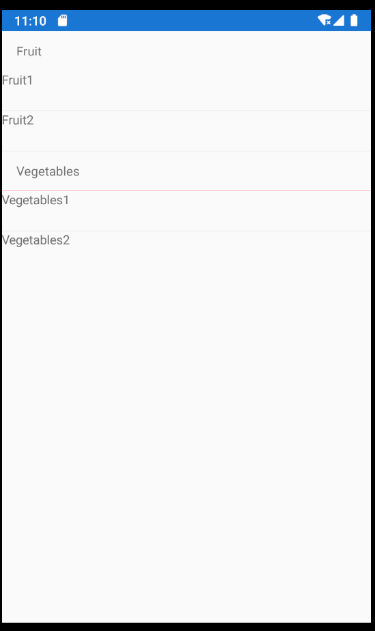
If so, I notice you have three static properties in the Groceries.cs. If you want to achieve the grouping in the listview, do not need these property. change it like following code.
   public class Groceries : ObservableCollection<string>
       {
           public string Category { get; set; }

           public Groceries(string s)
           {
               Category = s;
           }
       }
Then, we can add data in the viewModel.
   class OrganizedViewModel
       {
           public ObservableCollection<Groceries> OGroupedList { get; set; }
           public string Category { get; set; }

           public OrganizedViewModel()
           {
               OGroupedList = new ObservableCollection<Groceries>();

             var groceriesFruit =  new Groceries("Fruit") { "Fruit1", "Fruit2" };
             var grocerieVegetables = new Groceries("Vegetables") { "Vegetables1", "Vegetables2" };
               OGroupedList.Add(groceriesFruit);
               OGroupedList.Add(grocerieVegetables);


           }
       }
In the layout's background code. You can add bindingContext.
   public partial class Page2 : ContentPage
       {
           public Page2()
           {
               InitializeComponent();
               BindingContext = new OrganizedViewModel();

           }
       }
Best Regards,
Leon Lu
If the response is helpful, please click "Accept Answer" and upvote it.
Note: Please follow the steps in our documentation to enable e-mail notifications if you want to receive the related email notification for this thread.
May I know if you have got any chance to check my answer? I am glad to help if you have any other questions