Microsoft 365 and Office | Visio | For business | Windows
A professional diagramming tool that helps users visualize complex information through easy-to-understand diagrams.

This browser is no longer supported.
Upgrade to Microsoft Edge to take advantage of the latest features, security updates, and technical support.
' cx='32' cy='32' r='32' /%3E%3Ctext x='50%25' y='55%25' dominant-baseline='middle' text-anchor='middle' fill='%23FFF' %3EA%3C/text%3E%3C/svg%3E)
I have Visio 2019 Premium installed.
From Server A to Server B, I have validated that I have matching SQL Instances installed (same CUs, drivers, etc).
When I try to reverse engineer a database, when I select a driver ( which all match between the two servers), no matter what I pick, I get this message:
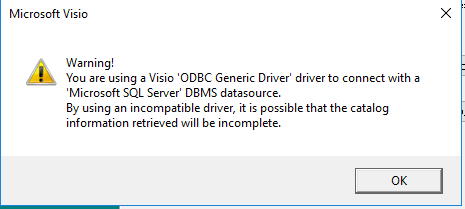
Now the tables schema does get created graphically but there is no interconnect between the table objects. I have tried this with each of the drivers and still no luck.
Any suggestions?
Thanks in advance
A professional diagramming tool that helps users visualize complex information through easy-to-understand diagrams.

@Farr, Jeff ,
Welcome to Q&A forum!
According to your description, I found this official article: Reverse engineer an existing database into a database model, please check if it helps.
Per my research, I suggest you try to download Microsoft OLE DB Driver for SQL Server and see if it helps.
Besides, I also suggest you post a new question in the following forum to see if there are more help.
Microsoft Tech Community
Thanks for your understanding!
Any updates, pleae let me know.
If an Answer is helpful, please click "Accept Answer" and upvote it.
Note: Please follow the steps in our documentation to enable e-mail notifications if you want to receive the related email notification for this thread.
@Farr, Jeff ,
I am checking this thread, please check if our information is helpful to you.