Hi all,
I've got the weirdest error and am wondering if anyone else has come across this before / know how to fix...
I have a table in xl that I want to paste into a ppt slide. Standard copy n paste stuff.
But something very odd is going wrong.
What source data looks like in Excel:

The first X lines of my data transfer into a table just fine, but then there are two lines that screw up. The first 2-3 columns display correctly, then all the values from the other columns display in a single cell. And below that, even those first few rows
don't transfer properly.
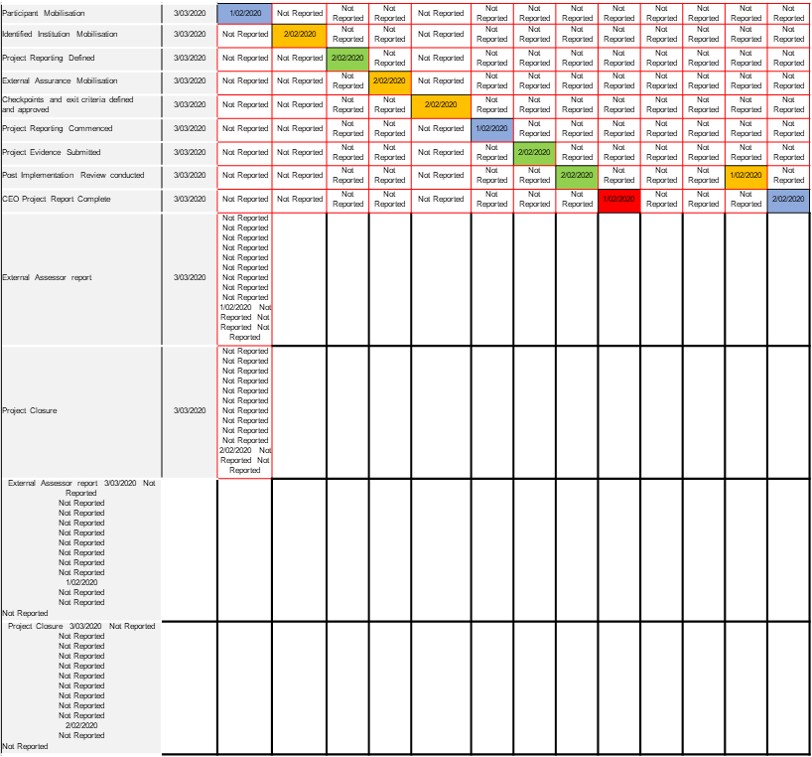
I have tried:
(in excel)
- ensuring the formatting in all cells is the same
- transferring the date to fresh rows, deleting the problematic rows
- copy-pasting data to fresh tab as "values only" (original data has formulas) and pasting "clean" data into ppt
- pasting the table without the problematic rows; this works fine, it isn't specifically the bottom X rows.
- pasting only the problematic rows; error still occurs; it isn't due to amount of data
- pasting with source formatting
- pasting with destination formatting
- pasting as text-only (which was never going to work as you cant paste tables like this)
- formatting the data as a table style
- transferring different data into the problem rows
(in powerpoint)
- pre-building a table to paste into
- selecting top left cell and pasting data
- selecting entire row and pasting data
- selecting entire table and pasting data
- pasting into a completely blank slide
- pasting into a "placeholder" box
- opening a new, completely unformatted doc with no template applied
And still it keeps happening.
Can anyone help? I'm going insane here....
Am using:
Windows 10 Home
Office 365 ProPlus apps.
Surface Pro 6 Model 1796 i5
' cx='32' cy='32' r='32' /%3E%3Ctext x='50%25' y='55%25' dominant-baseline='middle' text-anchor='middle' fill='%23FFF' %3EA%3C/text%3E%3C/svg%3E)
