Developer technologies | .NET | Xamarin
A Microsoft framework for building cross-platform mobile apps using .NET and C# with native performance and user interfaces.
This browser is no longer supported.
Upgrade to Microsoft Edge to take advantage of the latest features, security updates, and technical support.
' cx='32' cy='32' r='32' /%3E%3Ctext x='50%25' y='55%25' dominant-baseline='middle' text-anchor='middle' fill='%23FFF' %3ESA%3C/text%3E%3C/svg%3E)
Hi every one. I'm kind of new to Xamarin and I have a simple problem but no idea to how do that.
I have written an app with Xamarin forms. the problem is Here that I want user connect to my website do sth and then come back to the app. I need to change a Boolean in Xamarin to true when
the task is done in website.
how I can get this information (just turn a false to true) from web?
I have no idea so any help will appreciated.
' cx='32' cy='32' r='32' /%3E%3Ctext x='50%25' y='55%25' dominant-baseline='middle' text-anchor='middle' fill='%23FFF' %3EA%3C/text%3E%3C/svg%3E)
Hello,
Welcome to our Microsoft Q&A platform!
I make a test with a button click then send a value(true) to the C# code in HTML, running result like following screenshot.

To achieve it, you can use Js calls methods in C#.
Create a Custom renderer for your webview (note HybridWebView is extend of webview in xamarin forms.), then AddJavascriptInterface called CSharp
   [assembly: ExportRenderer(typeof(HybridWebView), typeof(HybridWebViewRenderer))]
   namespace WebviewInvokeJS.Droid
   {

       public class HybridWebViewRenderer : WebViewRenderer
       {
           Context _context;
           public HybridWebViewRenderer(Context context) : base(context)
           {
               _context = context;
           }
           protected override void OnElementPropertyChanged(object sender, PropertyChangedEventArgs e)
           {

               if (Control != null)
               {
                   Control.Settings.JavaScriptEnabled = true;
                   Control.AddJavascriptInterface(new HybridJSBridge(Android.App.Application.Context), "CSharp");
                   Control.SetWebViewClient(new WebViewClient());


                   Control.LoadUrl("file:///android_asset/index1.html");

               }
               base.OnElementPropertyChanged(sender, e);
           }
       }
   }
Then create a class called HybridJSBridge.cs.
   using System.Linq;
   using System.Text;

   using Android.App;
   using Android.Content;
   using Android.OS;
   using Android.Runtime;
   using Android.Views;
   using Android.Webkit;
   using Android.Widget;
   using Java.Interop;

   namespace WebviewInvokeJS.Droid
   {
       public class HybridJSBridge : Java.Lang.Object
       {
           Context context;

           public HybridJSBridge(Context context)
           {
               this.context = context;
           }

           [JavascriptInterface]
           [Export]
           public void ShowToast(string msg)
           {
               Toast.MakeText(context, msg, ToastLength.Short).Show();
           }

       }
   }
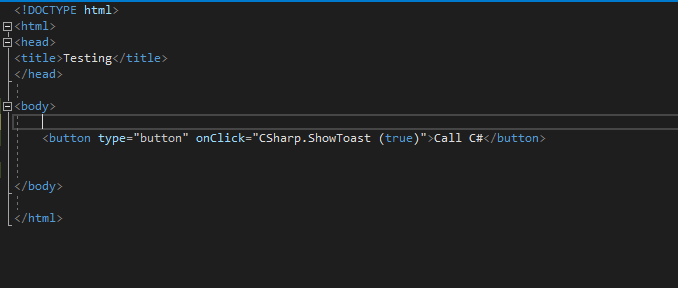
My html code is like following screenshot(this site cannot post html code). If you task is finished, you can call this CSharp.ShowToast (true) JS to return a value.
For more details, you can refer to this thread as well.
Best Regards,
Leon Lu
If the response is helpful, please click "Accept Answer" and upvote it.
Note: Please follow the steps in our documentation to enable e-mail notifications if you want to receive the related email notification for this thread.
@Sobhan Akbarzadeh May I know if you have got any chance to check my answer? I am glad to help if you have any other questions