Azure Logic Apps
An Azure service that automates the access and use of data across clouds without writing code.
This browser is no longer supported.
Upgrade to Microsoft Edge to take advantage of the latest features, security updates, and technical support.
' cx='32' cy='32' r='32' /%3E%3Ctext x='50%25' y='55%25' dominant-baseline='middle' text-anchor='middle' fill='%23FFF' %3ECM%3C/text%3E%3C/svg%3E)
Hi all,
I am having problems connecting with outlook within Azure logic apps.
I followed the steps in this guide: https://learn.microsoft.com/en-us/azure/connectors/connectors-create-api-office365-outlook
But when I try to select outlook, either as a trigger or action, I get a connection error as below:
Please check your account info and/or permissions and try again. Details: Unauthorized clientRequestId:.....
Tried many things, even reached chat with Azure suport but couldn't fix it.
Tried many regions, but had same issue.
Any one could help?
Thanks in advance.

Can you share the full exception messages that you are getting along with the trigger/action name?
Hi @MayankBargali-MSFT ,
Here is the message:
Please check your account info and/or permissions and try again. Details: Unauthorized clientRequestId: 4C19CE06-52B2-415A-A294-13776C919253 serviceRequestId: a2d9e6e9-4fda-4830-9f26-281c869b78d6
The action is:
Send an Email (V2)
I have a trigger that that runs when a SFTP folder is altered. It is working fine. Just can't perform the action.
Thanks
I have looked into the logs and I can see the same authentication issue while creating the test connection for your logic app. Want to confirm if you have tried to change the connection and add a new one and see if it helps you. I have tested the scenario at my end and I was not able to reproduce the issue.


If you are still facing the issue I wish to engage with you offline for a closer look and provide quick and specialized assistance, please send an email with the subject line “Attn:Mayank” to AzCommunity[at]Microsoft[dot]com referencing this thread.
The below error means that the operation that you are trying to perform doesn't have the required permission.
Please check your account info and/or permissions and try again. Details: Unauthorized clientRequestId: 4C19CE06-52B2-415A-A294-13776C919253 serviceRequestId: a2d9e6e9-4fda-4830-9f26-281c869b78d6
I was able to reproduce the issue at my end once I have created a new user in my Active Directory account that doesn't have the mailbox for that user. When I logged in with this user credentials I can see the same behaviour at my end.
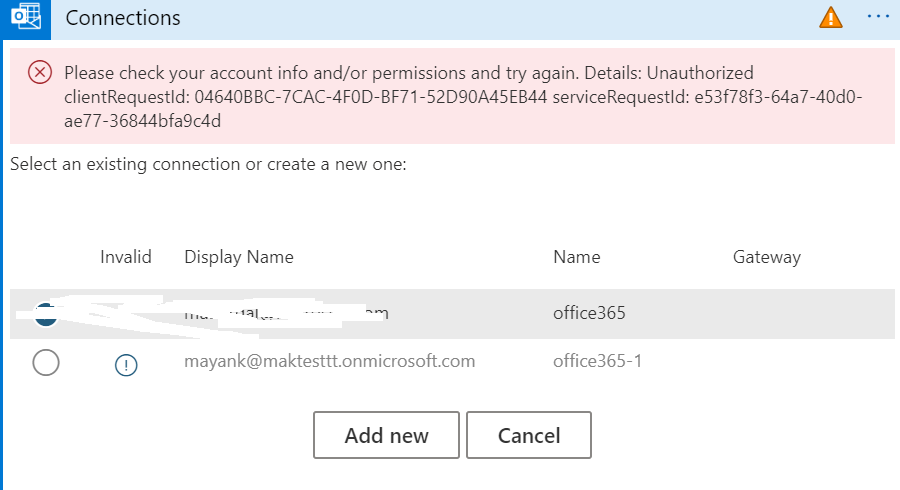
Please verify whether the user that you have login in has a mailbox created and has required permission. You can reach out to your team/admin to confirm the same.
Hi @MayankBargali-MSFT ,
Thanks again for your support. Seems that you are correct, for some reason I don't have an email at my contact info. The problem is that I can't change that. Any idea how to do it? is that what you meant?

Regards,
' cx='32' cy='32' r='32' /%3E%3Ctext x='50%25' y='55%25' dominant-baseline='middle' text-anchor='middle' fill='%23FFF' %3ESM%3C/text%3E%3C/svg%3E)
I switched to a new connection but still facing the issue following issues
Hi @MayankBargali-MSFT ,
Just wanted to thank you again for your support.
I was able to fix the problem. It was a small stupid mistake from my side.
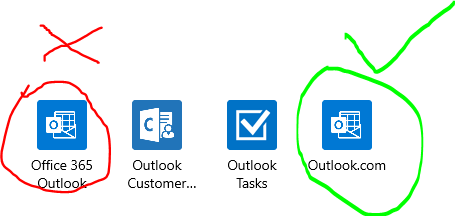
Since I have a Office 365 account, I was trying to use Office 365 outlook option while creating the action. Using Outlook.com worked fine.
Wish you all the best.
Regards,
Carlos
Thanks for the update. Glad to know that the issue is resolved now.
' cx='32' cy='32' r='32' /%3E%3Ctext x='50%25' y='55%25' dominant-baseline='middle' text-anchor='middle' fill='%23FFF' %3EPH%3C/text%3E%3C/svg%3E)
Saved my life