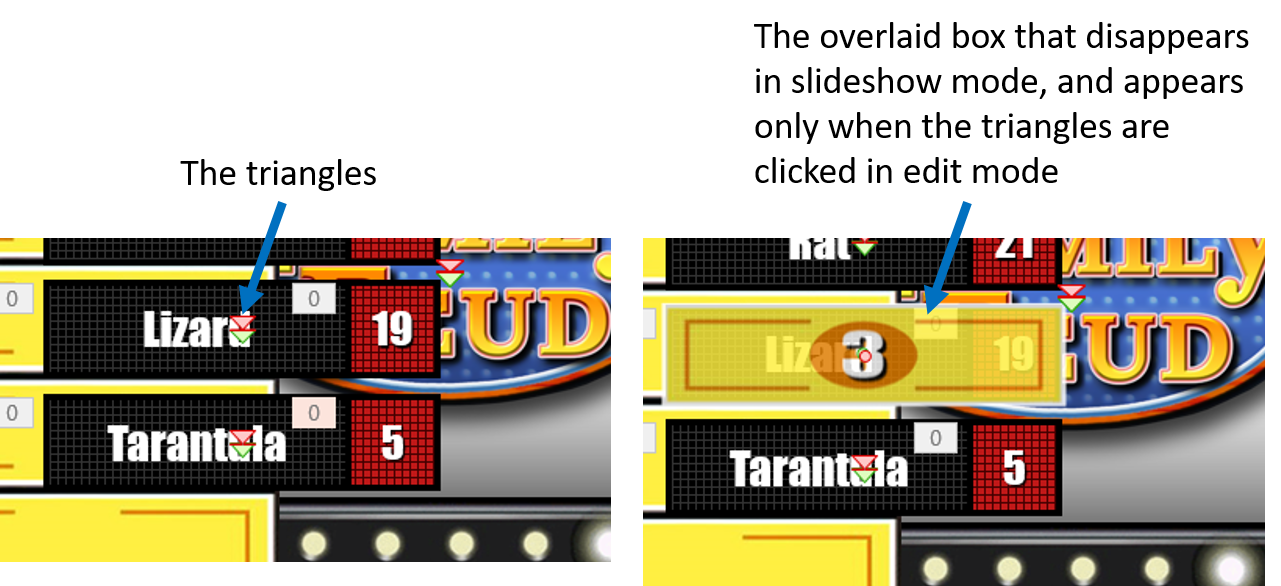
The green / red arrows indicate that the object has a motion path animation. The object is hidden behind something and only shows when you select by clicking the arrow.
Object formatting/Reveal formatting
General question: in working with a PowerPoint template I did not create, how can I figure out what actions have been applied to objects and how those actions were applied?
Specific question: on the PowerPoint I am working with, in slideshow mode, a box with a number in the center is clicked, then it "disappears" revealing a message in a box. However, in edit mode, the box that you click is not present. The message box is visible, and has two small downward-pointing triangles (a red and green) in the middle of it. When I click the triangles (still in edit mode), the overlaid box with a number is revealed, but slightly transparent. When I try to click the number box so I can work with it, it disappears. It cannot be found anywhere else on the page, it only appears when the triangles are clicked.
See pic, hope this makes sense. Tried to search for a solution but it is impossible to phrase the search in a way that brings relevant results.
Thanks
Microsoft 365 and Office | PowerPoint | For home | Windows
Locked Question. This question was migrated from the Microsoft Support Community. You can vote on whether it's helpful, but you can't add comments or replies or follow the question.
-
Anonymous
2020-08-20T14:07:59+00:00
3 additional answers
Sort by: Most helpful
-
Anonymous
2020-08-20T15:42:59+00:00 That makes sense, but the object ONLY appears when clicked. And it does not appear in a way that it can be edited or manipulated. It is not anywhere on the page otherwise. I have deleted every item on the page, one at a time, and never found the object hiding behind anything. So the question is, how/where did the original creator create the object and how can I edit it or copy it? Any ideas? Thank you!
-
Anonymous
2020-08-20T15:59:02+00:00 Without seeing your PC we can only guess. That guess would be that the author has included a LOCKED motion path and then moved the actual shape well off slide. Try viewing at 10% and see if it pops up.
-
Anonymous
2020-08-20T16:05:30+00:00 I'll give it a try. Any way I can send someone the file in question? I know everyone is just volunteering here, but if anyone is willing, it might be an easy fix for someone with experience, but hard to describe and understand without the file available.