System Center Orchestrator
A family of System Center products that provide an automation platform for orchestrating and integrating both Microsoft and non-Microsoft IT tools.
This browser is no longer supported.
Upgrade to Microsoft Edge to take advantage of the latest features, security updates, and technical support.
' cx='32' cy='32' r='32' /%3E%3Ctext x='50%25' y='55%25' dominant-baseline='middle' text-anchor='middle' fill='%23FFF' %3EJR%3C/text%3E%3C/svg%3E)
Hi Team,
I created a Runbook with "Monitor Object" Activity as below, which is supposed to be trigger whenever there is a new incident gets created in SCSM or an update happen to an existing incident in the SCSM.
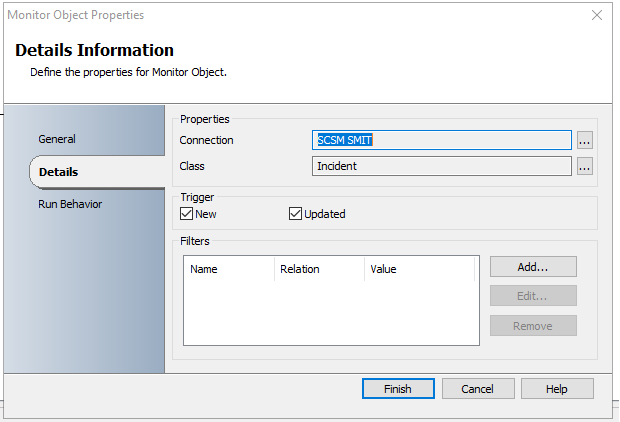
Actually it is getting triggered only when an incident gets created in SCSM. For any update happen to the existing incident this is suppose to be triggered, which is not happening now. For testing, I am trying to modify the fields like "Urgency", "Source", Support Group" as part of the update and Monitor Object activity does not gets triggered.
Please suggests If I am missing anything here.
Your help is greatly appreciated!
Regards,
Jansi

Hi @jansi rani krishnan ,
The "tiny circle" or "tiny loop":
Runbook monitors Incident for changes and one of the next activities is changing the same Incident that triggered the Runbook.
IR123 gets update (for instance modified Support Group) -> Triggers Runbook -> Runbook is doing changes on IR123 (for instance modifies Urgency) -> IR123 is changed so the Runbook will start over again.
The large or big circle/loop:
Your 3 runbooks with trigger on SNOW or SCSM Incident is changed or modified.
Create IR in SCSM -> Runbook 1 -> Create IR in SNOW -> Runbook 2 -> Modify SCSM IR -> Runbook 1 -> Update in SNOW IR -> ........
Updated IR in SNOW -> Runbook 3 -> Update IR in SCSM -> Runbook 1 -> Modify IR in SNOW -> Runbook 3 -> ........
The only option you have is working with conditions and criterias. This requires a detailed planning of which runbook should do something with which conditions.
Without knowing all the detailed activities and how they are configured and what happens on updated/new created IRs it's almost impossible to help with a detailed answer or solution.
----------
(If the reply was helpful please don't forget to upvote and/or accept as answer, thank you)
Regards
Andreas Baumgarten
Hi Andreas,
I totally understand your point. I post another question on this problem. Thanks for your time and effort.
Regards,
Jansi
Hi @jansi rani krishnan ,
after some testing here:
The monitoring activity is working as expected on updated and on new Incidents.
There is a short delay until the Log History is displaying the result.
Also it might happen one Runbook job is detecting one or more updates in one job instance.
This will look like this (3 different updates in a short timeframe):
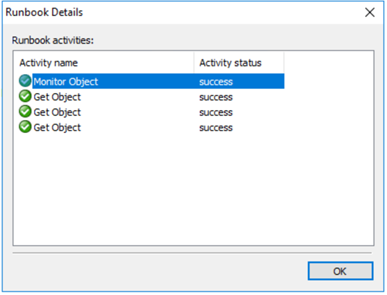
On monitor detected 3 updates and executed the following activity per Incident.
----------
(If the reply was helpful please don't forget to upvote and/or accept as answer, thank you)
Regards
Andreas Baumgarten
Hi Andreas,
When I executed the Runbook from "Runbook Designer", it is not getting triggered when there is an update in the incident. It is triggered when i open the "Runbook Tester" and click on the Run button, it is getting picked up by the "Runbook Tester". Any idea on why this difference.
Also as you mentioned, there is a short delay.
Regards,
Jansi
Hi @jansi rani krishnan ,
please check if all Orchestrator services are running.
Verify in the Runbook Designer the runbook is checked-in and it is running.
There must be a running job instance visible in the Log section.
----------
(If the reply was helpful please don't forget to upvote and/or accept as answer, thank you)
Regards
Andreas Baumgarten
Hi Andreas,
I verified all the Orchestrator Services. All are 4 services are running. PFB the screenshot.

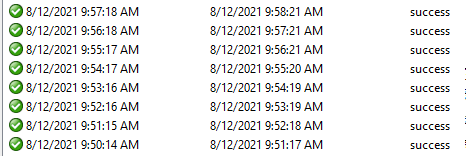
I tried to Run the Orchestrator Runbook and verified the update option and it is getting reflected in SNOW end. But i have one question.. The Runbook is running every one minute as shown below even though there is no any update or new incident created in SCSM. Is this correct behavior? Please confirm.
Hi @jansi rani krishnan ,
without seeing the Runbook with the configured Activities it's hard to say anything.
Please post the Runbook details here. The details of the first activity in the Runbook might be helpful as well.
If it's the Montior Object of the incident class in SCSM it might be you get updated every minute on the Incident object in SCSM. If an Incident update is happen every minute you get a runbook trigger every minute as well ;-)
----------
(If the reply was helpful please don't forget to upvote and/or accept as answer, thank you)
Regards
Andreas Baumgarten
Andreas,
You are right. I am talking about the Runbook which has the Monitor Object for incident in SCSM as first activity
Regards,
Jansi
Hi @jansi rani krishnan ,
than it could be that something is updating the SCSM Incident automatically and this is triggering the runbook with the Monitor activity. And if this runbook will modify a SCSM incident you have a nice tiny circle workflow.
The big circle workflow will be:
SNOW update triggers runbook which will modify SCSM Incident
Next runbook monitors SCSM Update and updates the SNOW incident which will trigger the first runbook again
Never ending story ;-)
----------
(If the reply was helpful please don't forget to upvote and/or accept as answer, thank you)
Regards
Andreas Baumgarten
Hi Andreas,
What a wonderful guess that you have made? hats off to you!!!
Even I thought of this big circle scenario few days ago. How to overcome this situation. Please advise.
Please help me to understand more on tiny circle. I did not understand this.
Actually I have two 3 runbooks which does the following for the incident.
I have another set of Runbooks created for Manual Activity in a similar manner.
Regards,
Jansi