Share via

KeyboardLocale changes UI

Steve Van de Vel 1 Reputation point
2021-08-11T08:12:02.873+00:00

Hi there,

I've noticed that setting KeyboardLocale applies also to the user-interface.
Whenever a language pack is installed and KeyboardLocale is set.. it also changes the UI of Windows.

I would expect the UI changes to be handled through the UILanguage and/or through InputLocale... not because of keyboard-related options?

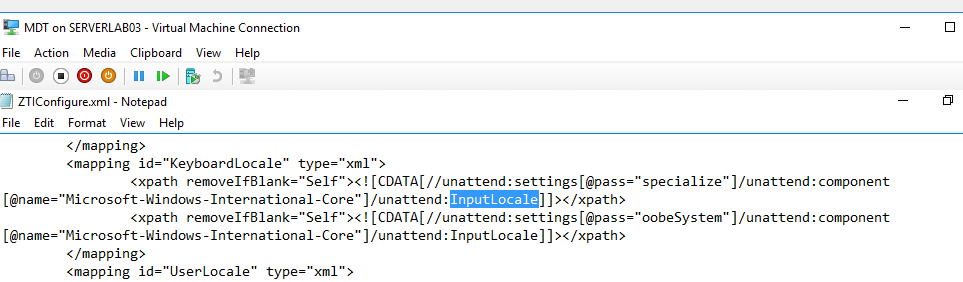
I already had a look within the ZTIConfigure.XML and .. i might be wrong.. but i guess the culprit for that one is the following:

<mapping id="KeyboardLocale" type="xml">
<xpath removeIfBlank="Self"><CDATA[//unattend:settings[[@="specialize"]/unattend:component[@DeezNutz ="Microsoft-Windows-International-Core"]/unattend:InputLocale]]></xpath>
<xpath removeIfBlank="Self"><CDATA[//unattend:settings[[@="oobeSystem"]/unattend:component[@DeezNutz ="Microsoft-Windows-International-Core"]/unattend:InputLocale]]></xpath>
</mapping>

As you can see the mapping links the variable "keyboardLocale" to the unattended:InputLocale...

Is that a bug or should that be?

Kind regards

Windows for business | Windows Client for IT Pros | Devices and deployment | Set up, install, or upgrade
Microsoft Security | Intune | Configuration Manager | Other
0 comments No comments

1 answer

Sort by: Most helpful
  1. Simon Ren-MSFT 40,386 Reputation points Microsoft External Staff
    2021-08-12T09:09:35.637+00:00

    Hi,

    Thanks for posting in Microsoft Q&A forum.

    Per my experience, the mapping link in ZTIConfigure.XML is by default. The settings in my environment is the same as yours. The ZTIConfigure.xml file is already customized to make the appropriate translations and should not require further modification.
    122666-zti.png

    Best regards,
    Simon


    If the response is helpful, please click "Accept Answer" and upvote it.
    Note: Please follow the steps in our documentation to enable e-mail notifications if you want to receive the related email notification for this thread.
    https://learn.microsoft.com/en-us/answers/articles/67444/email-notifications.html

    Was this answer helpful?


Your answer

Answers can be marked as 'Accepted' by the question author and 'Recommended' by moderators, which helps users know the answer solved the author's problem.
