Microsoft 365 and Office | Excel | For home | Windows
A family of Microsoft spreadsheet software with tools for analyzing, charting, and communicating data.

This browser is no longer supported.
Upgrade to Microsoft Edge to take advantage of the latest features, security updates, and technical support.
' cx='32' cy='32' r='32' /%3E%3Ctext x='50%25' y='55%25' dominant-baseline='middle' text-anchor='middle' fill='%23FFF' %3EA%3C/text%3E%3C/svg%3E)
I was wondering if there is a way to link a slider to a cell which has the item that I want to use the slider to filter to. My sliders are really long and I don't want users to scroll through the entire list.
A family of Microsoft spreadsheet software with tools for analyzing, charting, and communicating data.
Locked Question. This question was migrated from the Microsoft Support Community. You can vote on whether it's helpful, but you can't add comments or replies or follow the question.
Answer accepted by question author
Do you mean a table "Slicer" instead of Slider?
.
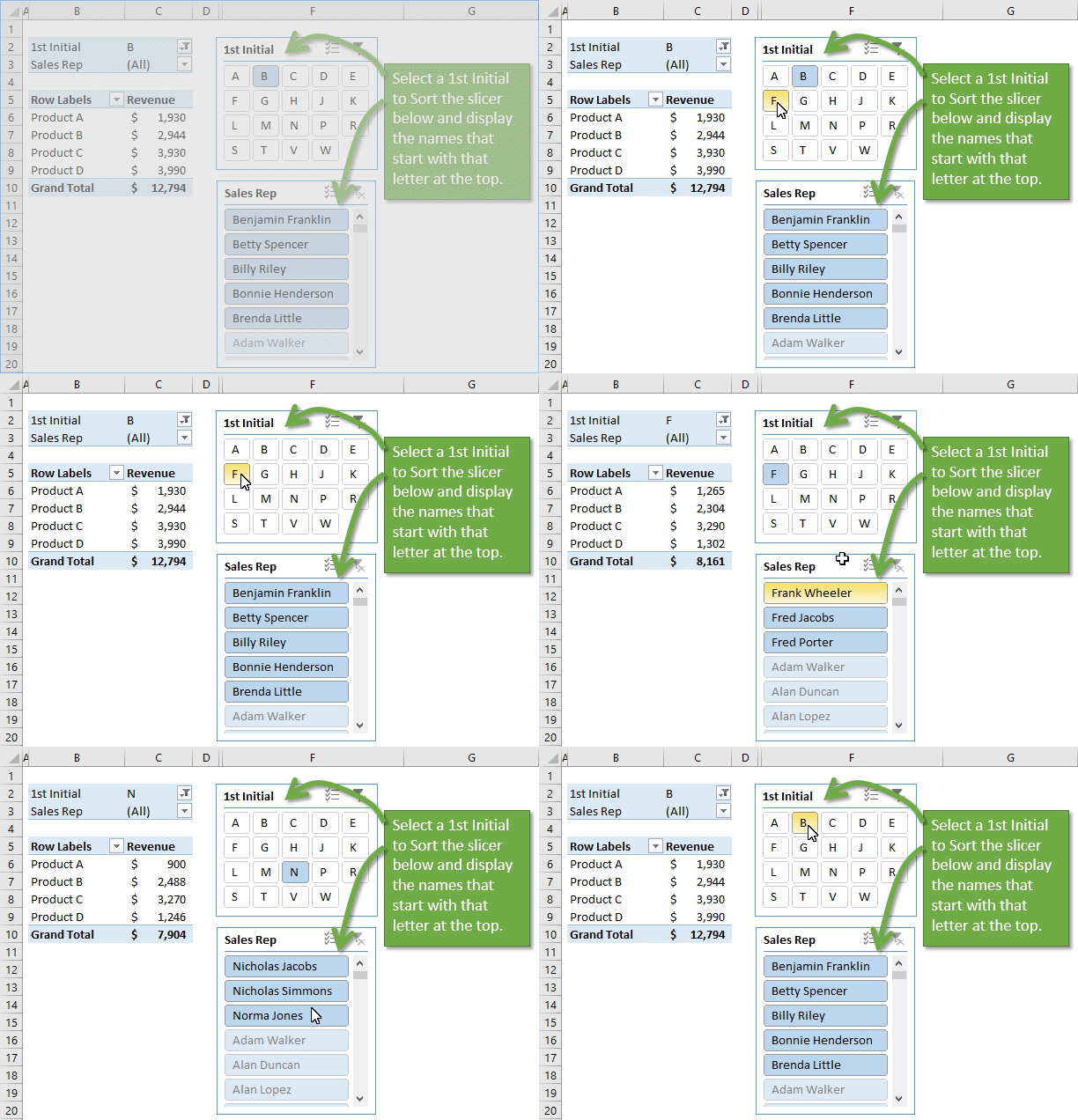
You can use a slicer to filter a slicer, ie, make one slicer just letters of alphabet, use that selection to filter the full slicer on your data to show entries that start with one selected letter.
.
Filter or Sort a Slicer with AnotherSlicer 2016 02 23https://www.excelcampus.com/pivot-tables/how-to-sort-a-slicer-with-another-slicer/
https://www.excelcampus.com/wp-content/uploads/2016/02/Filter-or-Sort-Slicer-with-Another-Slicer-GIF.gif
Learn how to group text or number fields to create a slicer that can sort and
filter another slicer. This technique is
great for slicers that contain a lot of items and are difficult to navigate.
a slicer can be difficult to navigate through when it contains a lot of items. The user has to scroll horizontally through a
long list to find the item they are looking for.
.
Did you know you can format slicers to display multiple columns so they don't have to drop down as far:
Add Columns to Pivot Table Slicer Buttons
https://www.myexcelonline.com/blog/add-columns-to-slicer-buttons-in-excel/
https://www.myexcelonline.com/wp-content/uploads/2015/10/Slicer-Columns.gif
When you insert an Excel
Slicer with your Pivot Table it defaults to one column, showing all
your items in a vertical layout. Say that your Pivot Table Slicer is showing
months from January to December. You can
change the layout of the buttons to show in 3 separate columns, turning it into
a “Quarterly View”.
.
Hi Peter,
I'm writing to follow up on this thread. Have you checked the above replies? Feel free to post back at your convenience.
Best regards,
Madoc
Hi Peter,
You could add a scroll bar or spin button to a worksheet after the Developer tab is enabled. But as it may be related to visual basic and out of my realm, if you are willing to, I could assist you to move the thread to the corresponding category so that you could get more professional assistance.
Thank you for your understanding.
Best regards,
Madoc